
 To Next Page
M
Madeline SanchezAug 14, 2025
What to do if ActronAir Network Router displays fault code?
- SSharon StewartAug 14, 2025
If 'EXX' is displayed on the wall controller, record the digits following 'E' and contact your installer.

What to do if ActronAir Network Router displays fault code?
If 'EXX' is displayed on the wall controller, record the digits following 'E' and contact your installer.
Why is ActronAir Network Router cooling or heating not sufficient?
Insufficient cooling or heating can occur if the return air filter is clogged with dust and dirt. Ensure the air inlet and outlet on the outdoor unit are not blocked. Also, the outside temperature being above or below the design conditions can affect performance.
Why is my ActronAir Network Router making noises?
Various noises can occur during operation: * A swishing or gurgling noise might be heard when heating or cooling starts or stops, caused by refrigerant flow. * A whooshing noise from the outdoor unit can occur during defrost as the refrigerant changes direction. * The outdoor unit may be louder than normal on start-up as the compressor reaches speed and pressure. * The compressor might generate more noise than usual during defrost operation.
How to troubleshoot ActronAir Network Router when the system does not start?
If the system doesn't start: * Ensure that 5 minutes has passed since turning it on, as the system has safety timers. * Verify that the thermostat settings are correct. * Check that the thermostat set-point is low enough for cooling or high enough for heating.
What to do if air does not flow from ActronAir Network Router indoor unit?
If air isn't flowing from the indoor unit: * Check if the zones are switched on (if fitted). * Note that during heating, air might not flow for about 15 seconds after startup to prevent cold drafts. * Also, during the outdoor unit's defrost cycle in heating mode, the indoor fan might not operate for several minutes to prevent cold air from blowing into the rooms.
Why set-temp can’t be adjusted on ActronAir Network Router?
If the set-temp cannot be adjusted, check that your wall control set-temp limits are not being exceeded and that the upper and lower temperature limits are set correctly.
Why is water coming from my ActronAir Network Router outdoor unit?
Water coming from the outdoor unit during heating operation is normal. It's due to water forming on the heat exchanger.
Why is there steam coming from my ActronAir Network Router outdoor unit?
Steam from the outdoor unit is caused by the defrosting process during heating operation in cold conditions.
Why ActronAir Network Router 7-day timeclock is not accepting times I enter?
If the 7-day timeclock isn't accepting the times you enter, ensure that you don’t have overlapping times from another day and that you're not trying to set the time past the maximum allowable.
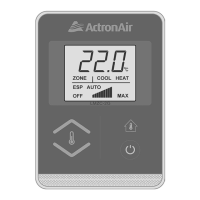
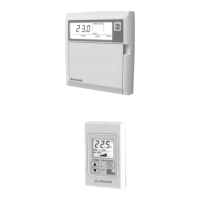
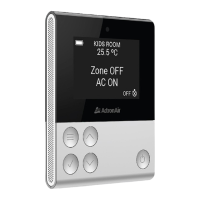
The ActronAir LM Series Wall Controllers are designed to provide intuitive and comprehensive control over ActronAir air conditioning systems. These controllers come in two main variants: the Standard Wall Controller (LM7 & LM7-D) and the Optional Secondary Wall Controller (LM24W), each offering distinct features tailored to different user needs and system configurations.
At its core, the LM Series Wall Controller serves as the primary interface for managing various aspects of an ActronAir ducted air conditioning system. Users can adjust temperature settings, control fan speed, and switch between different operating modes such as cooling, heating (if applicable), and fan-only operation. The controllers are equipped with a clear digital display that shows the current temperature, operating mode, and other relevant system information.
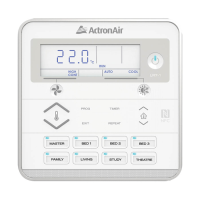
For systems with zoning capabilities, the wall controllers allow users to enable or disable specific zones, providing precise climate control in different areas of a building. This zoning functionality is particularly useful in larger homes or commercial spaces where varying temperature preferences exist across different rooms. The controllers also support the assignment of sensors to specific zones, ensuring accurate temperature readings and control for each designated area.
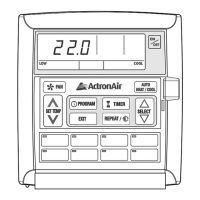
The LM7 & LM7-D Standard Wall Controller offers a straightforward interface with dedicated buttons for common functions like fan control, program settings, and timer adjustments. It includes a "SET TEMP" button for temperature adjustments and "SELECT" buttons for navigating through options. The display provides essential information such as the current temperature and operating status (LOW, COOL).
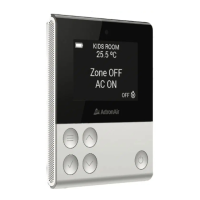
The LM24W Optional Secondary Wall Controller, while also providing core control functions, is designed to complement the primary controller or serve as an additional control point in a multi-controller setup. It features a similar digital display and button layout, allowing for consistent user experience across different control locations. This secondary controller is particularly useful in larger installations where multiple access points for system control are desired.
Both controllers incorporate a timer function, enabling users to program specific operating times for the air conditioning system. This feature enhances energy efficiency by allowing the system to operate only when needed, such as during occupied hours or specific times of the day. The "PROGRAM" button on the LM7 & LM7-D allows for setting these schedules, while the LM24W also offers similar scheduling capabilities.
A key safety feature, "Enabling / Disabling Last Zone," is integrated into the controllers. This function allows users to manage the activation status of zones, ensuring that a minimum number of zones remain active, or conversely, enabling all zones to be turned off for specific applications. This provides flexibility while maintaining system integrity.
The LM Series Wall Controllers are designed for ease of use, with a logical button layout and clear digital readouts.
While the LM Series Wall Controllers themselves require minimal direct maintenance, their design incorporates aspects that facilitate system maintenance and troubleshooting.
In summary, the ActronAir LM Series Wall Controllers are comprehensive and user-friendly interfaces that provide robust control over ActronAir air conditioning systems, emphasizing flexibility, energy efficiency, and ease of operation for both standard and multi-zone applications.
 General
| Model | LM Series |
|---|---|
| Category | Controller |
| Display | LCD |
| Temperature Control | Yes |
| Fan Speed Control | Yes |
| Timer Function | Yes |
| Backlight | Yes |
| Compatibility | ActronAir air conditioning systems |
| Mounting Type | Wall-mounted |