7
– Distance-to-go display (DRO100, DRO203, DRO300)
– Dynamic zoom (DRO203, DRO300)
Distance-to-go display
for turning and milling
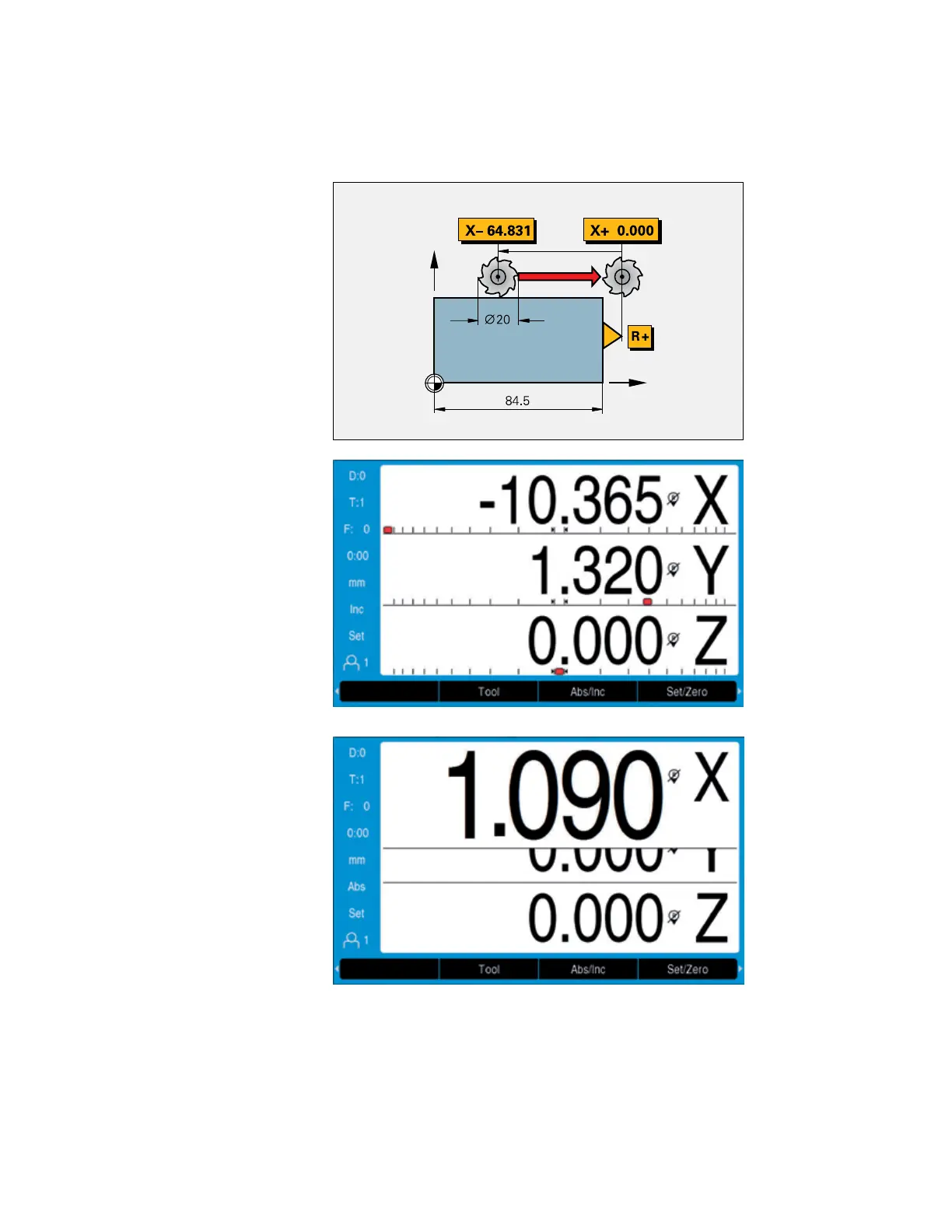
The distance-to-go display feature simplies
your work considerably: you enter the next
nominal position, and the display shows you
the distance remaining to the target position.
This means that you simply move to the
display value zero.
When you use the distance-to-go feature for
milling, the digital readout can compensate
for the milling radius. In this way you can
directly use the drawing dimensions without
having to do any conversions. You no longer
have to remember any complicated values.
Dynamic zoom
The dynamic zoom feature offers a signicant
improvement in position value readability.
Once activated, the display value for the axis
currently being moved is maximally enlarged.
This occurs in four steps depending on the
number of digits in the respective numerical
value. For small numbers (i.e., numbers close
to zero), the character height can be increased
from 17mm (standard height) to 25 mm. The
operator immediately sees which axis is
currently moving and can also easily read the
numerical value from a greater distance.
When the axis stops moving, the display
returns to its standard size after a second
has elapsed.
The distance-to-go display is enhanced by
a“near zero” message: as you traverse to
zero, a square cursor moves into a target
fork. The “near zero” message is
congurable for each axis.


 To Next Page
 Loading...