Need help?
Do you have a question about the AcuRite 15605 and is the answer not in the manual?
Instructions on how to set the correct time by adjusting the TIME SET and TIME WIND KEY.
Steps to set the alarm time and ensure it sounds by adjusting ALARM SET and ALARM WIND KEY.
Guidance on how to silence the alarm by closing the ALARM LEVER.
How to adjust the clock's speed using the REGULATOR LEVER for fast or slow running.
Details on how to contact AcuRite customer support via phone, email, or website for assistance.
Information on registering your product online to receive one year of warranty protection.
Summary of the one-year warranty terms, coverage, limitations, and how to make a claim.
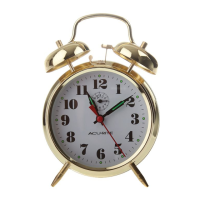
This document describes the AcuRite Keywound Alarm Clock, model 15605, providing instructions for its operation, setting, and maintenance.
The AcuRite Keywound Alarm Clock is a traditional mechanical clock designed to display time and provide an alarm function. Unlike digital clocks, it relies on a keywound mechanism for both timekeeping and alarm operation, offering a classic user experience. The clock features a clear analog display with hour and minute hands, and a separate hand for setting the alarm. Its keywound nature means it does not require batteries or an external power source, making it a reliable timekeeping device even during power outages. The alarm is designed to sound at a user-defined time, providing an audible alert.
Setting the Time: To set the correct time on the AcuRite Keywound Alarm Clock, locate the TIME SET (5) control. This control is typically a knob or dial on the back of the clock. The user should turn the TIME SET (5) in the direction indicated by the arrow on the clock's diagram. This action will move the hour and minute hands to the desired time. After setting the time, it is crucial to wind the clock's mainspring to ensure continuous operation. This is done by turning the TIME WIND KEY (4) in the direction of the arrow. Winding the TIME WIND KEY (4) provides the necessary power for the clock's movement to keep accurate time. The frequency of winding will depend on the clock's design, but typically, keywound clocks require winding daily or every few days.
Setting the Alarm: The alarm function is set independently of the time. To set the alarm, the user needs to turn the ALARM SET (2) control. Similar to the time set control, this is usually a knob or dial on the back of the clock. The ALARM SET (2) should be turned in the direction of the arrow until the alarm hand points to the desired alarm time on the clock face. Once the alarm time is set, the alarm mechanism needs to be wound. This is achieved by turning the ALARM WIND KEY (3) in the direction of the arrow. An important feature of this clock is that the alarm will automatically be set to go off each time the ALARM KEY (3) is wound. This means that if the user wants the alarm to sound daily, they must wind the ALARM WIND KEY (3) each day. To enable the alarm to sound, the ALARM LEVER (1), located on the top of the clock, must be in the "open" position. This lever acts as a switch, allowing the alarm mechanism to engage and produce sound when the set alarm time is reached.
Silencing the Alarm: When the alarm sounds, it can be silenced by closing the ALARM LEVER (1). This lever, positioned on the top of the clock, acts as a simple on/off switch for the alarm function. Pushing the lever down or moving it to the "closed" position will disengage the alarm mechanism, stopping the sound. To reactivate the alarm for the next day, the user would typically need to ensure the ALARM LEVER (1) is in the "open" position again and that the ALARM WIND KEY (3) has been wound.
Timekeeping Adjustment: The AcuRite Keywound Alarm Clock may require occasional timekeeping adjustments, especially after shipping and handling, which can affect its internal mechanisms. The clock provides a feature to regulate its speed, allowing the user to correct if it runs too fast or too slow. This adjustment is made using the internal REGULATOR LEVER (6).
These adjustments should be made incrementally, with observation periods in between to ensure the desired accuracy is achieved. Fine-tuning may require several small adjustments over time.
Customer Support: For any questions or assistance, AcuRite provides customer support. Users can contact customer support by phone at (877) 221-1252 or visit their website at www.AcuRite.com. The manual also encourages users to save it for future reference, highlighting its importance for understanding and maintaining the device.
Product Registration and Warranty: AcuRite offers a one-year warranty on its products, ensuring they are free from defects in material and workmanship. To receive warranty service, product registration is recommended. Users can register their product online at www.AcuRite.com. While registration is encouraged, it does not eliminate the need to retain the original proof of purchase for warranty claims. The warranty covers repair or replacement of defective items under normal use and service. It does not cover damage from normal wear and tear, acts of nature, tampering, abuse, improper installation, shipping damage, or repairs by unauthorized personnel. For in-warranty claims, users should contact Chaney Instrument Co. at their specified address. The manual also provides information on various support resources, including installation videos, instruction manuals, support user forums, replacement parts, and a platform to submit feedback and ideas, all accessible via www.AcuRite.com.
 General
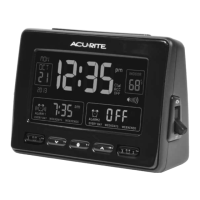
| Display Type | LCD |
|---|---|
| Alarm Type | Buzzer |
| Snooze Function | Yes |
| Temperature Display | Yes |
| Humidity Display | Yes |

 To Next Page