EasyManua.ls Logo

AcuRite 15606 - User Manual

AcuRite 15606
2 pages
Print Icon
To Next Page IconTo Next Page
Loading...
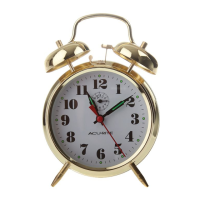
Keywound Alarm Clock
model 15606
1
Instruction Manual
2
4
3
5
6
Set the Time
Turn TIME SET (5) in the direction of the arrow to set to correct time.
Wind the TIME WIND KEY (4) in the direction of the arrow.
Set the Alarm
1. Turn ALARM SET (2) in the direction of the arrow to the alarm time.
2. Wind ALARM WIND KEY (3) in the direction of the arrow. The alarm
will automatically be set to go off each time the ALARM KEY is wound.
It is not necessary to pull out the ALARM SWITCH (1).
Silence the Alarm
Push the ALARM SWITCH (1) inward.
Timekeeping Adjustment
This clock may require timekeeping adjustment due to shipping and handling. If
the clock runs fast, move the internal REGULATOR LEVER (6) slightly towards
the “-” sign to make the clock run slower. If the clock runs slow, move the internal
REGULATOR LEVER (6) slightly towards the “+” sign to make the clock run faster.
Questions? Contact Customer Support at
(877) 221-1252 or visit www.AcuRite.com
SAVE THIS MANUAL FOR FUTURE REFERENCE.
Question and Answer IconNeed help?

Do you have a question about the AcuRite 15606 and is the answer not in the manual?

Summary

Keywound Alarm Clock Operation

Set the Time

Instructions for setting the correct time using the time set knob and winding key.

Set the Alarm

Procedure to set the alarm time by turning the alarm set knob and winding the alarm key.

Silence the Alarm

How to silence the alarm by pushing the alarm switch inward.

Timekeeping Adjustment

Guidance on adjusting the clock's speed using the regulator lever for accuracy.

Customer Support and Warranty Information

Customer Support Contact

Information on how to contact AcuRite customer support for assistance with the product.

Product Registration

Details on registering the product online to receive warranty protection and service.

Limited One Year Warranty

Overview of the one-year limited warranty, coverage, and disclaimers for the product.

Overview

This document provides the instruction manual for the AcuRite Keywound Alarm Clock, model 15606. It details the clock's functions, how to set the time and alarm, make timekeeping adjustments, and silence the alarm. The manual also includes customer support information and a limited one-year warranty.

Function Description

The AcuRite Keywound Alarm Clock, model 15606, is a mechanical alarm clock designed for basic timekeeping and alarm functions. It operates without external power, relying on a keywound mechanism for both timekeeping and alarm activation. The clock features a simple, intuitive design with clearly labeled controls for ease of use. Its primary functions include displaying the current time, sounding an alarm at a set time, and allowing for manual adjustment of both time and alarm settings. The keywound mechanism ensures reliability and independence from electrical outlets or batteries, making it suitable for various environments, including those without readily available power.

Important Technical Specifications

The manual does not explicitly list detailed technical specifications such as dimensions, weight, or material composition. However, based on the provided diagrams and instructions, the following can be inferred:

  • Model Number: 15606
  • Power Source: Keywound mechanical movement (no batteries or external power required).
  • Controls:
    • ALARM SWITCH (1): A push-button or lever mechanism used to silence the alarm.
    • ALARM SET (2): A knob or dial used to set the desired alarm time. It is turned in the direction of the arrow.
    • ALARM WIND KEY (3): A key used to wind the alarm mechanism. Winding this key automatically sets the alarm to go off.
    • TIME WIND KEY (4): A key used to wind the timekeeping mechanism.
    • TIME SET (5): A knob or dial used to set the current time. It is turned in the direction of the arrow.
    • REGULATOR LEVER (6): An internal lever accessible for fine-tuning the clock's accuracy, with "+" and "-" indicators for faster or slower adjustments.

Usage Features

The AcuRite Keywound Alarm Clock is designed for straightforward operation, emphasizing simplicity and reliability.

Setting the Time

To set the current time:

  1. Locate the TIME SET (5) knob.
  2. Turn TIME SET (5) in the direction of the arrow indicated on the clock face until the correct time is displayed.
  3. After setting the time, wind the TIME WIND KEY (4) in the direction of its arrow to ensure the clock continues to run. Regular winding is necessary for continuous operation.

Setting the Alarm

To set the alarm:

  1. Locate the ALARM SET (2) knob.
  2. Turn ALARM SET (2) in the direction of the arrow until the desired alarm time is indicated.
  3. Locate the ALARM WIND KEY (3).
  4. Wind ALARM WIND KEY (3) in the direction of its arrow. The manual states that winding this key automatically sets the alarm to go off each time it is wound. It explicitly notes that it is not necessary to pull out the ALARM SWITCH (1) for the alarm to be set. This implies that the alarm is always "on" when wound and will sound at the set time.

Silencing the Alarm

When the alarm sounds:

  1. Locate the ALARM SWITCH (1).
  2. Push the ALARM SWITCH (1) inward to silence the alarm.

Maintenance Features

The primary maintenance feature described in the manual relates to timekeeping accuracy.

Timekeeping Adjustment

The clock may require adjustment due to factors like shipping and handling, which can affect its internal mechanism.

  1. If the clock runs fast: Locate the internal REGULATOR LEVER (6). Move this lever slightly towards the "-" sign. This action will slow down the clock's movement, making it run slower.
  2. If the clock runs slow: Locate the internal REGULATOR LEVER (6). Move this lever slightly towards the "+" sign. This action will speed up the clock's movement, making it run faster.

This internal adjustment feature allows users to fine-tune the clock's accuracy over time, ensuring it keeps precise time. The manual does not specify how to access the regulator lever, implying it might be accessible from the back or through a small opening without needing to disassemble the clock significantly.

Customer Support and Warranty

AcuRite provides comprehensive customer support for its products.

  • Contact Information: For assistance, customers can call (877) 221-1252 or email info@chaney-inst.com.
  • Online Resources: 24/7 support is available at www.AcuRite.com, offering installation videos, product registration, instruction manuals, a support user forum, and options to submit feedback and ideas.
  • Product Registration: Users are encouraged to register their product online at www.AcuRite.com to receive one year of warranty protection. While registration is recommended, it does not replace the need to retain the original proof of purchase for warranty benefits.
  • Limited One-Year Warranty: Chaney Instrument Co. (the manufacturer of AcuRite products) warrants that all products are free of defects in material and workmanship for one year from the date of purchase, provided they are properly installed and operated. The warranty covers repair or replacement of defective items. It explicitly excludes normal wear and tear, damage from acts of nature, tampering, abuse, improper installation, shipping damage, or repairs by unauthorized personnel. The warranty disclaims liability for special, consequential, or incidental damages. For in-warranty claims, customers should contact Chaney Instrument Co. at 965 Wells St., Lake Geneva, WI 53147.

The manual concludes with a recommendation to save it for future reference, underscoring its importance for proper use and maintenance of the AcuRite Keywound Alarm Clock.

AcuRite 15606 Specifications

General IconGeneral
BrandAcuRite
Model15606
CategoryAlarm clocks
LanguageEnglish

Related product manuals