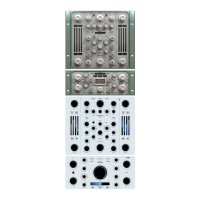
4-DYN EQ:
Used to modify the gain (compression/expansion) of the dynamic eq and the
frequency of both the static and dynamic eq.
• Frequency LF:
Sets the frequency of the LF filter band. The frequency range depends on
the emulation model selected.
• Frequency HF:
Sets the frequency of the HF filter band. The frequency range depends
on the emulation model selected.
• Gain LF:
This is a LF Gain knob which allows you to easily adjust the Gain for the LF band,
setting the desired level to define the maximum amount of gain variation applied. It allows
you to choose between compression or expansion. This control is therefore completely de-
pendent on the Threshold parameter.
• Gain HF:
This is a HF Gain knob which allows you to easily adjust the Gain for the HF band,
setting the desired level to define the maximum amount of gain variation applied. It allows
you to choose between compression or expansion. This control is therefore completely de-
pendent on the Threshold parameter.
• Eq menu:
Eq menu: Selects the eq model. The number of emulations in this menu chan-
ges depending on the additional volumes installed. By default, Jet (Tool) contains only two
emulations, a sampled eq (EMINENCE) and two algorithmic eq (‘DIGITAL SHELF’ and ‘DIGI-
TAL SHELF HQ 2X’).
NOTE:
- The number of LF and HF bands of each emulation varies from model to model. Each
model has its own intrinsic peculiarities such as a proportional or non-proportional Q, this
depends on the nature of the emulation itself.
- Loading the ‘HQ 2X’ emulations you can change the oversampling rate to improve the au-
dio quality increasing by 2X the sampling frequency of the emulation and minimize aliasing
artefacts. These emulations are much heavier than ‘standard’ versions (more CPU usage)
but have a better phase response.
• Oversampling:
Selects the dyn eq oversampling factor.
• Delta:
Listen to the difference between the signal processed by the static Eq and the pro-
cessed signal by the Dyn Eq.
5-MODE:
Used to select which channel is affected by the eq both static and dynamic (LR/
MID/SIDE).
6-LISTENING:
Allows you to listen to a specific channel/part of the signal flow.
•Delta:
Listen to the difference between original signal and processed signal.
• Mid:
Listen to only the centre of the soundstage (Mid component).
• Side:
Listen to only the edges of the soundstage (Side component).
• Run:
Default listening.
• Sc:
Sidechain listening.
• Byp:
General Bypass of the plugin.
• Eq:
Dyn Eq listening.


 To Next Page
 Loading...