10 H200 MANUAL [ENGLISH] 11H200 MANUAL [ENGLISH]
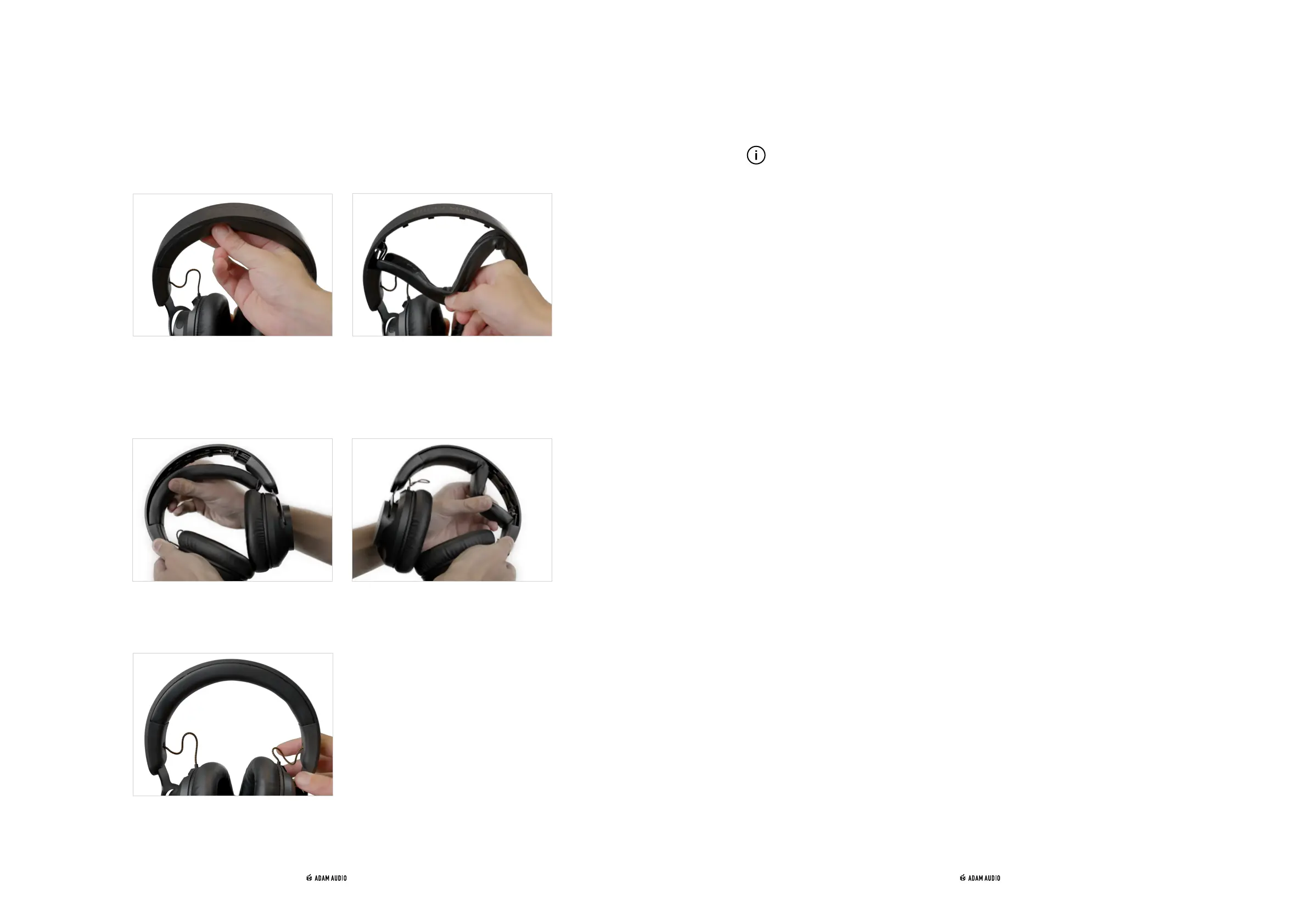
6. REPLACING THE HEADBAND
8. SHIPPING
9. TECHNICAL DATA
10. ACCESSORIES
7. INSTRUCTIONAL VIDEO
→ To remove the headband padding, simply pull firmly from the middle until it has fully
clipped out of the headband.
→ To replace the headband padding, insert one end into the end cap then clip the
padding on the headband, starting from the inserted end and working towards the
other. Insert the far end into the other end cap. You may need to open the headband
wide to finish installing.
→ After several clicks the replaced headband padding should sit flush with the headband
again.
→ Keep your product packaging in case your headphones ever need to be transported.
Without the original packing it is extremely difficult to protect your headphones so
that they can be shipped without damage. ADAM Audio cannot accept responsibility
for transit damages caused by improper packaging.
→ For detailed technical specifications, see the ADAM Audio H200 product pages at
→
www.adam-audio.com
→ Compatible accessories (a short cable, a coiled cable or the soft cloth earpads and
headband padding etc) can be seen on product pages at
→
www.adam-audio.com
→ Click on the following link to watch a video summarising everything described here:
→
Link



 To Next Page