Need help?
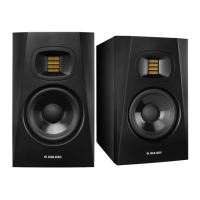
Do you have a question about the Adam T5V and is the answer not in the manual?
Covers safe electrical connections, fuse use, voltage matching, cable protection, and proper handling.
Recommends nearfield placement, speaker stands, and symmetrical room setup for accurate reference.
Advises on room orientation, avoiding boundary effects to prevent bass issues, and distance from walls.
Ensures tweeters are at ear level, forming an equilateral triangle with the listener for optimal imaging.
Guides on connecting monitors, setting level controls, and using balanced/unbalanced inputs correctly.
Troubleshooting steps for no signal or distorted audio, focusing on source, wiring, and cables.
Troubleshooting steps for buzzing, humming, or crackling, checking cables and interference sources.
Explains the process for claiming repairs, dealer contact, and costs for international service.
 General
| Frequency range | 45 - 25000 Hz |
|---|---|
| Noise level (high gain) | 106 dB |
| Line-out Total Harmonic Distortion (THD) | 0.5 % |
| Line-in Total Harmonic Distortion plus Noise (THD+N) (1kHz) | - % |
| RMS rated power | 70 W |
| Woofer diameter (imperial) | 5 \ |
| Tweeter diameter (imperial) | 1.9 \ |
| Built-in display | - |
| Line inputs (RCA) | 1 |
| Product color | Black |
| Cables included | AC |
| Power consumption (max) | 132 W |
 Weight and Dimensions
| Depth | 297 mm |
|---|---|
| Width | 179 mm |
| Height | 298 mm |
| Weight | 5700 g |

 To Next Page