9
Connecting External SCSI Devices
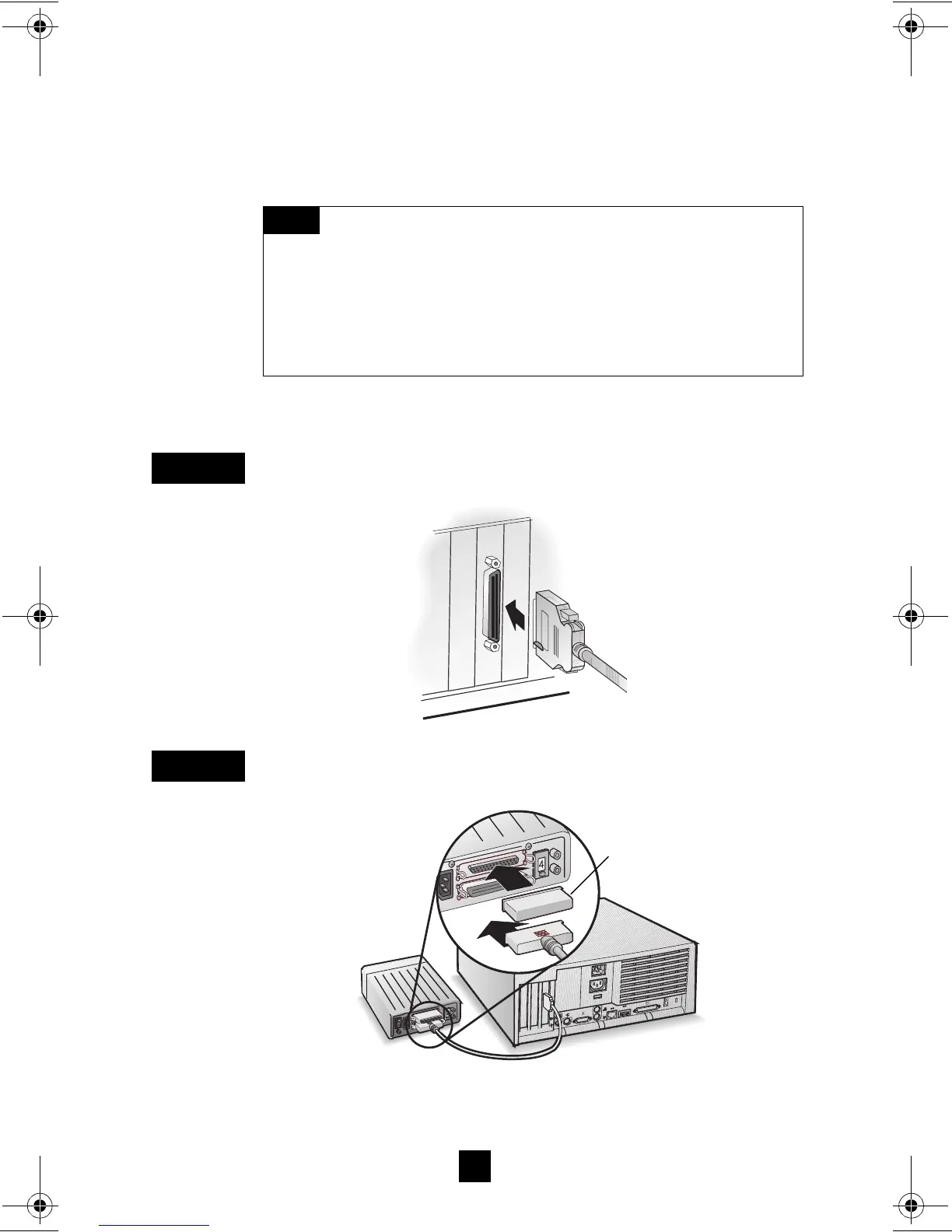
Connect external Ultra2 and Ultra160 SCSI devices to the 68-pin
external LVD/SE SCSI connector. Each external device will
require a 68-pin external LVD SCSI cable.
Follow these steps to connect the external devices:
Connect one end of the external LVD SCSI cable to the external
LVD/SE connector on the Adaptec SCSI Card 29160.
Connect the other end of the external SCSI cable to a SCSI con-
nector on the back of an external SCSI device.
If you are installing only one external device, terminate the device
and skip to Step 4.
We recommend that you connect only Ultra160 and
Ultra2 SCSI devices to the external SCSI connector. If you
also attach older Ultra SCSI devices, the data transfer speed of
the Ultra160 and Ultra2 SCSI devices will drop to the speed of
the older devices. (See Bus Segments on the Adaptec SCSI
Card 29160 on page 2.)
N
OTE
S
TEP
1
S
TEP
2
4
4
SCSI Terminator
29160_OEM_InsGd.fm Page 9 Tuesday, October 19, 1999 7:47 AM



 To Next Page