6
Radio mode
Start radio mode
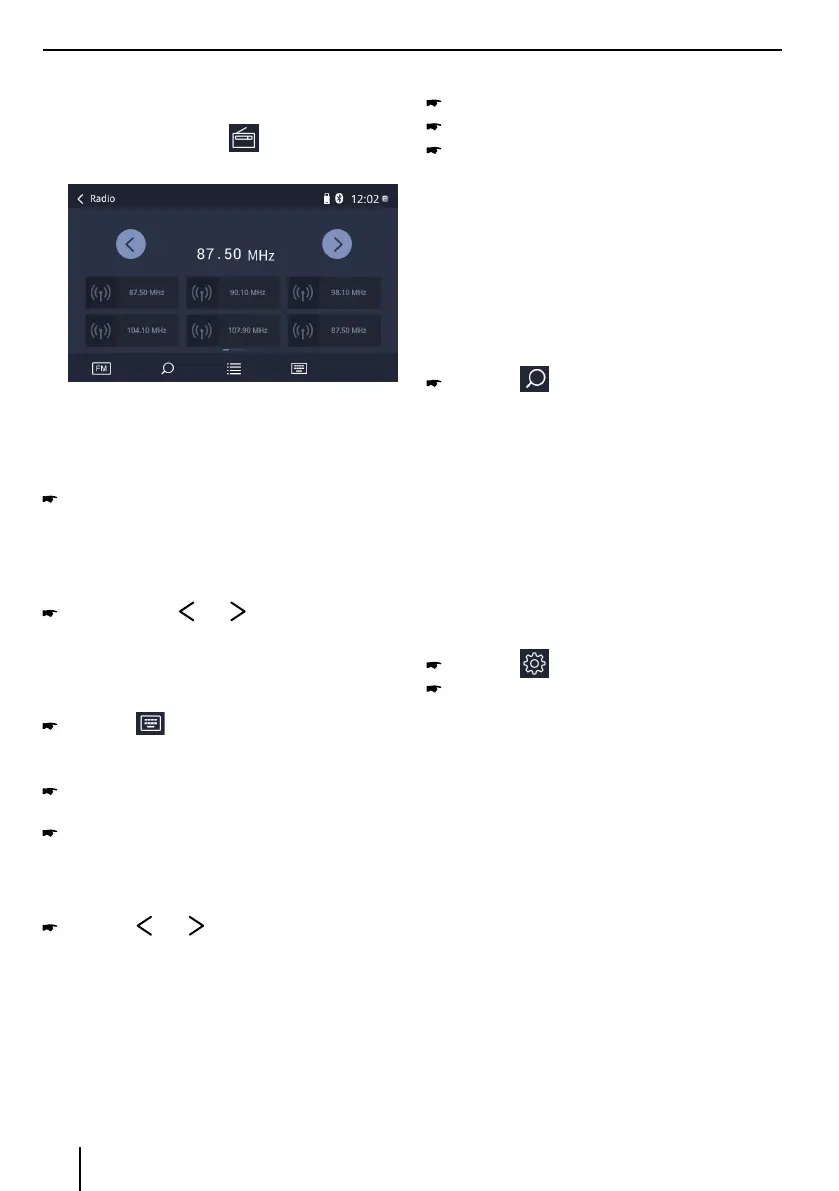
In the main menu, press the button.
The radio playback menu is displayed.
Select memory band
Dierent memory bands and wavebands are available.
Up to 18 FM and 12 AM stations can be stored in each
memory bank.
Press the FM / AM button to switch band.
Tuning into a station
Tuning into stations manually
Briey press the or button once or several
times to change the frequency in increments.
Enter broadcast frequency directly
If the frequency of the desired stations is known, it can
be entered directly via the touchscreen.
Press the button.
A numeric keypad is displayed for the frequency
input.
Enter the frequency of the desired station with the
numeric keypad.
Press the OK button.
The radio playback menu is displayed, the station of
the frequency entered is played back.
Starting station seek tuning
Press the or button for approx. 2 seconds
to start station seek tuning.
The radio tunes into the next receivable station.
Note:
For the reception area Europe: In the FM waveband,
only trac information stations are tuned into if the
priority for trac information is switched on.
Storing stations manually
Select the desired memory band.
Set the desired station.
Press one of the memory buttons on center of the
screen for approx. 2 seconds to store the current
station at the button.
The station is stored.
Storing stations automatically
(Travelstore)
With Travelstore, you can automatically search for and
store the 6 FM stations oering the strongest reception
in the region in the current memory bank. Any previously
stored stations in this memory bank are deleted in the
process.
Press the button.
The tuner starts the automatic station seek tuning.
After the storing is completed, the radio plays the
station at memory location 1 of the previously se
-
lected memory bank.
Note:
For the reception area Europe: With switched-on pri
-
ority for trac information, only trac information
stations are stored.
Adjusting the seek tuning sensitivity
The seek tuning sensitivity decides whether the
automatic station seek tuning nds only strong stations
or also weaker stations that may be noisy.
Press the button in main menu.
Press the button right to LOC to adjust the
sensitivity of station seek tuning.
If LOC is on, only stations with a strong signal are
found during seek tuning.
If LOC is o, stations with a strong and weak signal
are found during seek tuning.
Radio mode



 To Next Page