7
Audio playback from USB or microSDHC
The principles of the audio playback (MP3/WMA) from
data carriers are identical for all sources.
Select the desired source via the main menu.
The device changes to the desired source and the
playback starts.
If the playback does not start with the audio playback,
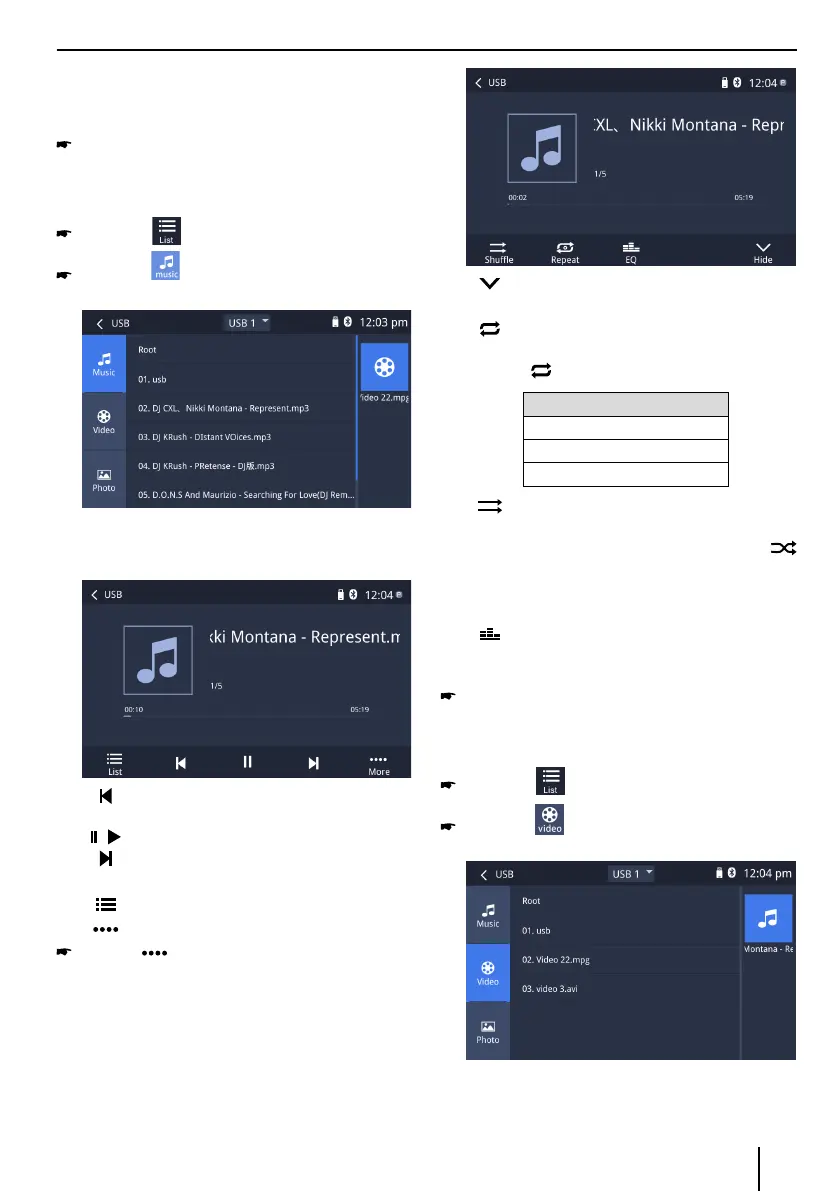
press the button to change to the folder/file
list.
Press the button to display all the audio les
of the data carrier.
Briey tap on the name of the folder/track. The folder
is opened/the track is started.
After starting a title, the playback menu is displayed.
[ ] Short press: Title selection.
Long press: Fast searching.
[
/ ] Interrupt playback and continue playback.
[
] Short press: Title selection.
Long press: Fast searching.
[
] Display the folder/le list.
[
] Show additional operating options.
Tap on to display additional operating op-
tions of the playback menu.
USB/microSDHC media playback
[ ] Hide additional operating options.
Audio playback from USB or microSDHC:
[
] Start and end REPEAT function.
The REPEAT mode changes each time the
button is pressed.
REPEAT mode
Repeat current track
Repeat current folder
Repeat all tracks of data carrier
[
] Start MIX random track play and end it
again.
If the MIX function is switched on, the
symbol is displayed in white.
The MIX mode depends on the selected
REPEAT function.
[
] Display equalizer.
Video playback from USB or microSDHC
Select the desired source via the main menu.
The device changes to the desired source and the
playback starts.
If the playback does not start with the video playback,
press the button to change to the folder/file
list.
Press the button to display all the video les
of the data carrier.
Note:
Folders and videos are selected and started as de
-
scribed under audio playback.



 To Next Page