Need help?
Do you have a question about the ADB 2721W and is the answer not in the manual?
Describes power, input selection, and recording controls.
Explains buttons for menu navigation, playback, and channel selection.
Details controls for playback, on-demand, DVR, and audio/captioning.
Covers device selection, setup, and numeric input.
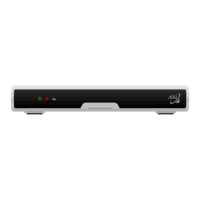
Details indicators and ports on the front of the set-top box.
Explains the various output and input ports on the rear of the device.
Describes the status lights and their meaning on the modem's front.
Details the physical connections available on the rear of the modem.
Allows recording, pausing, and rewinding live TV.
Enables watching recorded shows on any TV with one DVR box.
Provides a smoother and faster menu browsing experience.
Allows pause, play, rewind with USB/SD card without DVR.
Customers can customize the menu and guide interface color.
Displays caller information as an on-screen pop-up window.
Access live events, concerts, and specialty programming.
Provides access to free content and movies with premium channels.
Displays listings, show times, and detailed program descriptions.
Offers improved picture and sound quality up to 1080i resolution.
Provides instant access to movies and trailers for viewing at home.
Filters unwanted content and blocks unsuitable programming for viewers.
Explains GTA Digital TV as an IP-based service with extensive channels and features.
Clarifies that a set-top box adapts digital signals for current TVs.
Advises checking batteries if the remote shows dim or no lights.
Recommends using the highest quality wiring available, starting with HDMI.
Suggests power cycling the modem and set-top box to fix issues.
Highlights access to VOD, Pay-Per-View, and SVOD content.
Recommends verifying TV input settings and scrolling through inputs.
Provides contact and operating hours for the AAFB BX location.
Lists operating hours and address for the Agana Shopping Center.
Details address and business hours for the GTA Main Office.
Provides operating hours and address for the Guam Premier Outlets.
Lists operating hours and address for the Micronesia Mall location.
Details operating hours and address for the NEX location.
Provides operating hours and address for the Yigo Pay-Less Kiosk.
Provides the 24/7 customer support phone number.
Provides the website address for more information.
 General
| Brand | ADB |
|---|---|
| Model | 2721W |
| Category | Set-top boxes |
| Language | English |

 To Next Page