page 14ADDAC SYSTEM
This settings allow for easy chord generation assuming you choose a 7 note
scale.
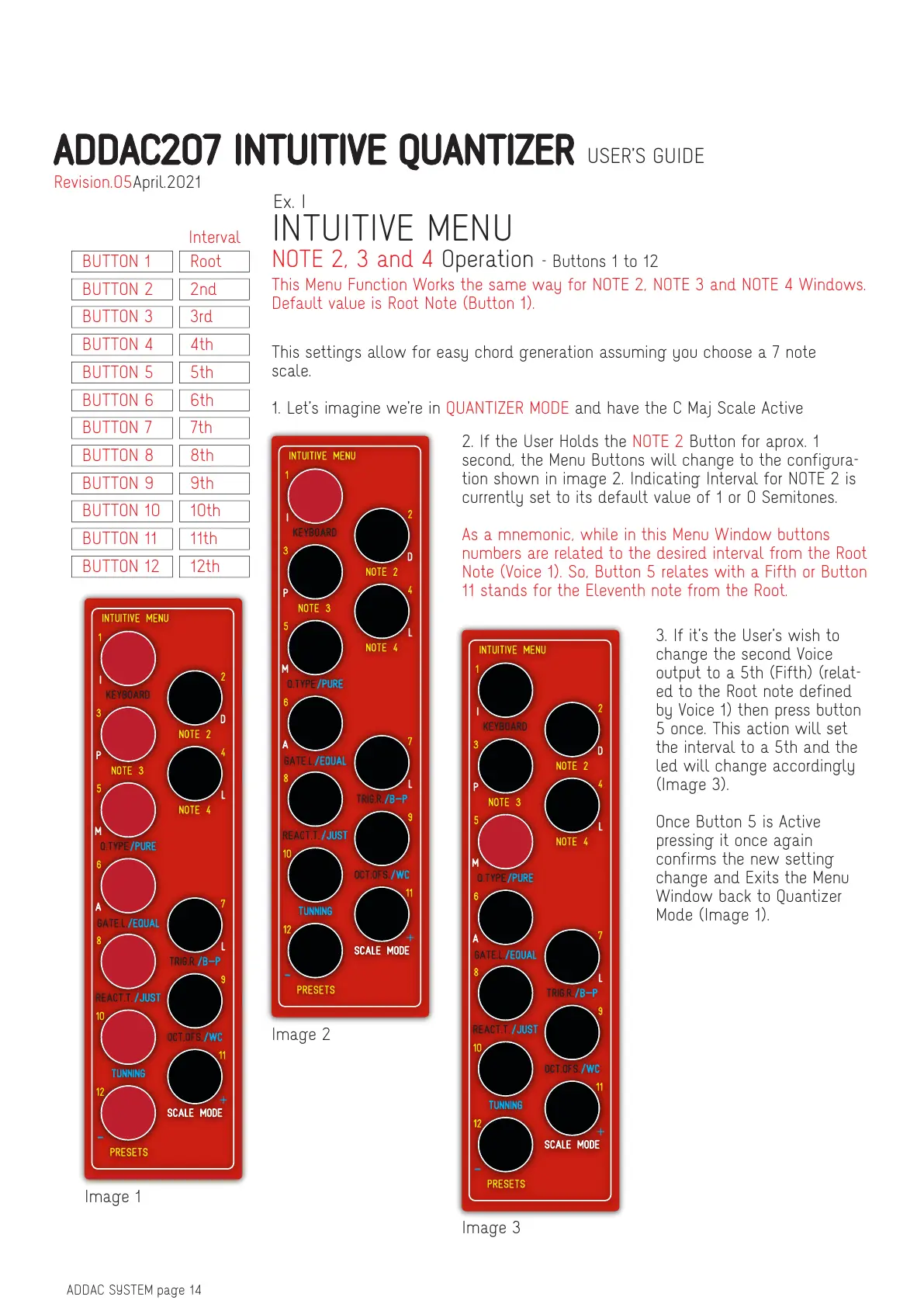
1. Let’s imagine we’re in QUANTIZER MODE and have the C Maj Scale Active
This Menu Function Works the same way for NOTE 2, NOTE 3 and NOTE 4 Windows.
Default value is Root Note (Button 1).
2. If the User Holds the NOTE 2 Button for aprox. 1
second, the Menu Buttons will change to the configura-
tion shown in image 2. Indicating Interval for NOTE 2 is
currently set to its default value of 1 or 0 Semitones.
As a mnemonic, while in this Menu Window buttons
numbers are related to the desired interval from the Root
Note (Voice 1). So, Button 5 relates with a Fifth or Button
11 stands for the Eleventh note from the Root.
3. If it’s the User’s wish to
change the second Voice
output to a 5th (Fifth) (relat-
ed to the Root note defined
by Voice 1) then press button
5 once. This action will set
the interval to a 5th and the
led will change accordingly
(Image 3).
Once Button 5 is Active
pressing it once again
confirms the new setting
change and Exits the Menu
Window back to Quantizer
Mode (Image 1).
Image 3
Image 2
Image 1
INTUITIVE MENU
NOTE 2, 3 and 4 Operation - Buttons 1 to 12
Ex. I
BUTTON 1 Root
Interval
BUTTON 2 2nd
BUTTON 3 3rd
BUTTON 4 4th
BUTTON 5 5th
BUTTON 6 6th
BUTTON 7 7th
BUTTON 8 8th
BUTTON 9 9th
BUTTON 10 10th
BUTTON 11 11th
BUTTON 12 12th
ADDAC207 INTUITIVE QUANTIZER USER’S GUIDE
April.2021Revision.05


 To Next Page