page 15ADDAC SYSTEM
Image 2
Image 1
INTUITIVE MENU
Q.TYPE - Quantization Type Operation - Buttons 3, 5 and 6
This setting is shared by all 4 Voices.
Default value is Above Method (Button 3).
Ex. II
BUTTON 3 ABOVE
Q.Type
BUTTON 5 IGNORE
BUTTON 6 BELOW
1. Let’s imagine we’re still in QUANTIZER MODE and have the C Maj Scale Active
(image 1). It’s the User’s decision to change the Quantization Type, please keep
in mind that there are 3 methods for Quantizing the input voltage to the closest
note: Above (BUTTON 3), Below (BUTTON 6) or if it ignores any voltage that is
not in the scale range (BUTTON 5).
As a mnemonic, always remember that Button 3-Above is Above the Q.TYPE
Button and that Button 6 - Below is Below the Q.TYPE Button.
Let’s assume the Active Method is Above (Button 3).
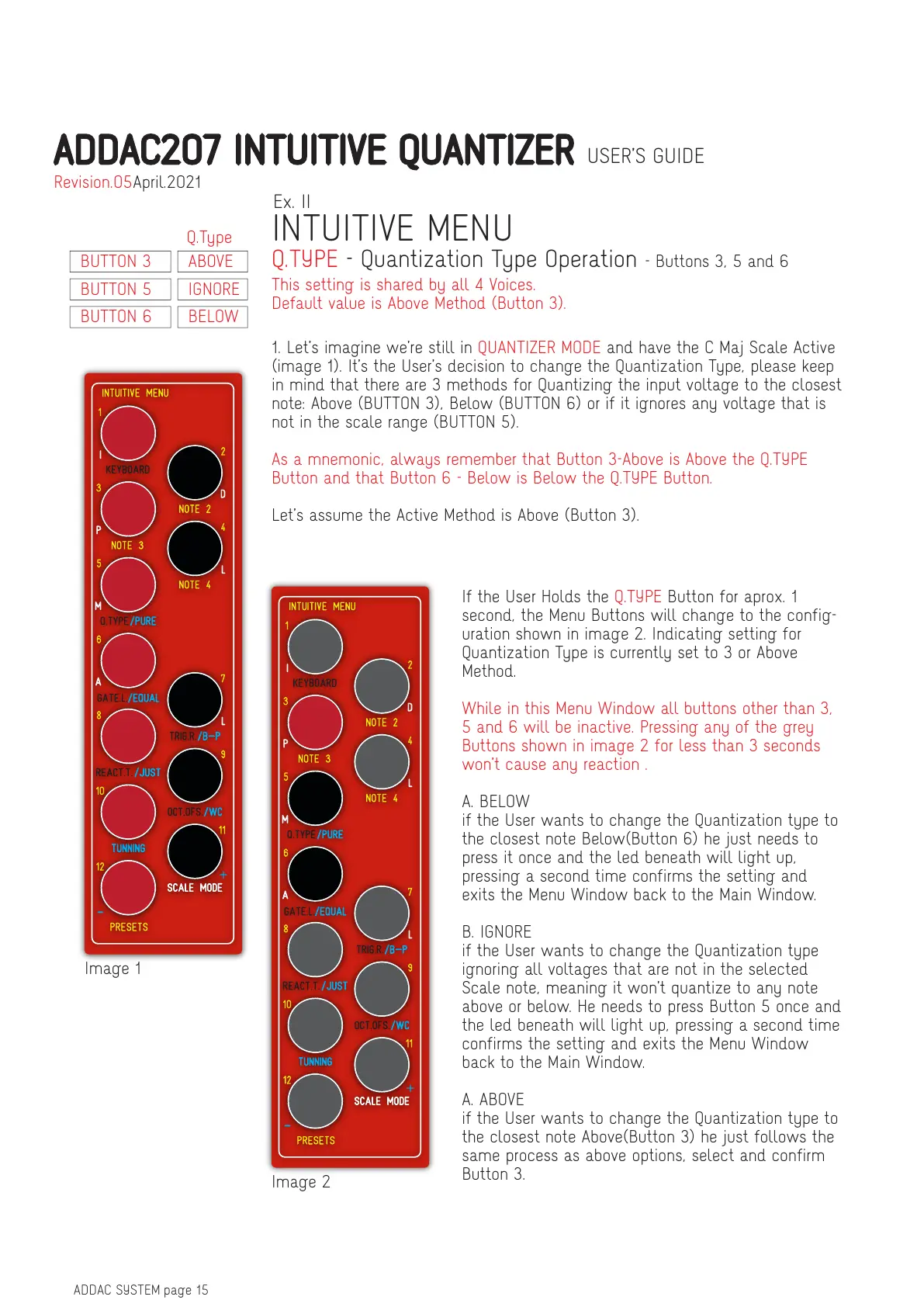
If the User Holds the Q.TYPE Button for aprox. 1
second, the Menu Buttons will change to the config-
uration shown in image 2. Indicating setting for
Quantization Type is currently set to 3 or Above
Method.
While in this Menu Window all buttons other than 3,
5 and 6 will be inactive. Pressing any of the grey
Buttons shown in image 2 for less than 3 seconds
won’t cause any reaction .
A. BELOW
if the User wants to change the Quantization type to
the closest note Below(Button 6) he just needs to
press it once and the led beneath will light up,
pressing a second time confirms the setting and
exits the Menu Window back to the Main Window.
B. IGNORE
if the User wants to change the Quantization type
ignoring all voltages that are not in the selected
Scale note, meaning it won’t quantize to any note
above or below. He needs to press Button 5 once and
the led beneath will light up, pressing a second time
confirms the setting and exits the Menu Window
back to the Main Window.
A. ABOVE
if the User wants to change the Quantization type to
the closest note Above(Button 3) he just follows the
same process as above options, select and confirm
Button 3.
ADDAC207 INTUITIVE QUANTIZER USER’S GUIDE
April.2021Revision.05


 To Next Page
 Loading...