EasyManua.ls Logo

AddSecure Tor V - Serial Ports; Example of a Cable for Connecting the Control Panel; Example of a Null Modem Cable for Connecting a PC

AddSecure Tor V
20 pages
Print Icon
To Next Page IconTo Next Page
To Previous Page IconTo Previous Page
Loading...
AddSecure Tor V, PDK-11606 13
6.9 Serial ports
Whenever serial ports are included in the service, S2 is connected to the serial equipment. The
connector is of the type RJ12, and the electrical user interface is RS232.
Note that serial interface is only for additional information. You must use the
input interfaces to follow the regulations (EN 54-21:2006, EN 50136/SSF
114)
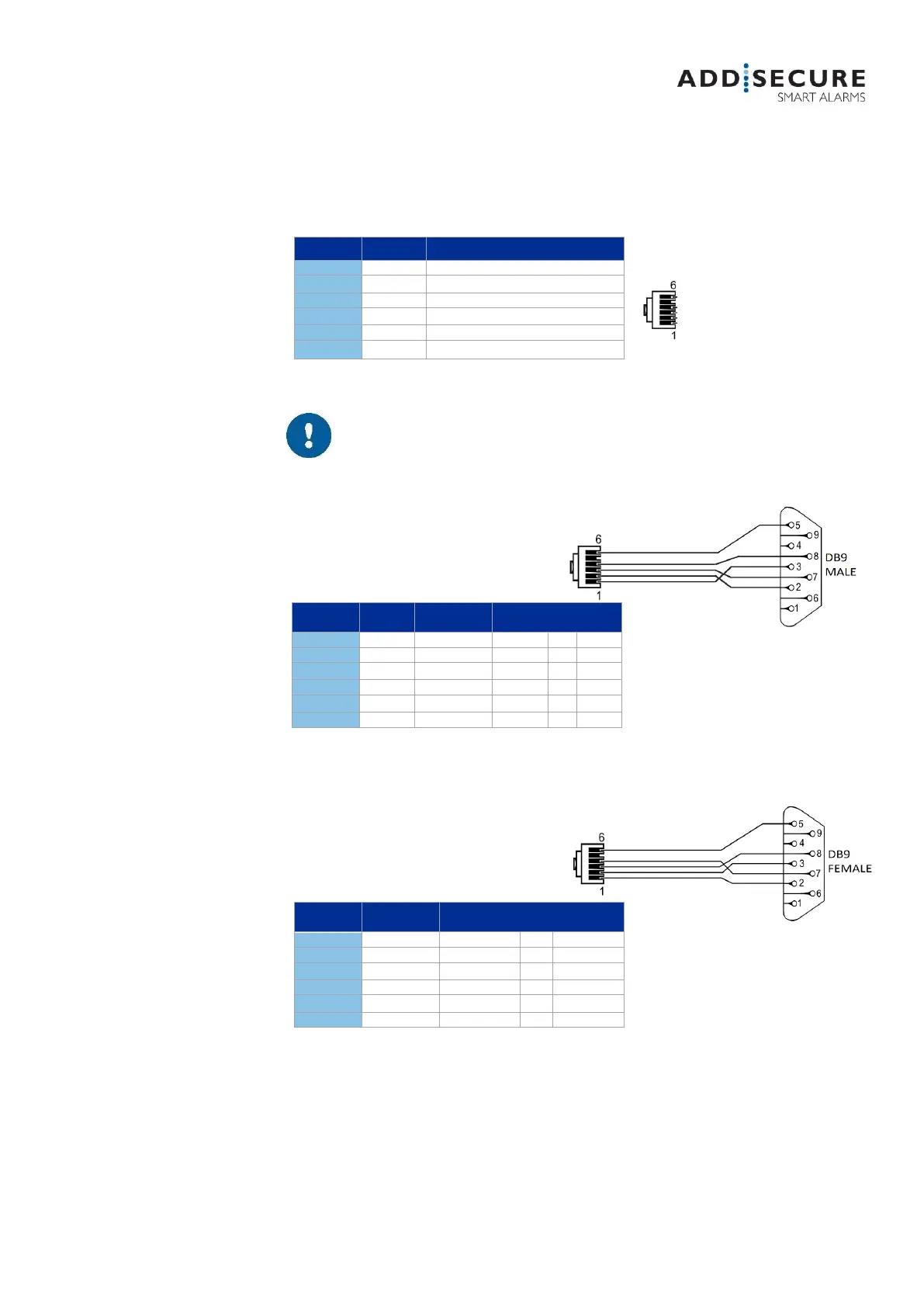
6.9.1 Example of a cable for connecting the control panel
A 5-meter ready-to-go is available as an option and can be ordered. Article number: 80 321 329
6.9.2 Example of a null modem cable for connecting a PC

S2
NAME
FUNCTION
1
Tx
Transmit
2
Rx
Receive
3
RTS
Request to send
4
CTS
Clear to send
5
Power
+5VDC
6
GND
Ground
PIN CPU
CABLE
PIN
CONTACT
FUNCTION
1
Green
3
Tx
Tx
2
Yellow
2
Rx
Rx
3
Orange
7
RTS
RTS
4
Brown
8
CTS
CTS
5
Red
+5VDC
6
Black
5
GND
GND
PIN CPU
PIN
CONTACT
FUNCTION
1
2
Tx
Rx
2
3
Rx
Tx
3
8
RTS
CTS
4
7
CTS
RTS
5
+5VDC
6
5
GND
GND
Figure 11 Example of a null
modem cable
Figure 10 Example of cable
for control panel