11
Turning ON/OFF
1. Press ON/OFF button, the unit will start in AUTO (automatic) mode.
Automatic mode
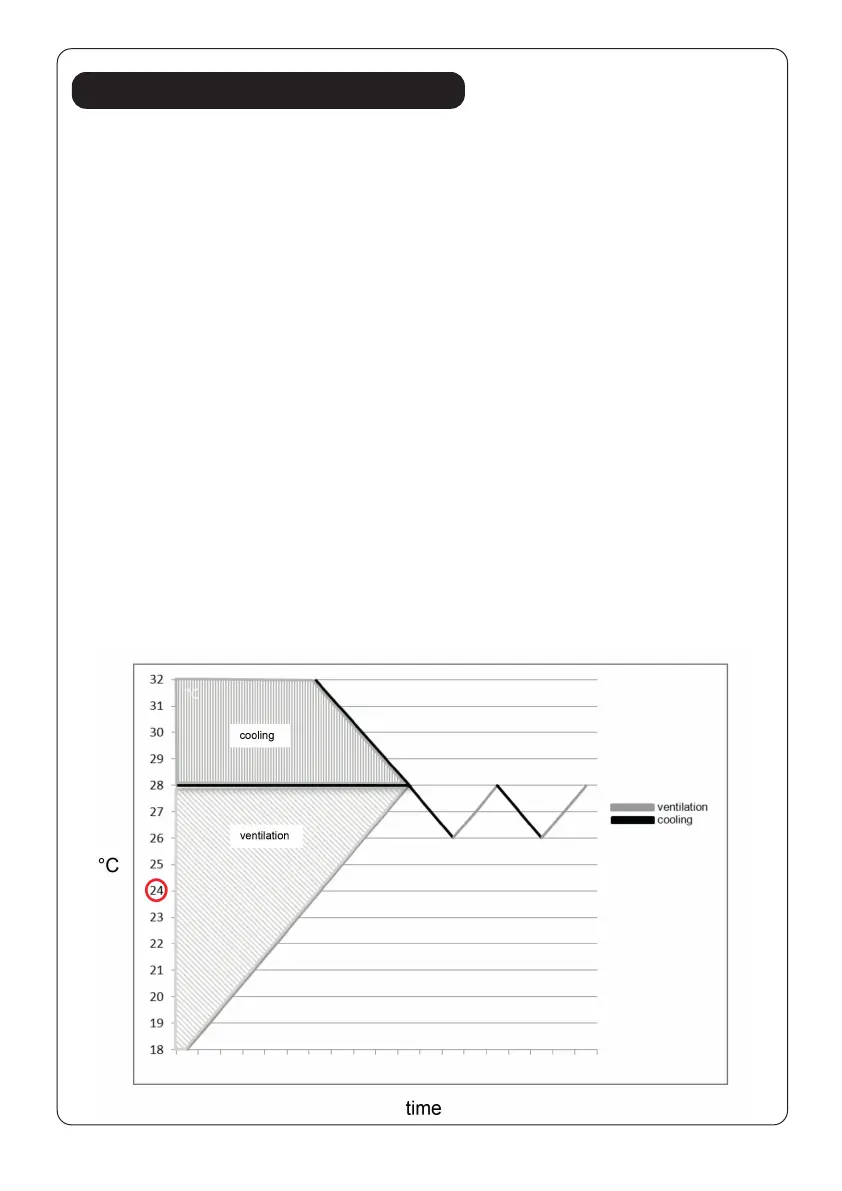
In automatic mode, the unit can cool or ventilate depending on ambient
temperature and setpoint adjustment. The unit is preset as follows:
If ambient temperature is above 23°C the unit is in automatic cooling mode
and is running according to the setpoint (Default setting 24°C). During this
operation, the indicators (LED) for AUTO & COOLING MODE illuminate
in green.
If the ambient temperature is less than or equal to (≤) 23°C, the unit is in
automatic ventilation mode. The indicators (LED) for AUTO & FAN MODE
illuminate in green.
Remark : For default setpoint 24°C , the unit starts to cool at 28°C (Setpoint
+ 4°C), when it cools down to 26°C (setpoint +2°C, it will then switch back
to ventilation mode.
2. The display window also shows the ambient room temperature from 0°C to
50°C.
3. To turn the unit off, press ON/OFF button again.


 To Next Page