EasyManua.ls Logo

ADE CK 2301 - User Manual

ADE CK 2301
146 pages
Go to English
Print Icon
To Next Page IconTo Next Page
Loading...
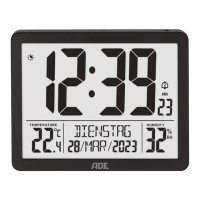
Funkuhr mit
XL-Anzeige
Radio-controlled clock with XL display |
Reloj radio controlado con pantalla
extragrande | Horloge radiopilotée avec
affichage XL | Radiosveglia con display XL |
Zegar radiowy z wyświetlaczem XL
Deutsch
English
Español
Français
Italiano
Polski
Bedienungsanleitung
CK 2301
Operating instructions | Instrucciones de operación
Mode d‘emploi | Istruzioni per l‘uso | Instrukcja obsługi

Table of Contents

Question and Answer IconNeed help?

Do you have a question about the ADE CK 2301 and is the answer not in the manual?

Summary

Scope of delivery

General information

About this operating manual

Describes how to operate and maintain the product safely for future reference.

Explanation of symbols

Explains warning symbols like DANGER, WARNING, and NOTE for injuries and material damage.

Technical data

Safety

DANGER for children

Warning about choking hazards from packaging material for children.

RISK of fire;burning and;or explosion

Warns about risks of explosion and leakage from improper battery handling or damage.

BEWARE of material damage

Advises on protecting the clock from shocks and handling batteries to prevent damage.

Intended use

At a glance

Start-up

Receiving the time signal

Checklist when data is missing on the display

Troubleshooting steps for when the clock is not receiving the time signal or data is missing.

Setting the time manually

Starting signal reception manually

Choosing a location

Setting up the radio-controlled alarm clock

Guidance on placing the radio-controlled clock near a window for optimal signal reception.

About the time signal transmitter DCF77

Alarm

Setting the alarm time

Step-by-step instructions for setting the alarm hour and minute for the radio-controlled clock.

Switches the alarm function on;off

Instructions on how to activate or deactivate the alarm function and check set alarm times.

Waking up

Describes the alarm signal and how the clock wakes the user at the set time.

Display illumination

Illuminating the display

How to turn on the display backlight for a short period on the radio-controlled clock.

Using the night light function

Activating the automatic brightness adjustment for the display backlight with the night light function.

Other functions

Changing the time format

How to switch the time display between 12-hour (AM/PM) and 24-hour formats.

Change temperature unit

Toggle the temperature display between degrees Celsius (°C) and degrees Fahrenheit (°F).

Switching between summer and winter time

Automatic switching between summer and winter time based on good signal reception.

Battery change indicator

Resetting the radio-controlled alarm clock to factory setting

Cleaning

Fault;Remedy

Declaration of conformity

Warranty

Disposal

Disposing of the packaging

Instructions for disposing of product packaging materials responsibly and separating recyclables.

Disposing of the product

Guidelines for environmentally friendly disposal of the product at the end of its life cycle.

Summary

Scope of delivery

General information

About this operating manual

Describes how to operate and maintain the product safely for future reference.

Explanation of symbols

Explains warning symbols like DANGER, WARNING, and NOTE for injuries and material damage.

Technical data

Safety

DANGER for children

Warning about choking hazards from packaging material for children.

RISK of fire;burning and;or explosion

Warns about risks of explosion and leakage from improper battery handling or damage.

BEWARE of material damage

Advises on protecting the clock from shocks and handling batteries to prevent damage.

Intended use

At a glance

Start-up

Receiving the time signal

Checklist when data is missing on the display

Troubleshooting steps for when the clock is not receiving the time signal or data is missing.

Setting the time manually

Starting signal reception manually

Choosing a location

Setting up the radio-controlled alarm clock

Guidance on placing the radio-controlled clock near a window for optimal signal reception.

About the time signal transmitter DCF77

Alarm

Setting the alarm time

Step-by-step instructions for setting the alarm hour and minute for the radio-controlled clock.

Switches the alarm function on;off

Instructions on how to activate or deactivate the alarm function and check set alarm times.

Waking up

Describes the alarm signal and how the clock wakes the user at the set time.

Display illumination

Illuminating the display

How to turn on the display backlight for a short period on the radio-controlled clock.

Using the night light function

Activating the automatic brightness adjustment for the display backlight with the night light function.

Other functions

Changing the time format

How to switch the time display between 12-hour (AM/PM) and 24-hour formats.

Change temperature unit

Toggle the temperature display between degrees Celsius (°C) and degrees Fahrenheit (°F).

Switching between summer and winter time

Automatic switching between summer and winter time based on good signal reception.

Battery change indicator

Resetting the radio-controlled alarm clock to factory setting

Cleaning

Fault;Remedy

Declaration of conformity

Warranty

Disposal

Disposing of the packaging

Instructions for disposing of product packaging materials responsibly and separating recyclables.

Disposing of the product

Guidelines for environmentally friendly disposal of the product at the end of its life cycle.

ADE CK 2301 Specifications

General IconGeneral
TypeClock Radio
DisplayLED
AlarmYes
BrandADE
ModelCK 2301
Battery BackupYes
TunerFM