EasyManua.ls Logo

Adec 500 - Touchpad Operation and Functions; Manual Chair Controls; Program Button and Presets; Chair Position Functions

Adec 500
13 pages
Print Icon
To Next Page IconTo Next Page
To Previous Page IconTo Previous Page
Loading...
Touchpad
A-dec
500
Assistant’s
Instrumentation
How
to
Operate
Your
Standard
Touchpad
Manual
Chair
Controls
The
Base
function
controls
chair
lift,
or
vertical
movement.
To
raise
the
chair,
press
the
up
arrow.
To
lower
the
chair,
press
the
down
arrow.
Hold
down
the
arrow
until
the
chair
reaches
the
desired
height,
then
release
it.
The
Back
function
controls
the
chair
back.
To
raise
the
chair
back, press
the
right
arrow.
To
lower
the
chair
back,
press
the
left
arrow.
Hold
down
the
button
until
the
chair
back
reaches
the
desired
position,
then
release
it.
Program
Button
Use
the
Program
button
located
in
between
the
arrows
on
the
touchpad
to
save
the
settings
for
chair
positions
and
cuspidor
cup
fill
and
bowl
rinse
times.
Position
0
(Entry/Exit)
Pressing
Entry/Exit
(Position
0)
sends
the
chair
to
a
preset
entry/exit
position.
Positions
1
and
2
Pressing
Position
1
or
2
on
the
touchpad
sends
the
chair
base
and
back
to
a
preset
position.
Pressing
this
position
Causes
this
action...
Chair
base
and
back
move
to
Entry/Exit
(0)
|
me
preset
entry/exit
position.
Chair
moves
to
a
programmed
Position
1
or
2
.
operating
position.
Chair
back
moves
to
an
Position
3
a
x-ray /rinse position.
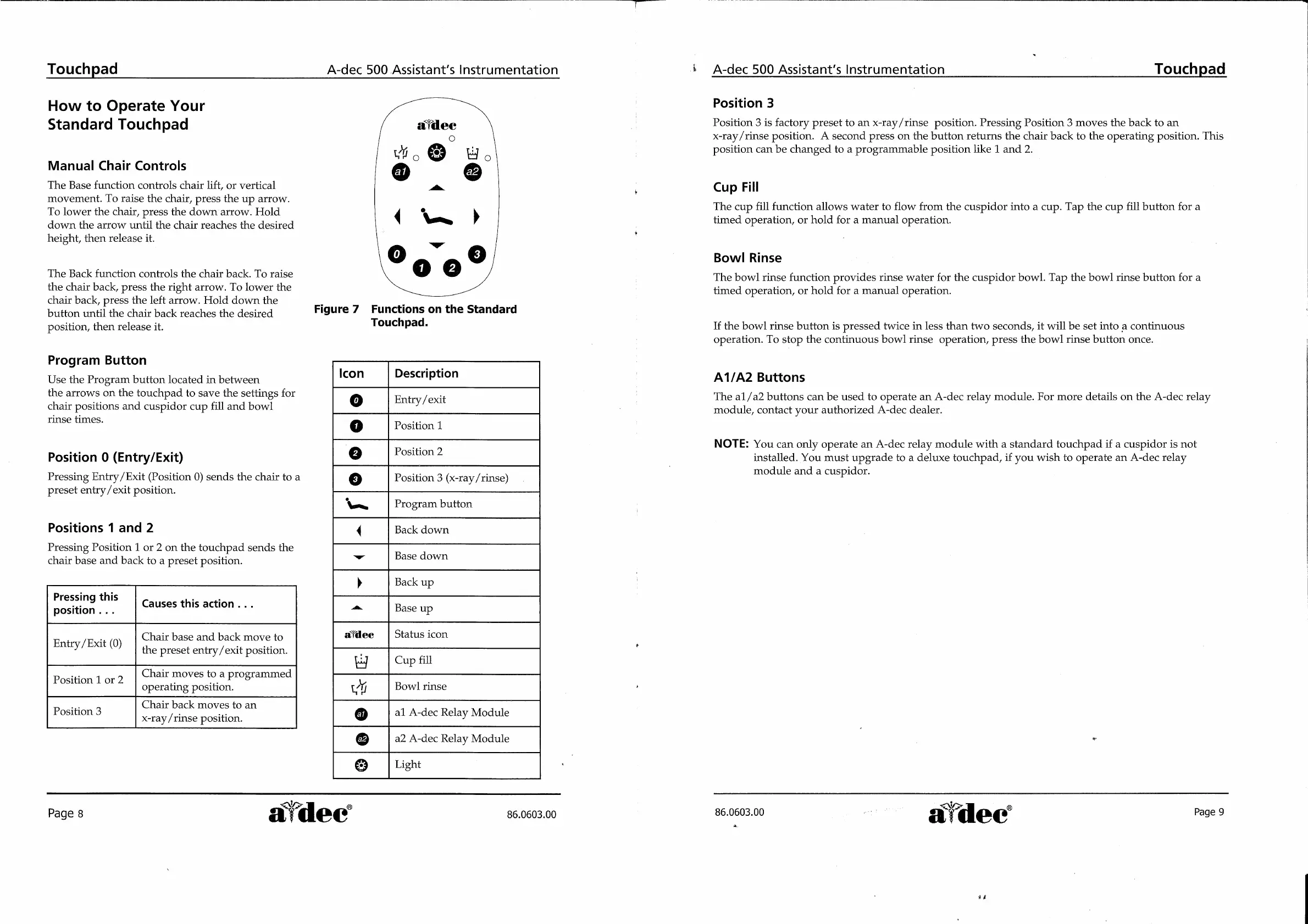
Figure
7
Functions
on
the
Standard
Touchpad.
Icon
Description
Entry
/exit
Position
1
Position
2
Position
3
(x-ray
/rinse)
Program
button
Back
down
Base
down
Back
up
„|-|
|
fooeeo
Base
up
afdec
Status
icon
Cup
fill
vi
Bowl
rinse
al
A-dec
Relay
Module
a2
A-dec
Relay
Module
61616
Light
Page
8
aldec
86.0603.00
A-dec
500
Assistant’s
Instrumentation
|
Touchpad
Position
3
Position
3
is
factory
preset
to
an
x-ray/rinse
position.
Pressing
Position
3
moves
the
back
to
an
x-ray/rinse
position.
À
second
press
on
the
button
returns
the
chair
back
to
the
operating
position.
This
position
can
be
changed
to
a
programmable
position
like
1
and
2.
Cup
Fill
The
cup
fill
function
allows
water
to
flow
from
the
cuspidor
into
a
cup.
Tap
the
cup
fill
button
for
a
timed
operation,
or
hold
for
a
manual
operation.
Bowl
Rinse
The
bowl
rinse
function
provides
rinse
water
for
the
cuspidor
bowl.
Tap
the
bowl
rinse
button
for
a
timed
operation,
or
hold
for
a
manual
operation.
If
the
bowl
rinse
button
is
pressed
twice
in
less
than
two
seconds,
it
will
be
set
into
a
continuous
operation.
To
stop
the
continuous
bowl
rinse
operation,
press
the
bow]
rinse
button
once.
A1/A2
Buttons
The
a1/a2
buttons
can
be
used
to
operate
an
A-dec
relay
module.
For
more
details
on
the
A-dec
relay
module,
contact
your
authorized
A-dec
dealer.
NOTE:
You
can
only
operate
an
A-dec
relay
module
with
a
standard
touchpad
if
a
cuspidor
is
not
installed.
You
must
upgrade
to
a
deluxe
touchpad,
if
you
wish
to
operate
an
A-dec
relay
module
and
a
cuspidor.
86.0603.00
Lee
에어
are
A.
kd
"dec

Related product manuals