EasyManua.ls Logo

Adec 500 - Positioning the Assistants Instrumentation; Positioning Left;Right Conversion

Adec 500
13 pages
Print Icon
To Next Page IconTo Next Page
To Previous Page IconTo Previous Page
Loading...
Positioning
A-dec
500
Assistant's
Instrumentation
How
to
Position
Your
Assistant's
Instrumentation
The
A-dec
500
assistant’s
instrumentation
is
equipped
with
either
a
short
or
long
assistant’s
arm
for
easy
positioning
of
instrumentation.
Both
arms
are
equipped
with
a
touchpad
and
holder
assemblies
with
individual
holders
for
added
positioning.
Short
Assistant’s
Arm
The
short
assistant’s
arm
positions
near
the
cuspidor
or
along
side
the
chair
back.
It
adjusts
in
a
forward,
backward,
and
side-to-side
movement
for
easy
positioning
and
access
to
the
instrumentation.
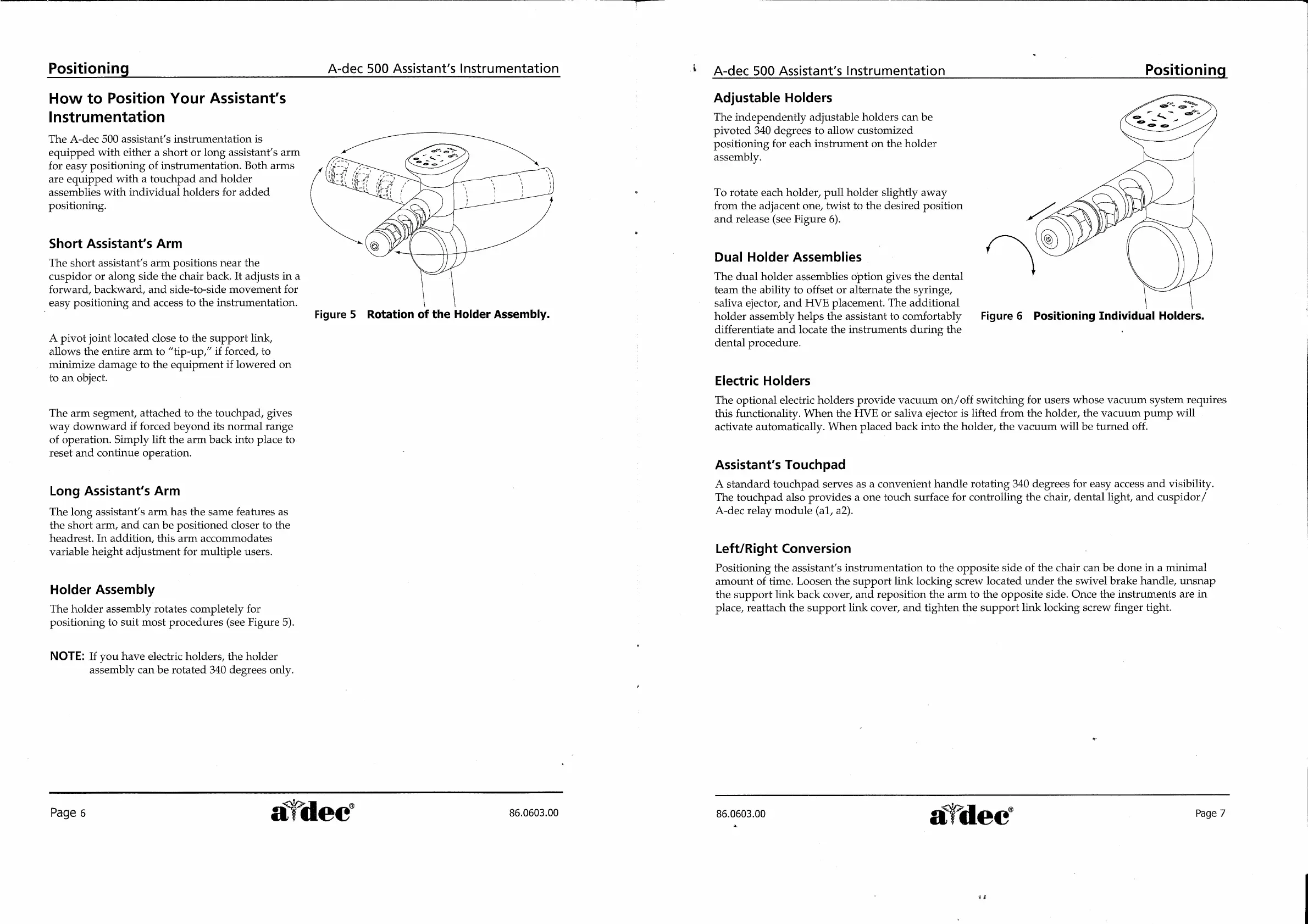
Figure
5
Rotation
of
the
Holder
Assembly.
A
pivot
joint
located
close
to
the
support
link,
allows
the
entire
arm
to
“tip-up,”
if
forced,
to
minimize
damage
to
the
equipment
if
lowered
on
to
an
object.
The
arm
segment,
attached
to
the
touchpad,
gives
way
downward
if
forced
beyond
its
normal
range
of
operation.
Simply
lift
the
arm
back
into
place
to
reset
and
continue
operation.
Long
Assistant's
Arm
The
long
assistant’s
arm
has
the
same
features
as
the
short
arm,
and
can
be
positioned
closer
to
the
headrest.
In
addition,
this
arm
accommodates
variable
height
adjustment
for
multiple
users.
Holder
Assembly
The
holder
assembly
rotates
completely
for
positioning
to
suit
most
procedures
(see
Figure
5).
NOTE:
If
you
have
electric
holders,
the
holder
assembly
can
be
rotated
340
degrees
only.
A-dec
500
Assistant’s
Instrumentation
Positioning
i
Page
6
sa
dec
86.0603.00
Adjustable
Holders
The
independently
adjustable
holders
can
be
pivoted
340
degrees
to
allow
customized
positioning
for
each
instrument
on
the
holder
assembly.
To
rotate
each
holder,
pull
holder
slightly
away
from
the
adjacent
one,
twist
to
the
desired
position
and
release
(see
Figure
6).
Dual
Holder
Assemblies
The
dual
holder
assemblies
option
gives
the
dental
team
the
ability
to
offset
or
alternate
the
syringe,
saliva
ejector,
and
HVE
placement.
The
additional
holder
assembly
helps
the
assistant
to
comfortably
Figure
6
Positioning
Individual
Holders.
differentiate
and
locate
the
instruments
during
the
dental
procedure.
Electric
Holders
The
optional
electric
holders
provide
vacuum
on/off
switching
for
users
whose
vacuum
system
requires
this
functionality.
When
the
HVE
or
saliva
ejector
is
lifted
from
the
holder,
the
vacuum
pump
will
activate
automatically.
When
placed back
into
the
holder,
the
vacuum
will
be
turned
off.
Assistant's
Touchpad
A
standard
touchpad
serves
as
a
convenient
handle
rotating
340
degrees
for
easy
access
and
visibility.
The
touchpad
also
provides
a
one
touch
surface
for
controlling
the
chair,
dental
light,
and
cuspidor/
A-dec
relay
module
(a1,
a2).
Left/Right
Conversion
Positioning
the
assistant’s
instrumentation
to
the
opposite
side
of
the
chair
can
be
done
in
a
minimal
amount
of
time.
Loosen
the
support
link
locking
screw
located
under
the
swivel
brake
handle,
unsnap
the
support
link
back
cover,
and
reposition
the
arm
to
the
opposite
side.
Once
the
instruments
are
in
place,
reattach
the
support
link
cover,
and
tighten
the
support
link
locking
screw
finger
tight.
i
$
θες
86.0603.00
a
Le
dec
|
Раде
7
#4

Related product manuals