A-dec 6300 Ceiling-Mount Dental Light Installation Guide
85.0521.00 Rev R 7
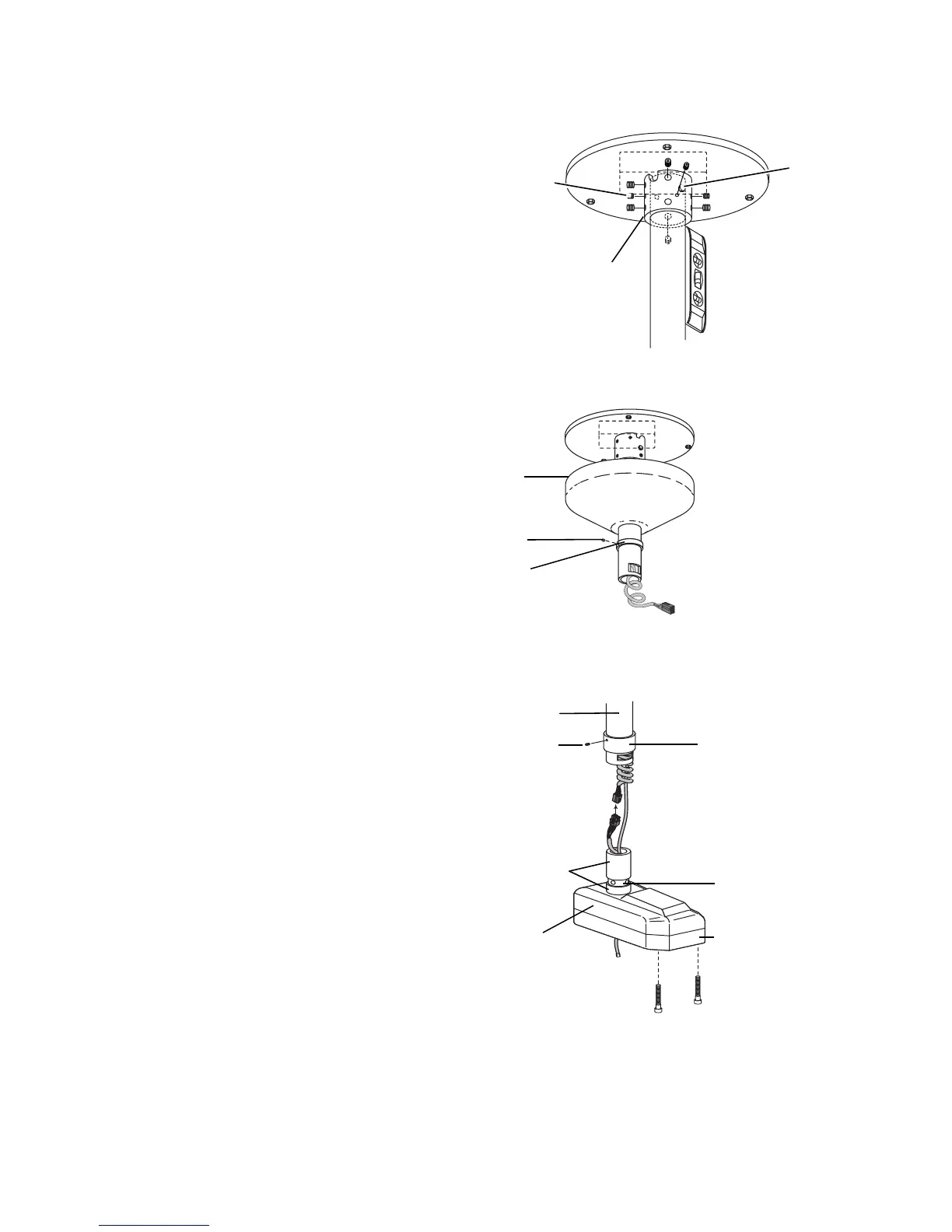
5. Use a 3/16" hex key and a level to plumb
the post by adjusting the eight setscrews
in the collar.
6. Slide the cover and small stop ring up the
post. Use a 1/16" hex key to slightly
tighten the setscrew in the stop ring and
hold the cover in place. To prevent
marring the post, do not over-tighten the
setscrew.
7. Slide the retaining ring onto the post.
Use a 1/16" hex key to slightly tighten
the setscrew in the retaining ring. This
holds it in place on the post.
Set Up the Dental Light
1. Use a 5/32" hex key to remove the two
screws securing the lower cover and
remove the cover.
2. Apply a light coat of lubricant (provided)
on the hub of the dental light assembly.
Do not lubricate the locking tab recess.
3. With the rigid arm over the chair, lift the
dental light assembly into position just
below the post.
Figure 9. Level the Light Post
Figure 10. Install the Cover
Figure 11. Connect the Power Cord and Data Line
Setscrews (8)
Collar Bolt
Collar
Post
Setscrew
Retaining Ring
Locking
Tab Recess
Apply Lubricant
to Hub
Lower Cover
Transformer
Housing


 To Next Page
 Loading...