Trinity 788 Operation Manual
Trinity 788 Operation Manual
Open the door with password
Operational procedure
Indication of the lock
Press Button + or - directly
The LED displays -0
Input the 6-digit spare password. Press Button
# to enter each digit of the password.
The green light is on all along after a beep,
and the electric engine makes a rolling sound,
with 99 display on the LED
Turn the handle to open the door
Otherwise it will automatically be locked
5 seconds later
Notes:
1. Method of password input: Press Button + or - to choose the first digit of the
password, and press Button # to confirm the choice. Continue to choose other five digits
with the same method;
2. In case the automatically start function fails, press Button # to start it manually;
3. If the operation fails, the red light will be on, and two short beeps sound.
17
18
Setup passage mode
Press Button or # within 5 seconds after the door opened, and the passage mode is
set.
Note: Passage mode refers to the state in which the door can be opened immediately by
turning the handle without recognition of fingerprint or password. It is for the convenience
of conferences or gathering.
Cancel passage mode
When the lock is in passage mode, place an enrolled fingerprint or input the valid password to
cancel the passage mode.
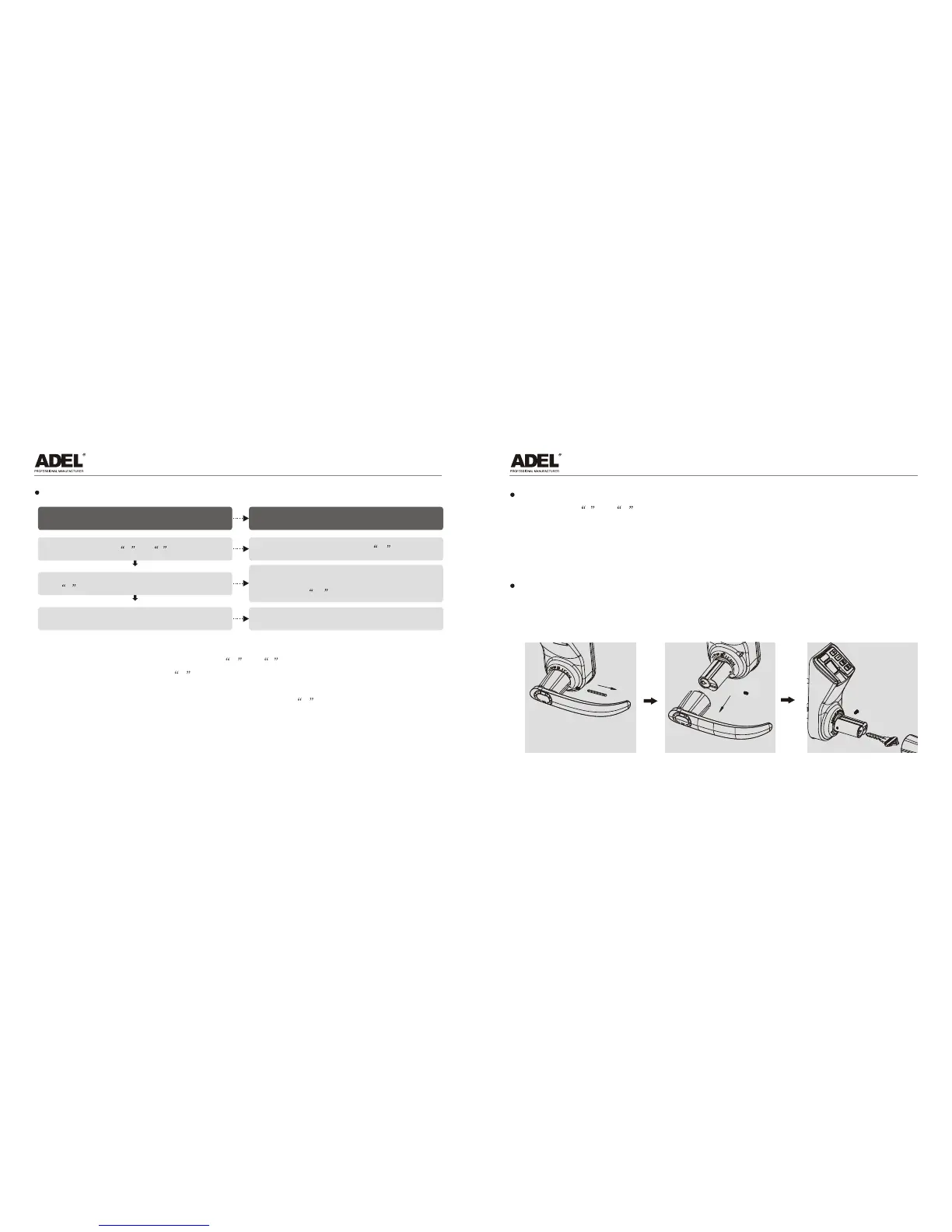
VIII. Use of emergency key
Remove the screw with
an instrument
Remove the handle and
you will see the key hole
Insert the key and
open the door
*


 To Next Page