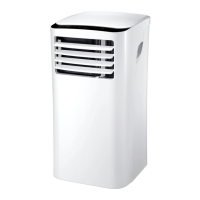
This document describes the WAP-357EM/EMH mobile air conditioner, providing instructions for its operation, installation, and maintenance.
Function Description
The WAP-357EM/EMH is a mobile air conditioner designed for indoor use. It offers multiple operating modes: cooling, dehumidification, ventilation, and heating (for the WAP-357EMH model only). The device is equipped with a control panel and a remote control for convenient operation.
Important Technical Specifications
- Model: WAP-357EM/EMH
- Rated Voltage: 220-240V
- Rated Frequency: 50Hz
- Rated Wattage: 1250 W
- Refrigerant Number: R-410A
- Refrigerant Amount: 580g
- Ambient Operating Temperature: 18-35°C
- Maximum Operating Pressure: 36 kg
- Maximum Allowable Pressure (Low-Pressure Side): 18 kg
- Maximum Allowable Pressure (High-Pressure Side): 36 kg
- Rated Input Power of Heater (WAP-357EMH only): 1300W
- Protection Class: I
- IP Number: IPX0
Usage Features
The air conditioner can be controlled via a control panel on the unit or a remote control (batteries not included).
Control Panel:
- Power Control: Turns the unit on and off.
- Warning Light: Illuminates when condensed water accumulates and the internal tank is full. The unit will not operate until the tank is drained.
- Mode Control: Allows selection between Cooling, Dehumidification, Ventilation, and Heating (WAP-357EMH only). An indicator light shows the active mode.
- Cooling Mode: Cools the air, expelling hot air outside through an exhaust hose. Fan speed and temperature are adjustable.
- Dehumidify Mode: Dehumidifies the air without significant cooling. The fan operates at medium speed. Fan speed is not adjustable in this mode. Air exchange hoses must vent inside the room.
- Ventilation Mode: Circulates air without cooling. The fan operates at three speeds (High, Medium, Low). The unit does not need to be vented outside in this mode.
- Heating Mode (WAP-357EMH only): Heats the air. Activates when ambient temperature is below 27°C. Desired temperature is adjustable between 16°C and 27°C. Both air hoses must be connected and led outside.
- Fan Speed Control: Adjusts fan speed to High, Medium, or Low, depending on the selected mode.
- Timer:
- Auto Turn Off: In fan mode, press the Timer button to set the number of hours before automatic shutdown.
- Auto Turn On: When powered off, press the Timer button to set the number of hours before automatic startup.
- Timer settings are available for 1-24 hours.
- Timer / Temperature Set Controls: Used for adjusting the timer and temperature. The default display shows room temperature. In cooling mode, pressing "+" or "-" displays and allows adjustment of the set temperature. The display reverts to room temperature after 15 seconds. Temperature is adjustable only in cooling mode. Pressing "+" and "-" simultaneously for more than 3 seconds switches between Celsius and Fahrenheit.
Remote Control:
The remote control offers the same functionalities as the control panel.
- On/Off Button: Powers the unit on or off.
- Fan Speed Button: Selects High, Medium, or Low fan speed.
- On/Off Timer Button: Sets auto switch-off (running mode) or auto switch-on (stand-by mode) in 1-hour intervals (1 to 24 hours).
- Tim/Temperature Set Buttons: Adjusts timer and temperature. Displays room temperature by default. In cool mode, pressing these buttons shows and allows adjustment of the set temperature.
- Mode Control Button: Cycles through operation modes: Cool, Dehumidify, Heating (WAP-357EMH only), Fan.
- Fahrenheit/Celsius Button: Switches temperature display between Fahrenheit and Celsius.
Installation:
The unit requires an exhaust hose to expel hot air outside during cooling and heating (WAP-357EMH). The exhaust hose can be installed through a window or a wall.
- Window Installation: Connect the exhaust hose to the unit and extend it through a window, using the provided window kit components (exhaust nozzle, connectors, foam strip).
- Semi-Permanent Wall Installation: Drill a hole in an exterior wall or window pane. Fit a flange accessory fixture into the hole. Insert the exhaust hose into the housing at the back of the appliance and then into the flange. If the hose is not in use, cover the hole with a cap. For semi-permanent installation, leave a door slightly open (approx. 1 cm) for sufficient ventilation.
Maintenance Features
Regular maintenance ensures optimal performance and longevity of the appliance.
Appliance Maintenance:
- Cut off Power: Always turn off and unplug the appliance before maintenance.
- Wipe Clean: Use a soft, dry cloth. For stubborn dirt, use a mild detergent and a damp cloth.
- Avoid Volatile Substances: Never use gasoline, polishing powder, or other volatile substances for cleaning.
- No Water: Do not sprinkle water onto the main unit to avoid electric shock.
Air Filter Maintenance:
The air filter should be cleaned every 100 hours of use.
- Remove Filter: Stop the appliance and remove the air filter from the back of the unit.
- Clean Filter: If visibly dirty, wash with lukewarm water and mild detergent. Dry it in a shaded, cool place before reinstalling.
- Frequent Cleaning: In dusty environments, clean the air filter every two weeks.
Maintenance After Using (for long periods):
- Drain Water: Remove the rubber plug from the drain port at the bottom to drain any accumulated water.
- Dry Coils: Run the unit in fan mode for a few hours to dry any moisture on the coils and prevent mold.
- Store Remote Control: Stop the appliance, unplug it, remove batteries from the remote control, and store them separately.
- Clean and Store Filter: Clean and reinstall the air filter.
- Store Hoses: Remove the air hoses, store them carefully, and cover the hole tightly.
Environmental Protection:
Electrical products should not be disposed of with domestic waste. They must be taken to a communal collecting point for environmentally friendly disposal in accordance with local regulations. Packaging material is recyclable.
Refrigerant Information:
Do not vent R-410A into the atmosphere. R-410A is a fluorinated greenhouse gas covered by the Kyoto Protocol, with a Global Warming Potential (GWP) = 1975.
Troubleshooting Guide:
The manual includes a troubleshooting section for common issues:
- Does not run: Check if the protector trip or fuse is blown, wait 3 minutes and restart, check remote control batteries, and ensure the plug is properly connected.
- Stops running during operation: Check if the set temperature is too close to room temperature (lower it), or if the air outlet is blocked.
- Runs but does not cool: Check for open doors/windows, other heat-generating appliances nearby, dirty air filter (clean it), blocked air outlet/intake, or excessively high set temperature.
- Does not run and water full indicator lights: Drain water from the unit using the drainage pipe. If the issue persists, consult a qualified technician.

 Need help?
 General

 To Next Page