EasyManua.ls Logo

ADEO Services WAP-357EM - Page 68

ADEO Services WAP-357EM
Print Icon
To Next Page IconTo Next Page
To Previous Page IconTo Previous Page
Loading...
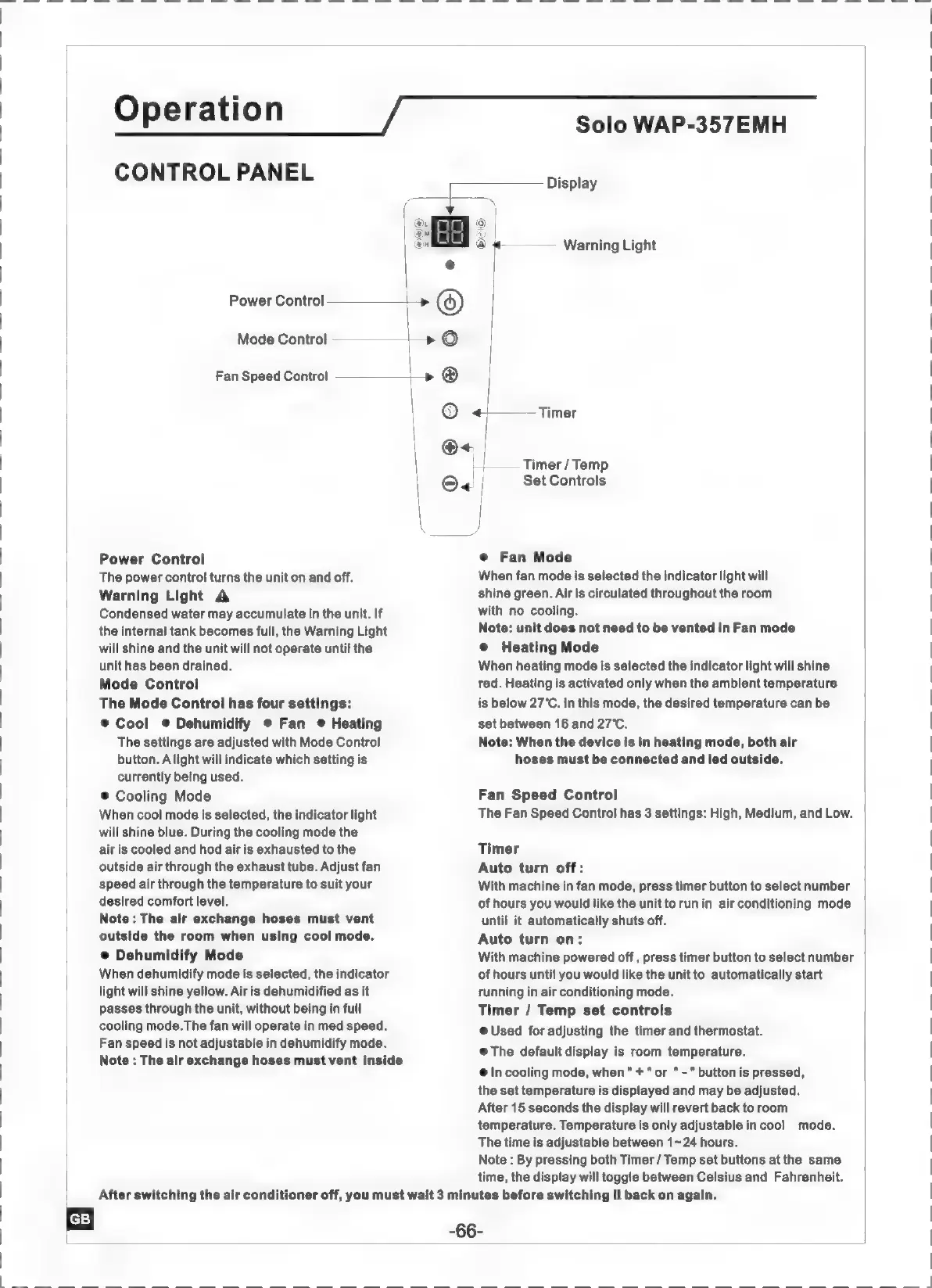
CONTROL
ΡΑΝΕΙ.
Fan
Speed
Control
Power
Control
The
power
control
turns
the
unit
on
and
off.
Warning
Light
A
Condensed
water
may
accumulate
in
the
unit.
If
the
internal
tank
becomes
full,
the
Warning
Light
will
shine
and
the
unit
will
not
operate
until
the
unit
has
been
drained.
Mode
Control
The
Mode
Control
has
four
settings:
e
Cool
9
Dehumidify
e
Fan
e
Heating
The
settings
are
adjusted
with
Mode
Control
button.
A
light
will
indicate
which
setting
is
currently
being
used.
®
Cooling
Mode
When
cool
mode
is
selected,
the
indicator
light
will
shine
blue.
During
the
cooling
mode
the
air
is
cooled
and
hod
air
is
exhausted
to
the
outside
air
through
the
exhaust
tube.
Adjust
fan
speed
air
through
the
temperature
to
suit
your
desired
comfort
level.
Note
:
The
air
exchange
hoses
must
vent
outside
the
room
when
using
cool
mode.
®
Dehumidify
Mode
When
dehumidify
mode
is
selected,
the
indicator
light
will
shine
yellow.
Air
is
dehumidified
as
it
passes
through
the
unit,
without
being
in
full
cooling
mode.The
fan
will
operate
in
med
speed.
Fan
speed
is
not
adjustable
in
dehumidify
mode.
Note
:
The
air
exchange
hoses
must
vent
inside
Power
Control
>
©
Mode
Control
—————>
©
le
|
Operation
Solo
WAP-357EMH
Display
+
Warning
Light
©
4+
Timer
O.
H
Timer
/
Temp
©«
|
Set
Controls
|
J
9
Fan
Mode
When
fan
mode
is
selected
the
indicator
light
will
shine
green.
Air
is
circulated
throughout
the
room
with
no
cooling.
Note:
unit
does
not
need
to
be
vented
in
Fan
mode
e
Heating
Mode
When
heating
mode
is
selected
the
indicator
light
will
shine
red.
Heating
is
activated
only
when
the
ambient
temperature
is
below
27°C.
In
this
mode,
the
desired
temperature
can
be
set
between
16
and
27°C.
Note:
When
the
device
is
in
heating
mode,
both
air
hoses
must
be
connected
and
led
outside.
Fan
Speed
Control
The
Fan
Speed
Control
has
3
settings:
High,
Medium,
and
Low.
Timer
Auto
turn
off:
With
machine
in
fan
mode,
press
timer
button
to
select
number
of
hours
you
would
like
the
unit
to
run
in
air
conditioning
mode
until
it
automatically
shuts
off.
Auto
turn
on:
With
machine
powered
off
,
press
timer
button
to
select
number
of
hours
until
you
would
like
the
unitto
automatically
start
running
in
air
conditioning
mode.
Timer
/
Temp
set
controls
@
Used
for
adjusting
the
timer
and
thermostat.
@
The
default
display
is
room
temperature.
e
In
cooling
mode,
when"
+"
or
"-"
button
is
pressed,
the
set
temperature
is
displayed
and
may
be
adjusted.
After
15
seconds
the
display
will
revert
back
to
room
temperature.
Temperature
is
only
adjustable
in
cool
mode.
The
time
is
adjustable
between
1-24
hours.
Note
:
By
pressing
both
Timer
/
Temp
set
buttons
at
the
same
time,
the
display
will
toggle
between
Celsius
and
Fahrenheit.
After
switching
the
air
conditioner
off,
you
must
wait
3
minutes
before
switching
it
back
on
again.
-66-

Related product manuals