Industrial Electronic Devices
ADFweb.com Srl – IT31010 – Mareno – Treviso INFO: www.adfweb.com Phone +39.0438.30.91.31
Document code: MN67643_ENG Revision 1.000 Page 17 of 24
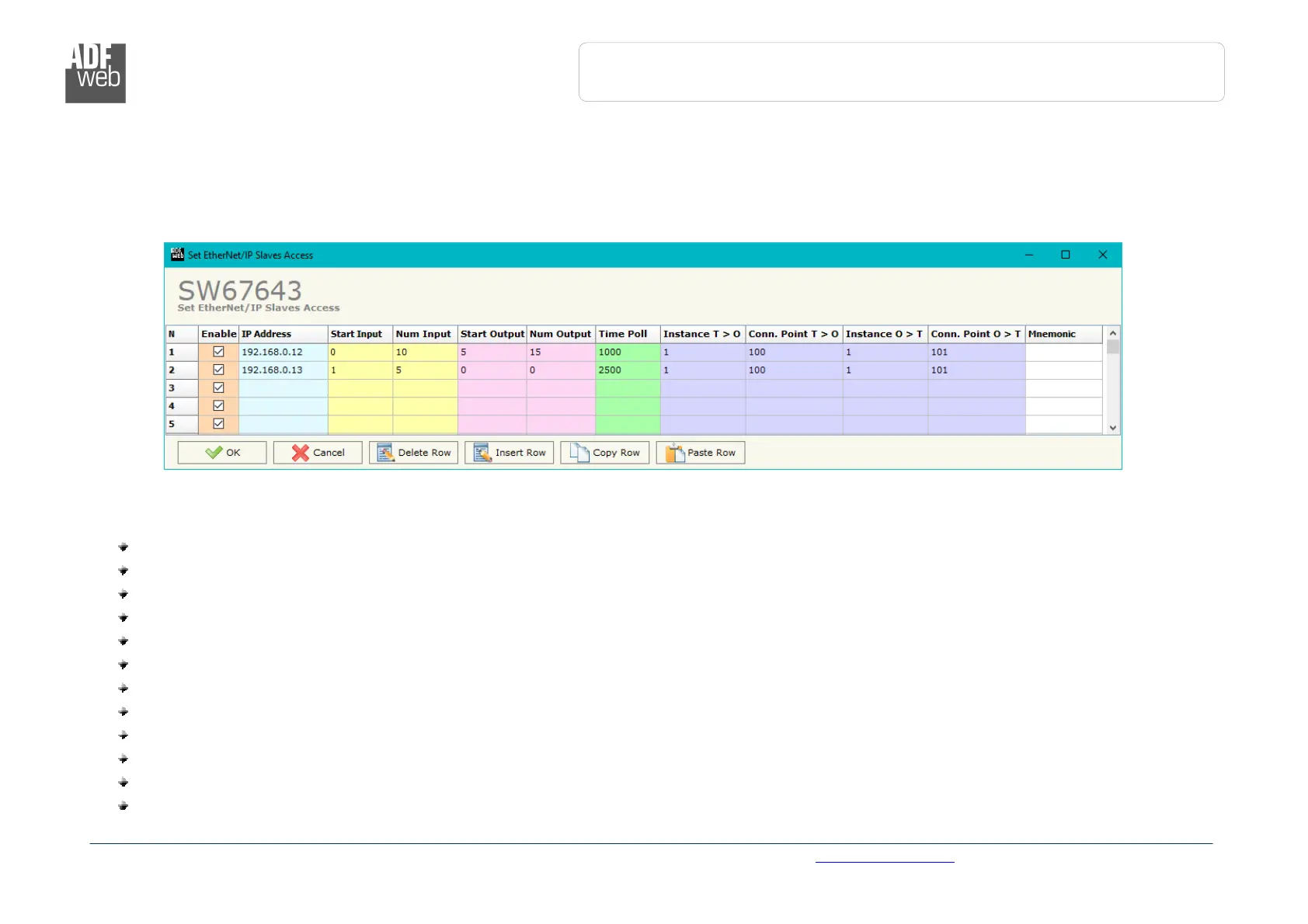
Figure 4: “Set EtherNet/IP Slaves Access” window
ETHERNET/IP ACCESS:
By Pressing the “EtherNet/IP Access” button from the main window for SW67643 (Fig. 2) the window “Set EtherNet/IP Slaves Access”
appears (Fig. 4).
This section is used to define the list of the EtherNet/IP slaves to read/write with the PROFIBUS Master.
The means of the fields are:
If the field “Enable” is checked, the polling to the EtherNet/IP slave is enabled;
In the field “IP Address” the IP Address of the EtherNet/IP slave is defined;
In the field “Start Input” the starting Input byte of the EtherNet/IP slave to map on PROFIBUS side is defined;
In the field “Num Input” the number of consecutive Input byte to map on PROFIBUS side is defined;
In the field “Start Output” the starting Output byte of the EtherNet/IP slave to write from PROFIBUS side is defined;
In the field “Num Output” the number of consecutive Output byte to write from PROFIBUS side is defined;
In the field “Time Poll” the polling time in ms is defined;
In the field “Instance T > O” the instance of the assembly for the Target to Originator data direction is defined;
In the field “Conn. Point T > O” the connection point of the assembly for the Target to Originator data direction is defined;
In the field “Instance O > T” the instance of the assembly for the Originator to Target data direction is defined;
In the field “Conn. Point O > T” the connection point of the assembly for the Originator to Target data direction is defined;
In the field “Mnemonic” a brief description is defined.


 To Next Page