EasyManua.ls Logo

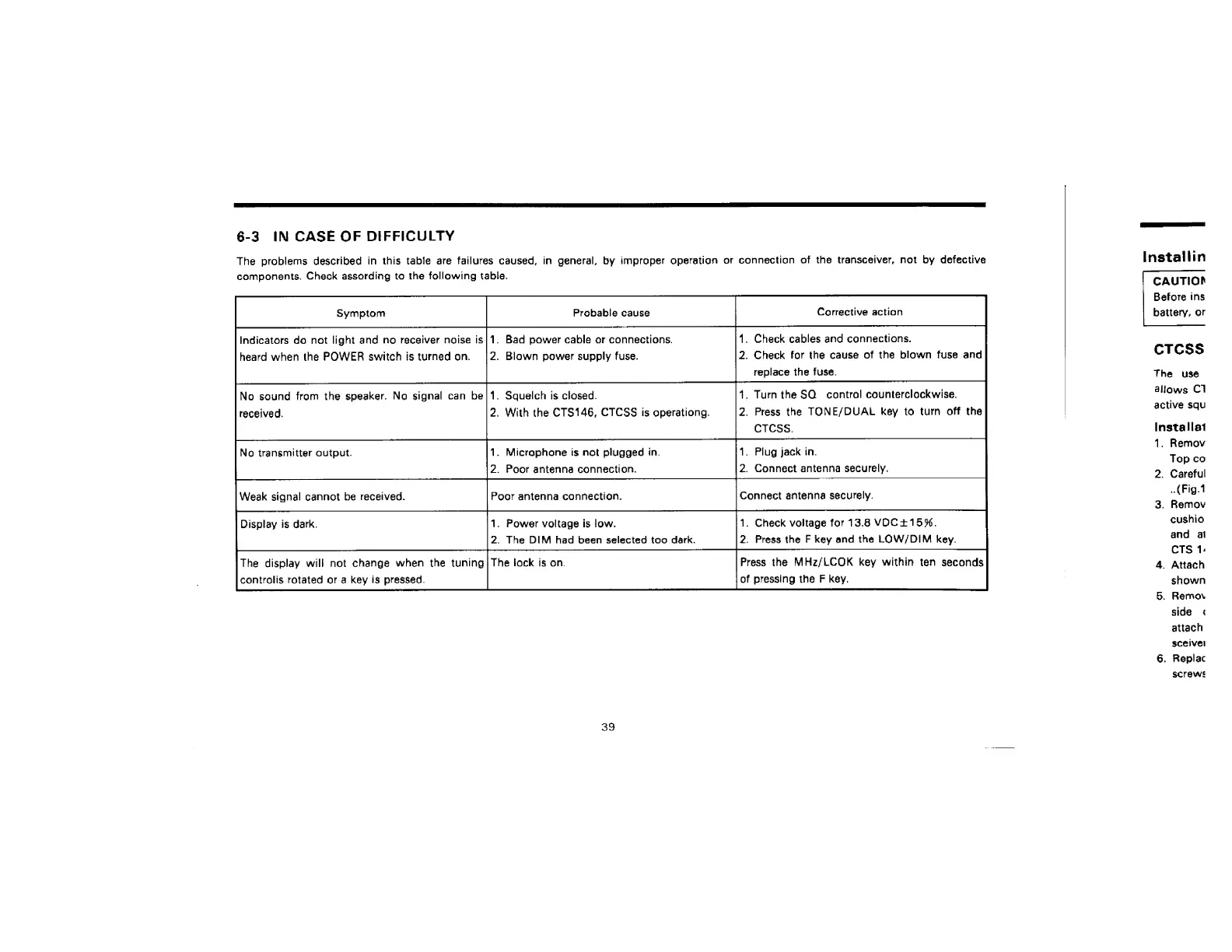
ADI AR-146 - TROUBLESHOOTING; Case of Difficulty Table

ADI AR-146
44 pages
Print Icon
To Next Page IconTo Next Page
To Previous Page IconTo Previous Page
Loading...
6-3
IN
CASE
OF
DIFFICULTY
The
problems
described
in
this
table
are
failures
caused,
in
general,
by
improper
operatian
or
connection
of
the
transceiver,
not
by
defective
components.
Check
assording
to
the
following
table.
Indicators
do
not
light
and
no
receiver
noise
is}1.
Bad
power
cable
or
connections.
1.
Check
cables
and
connections.
heard
when
the
POWER
switch
jis
turned
on.
/2.
Blown
power
supply
fuse.
2.
Check
for
the
cause
of
the
blown
fuse
and
replace
the
fuse.
4.
Turn
the
SQ
contral
counterclockwise.
2.
Press
the
TONE/DUAL
key
to
turn
off
the
CTCSS.
No
sound
from
the
speaker.
No
signal
can
be|1.
Squelch
is
closed.
2,
With
the
CTS146,
CTCSS
is
operationg.
1.
Plug
jack
in.
No
transmitter
output.
1.
Microphone
is
not
plugged
in.
2.
Poor
antenna
connection.
.
Connect
antenna
securely.
Weak
signal
cannot
be
received.
Poor
antenna
connection.
Connect
antenna
securely.
Display
is
dark.
1.
Power
voltage
is
low.
1.
Check
voltage
for
13.8
VOC115%,
2.
The
DIM
had
been
selected
too
dark.
2.
Press
the
F
key
and
the
LOW/DIM
key.
The
display
will
not
change
when
the
tuning|
The
lock
is
on.
Press
the
MHz/LCOK
key
within
ten
seconds
controlis
rotated
or
a
key
is
pressed.
of
pressing
the
F
key.
39
Installin
CAUTION
Before
ins
battery,
or
cTcss
The
use
allows
Cl
active
squ
Installat
1.
Remov
Top
co
2.
Careful
..
(Fig.1
3.
Remov
cushio
and
al
CTS
1:
4.
Attach
shown
5.
Remov
side
4
attach
sceivel
6.
Replac
screws

Related product manuals