EasyManua.ls Logo

ADI AR-446 - Page 10

Default Icon
44 pages
Print Icon
To Next Page IconTo Next Page
To Previous Page IconTo Previous Page
Loading...
5&5
OPERATION
5-1-1
CONTROL
FUNTIONS
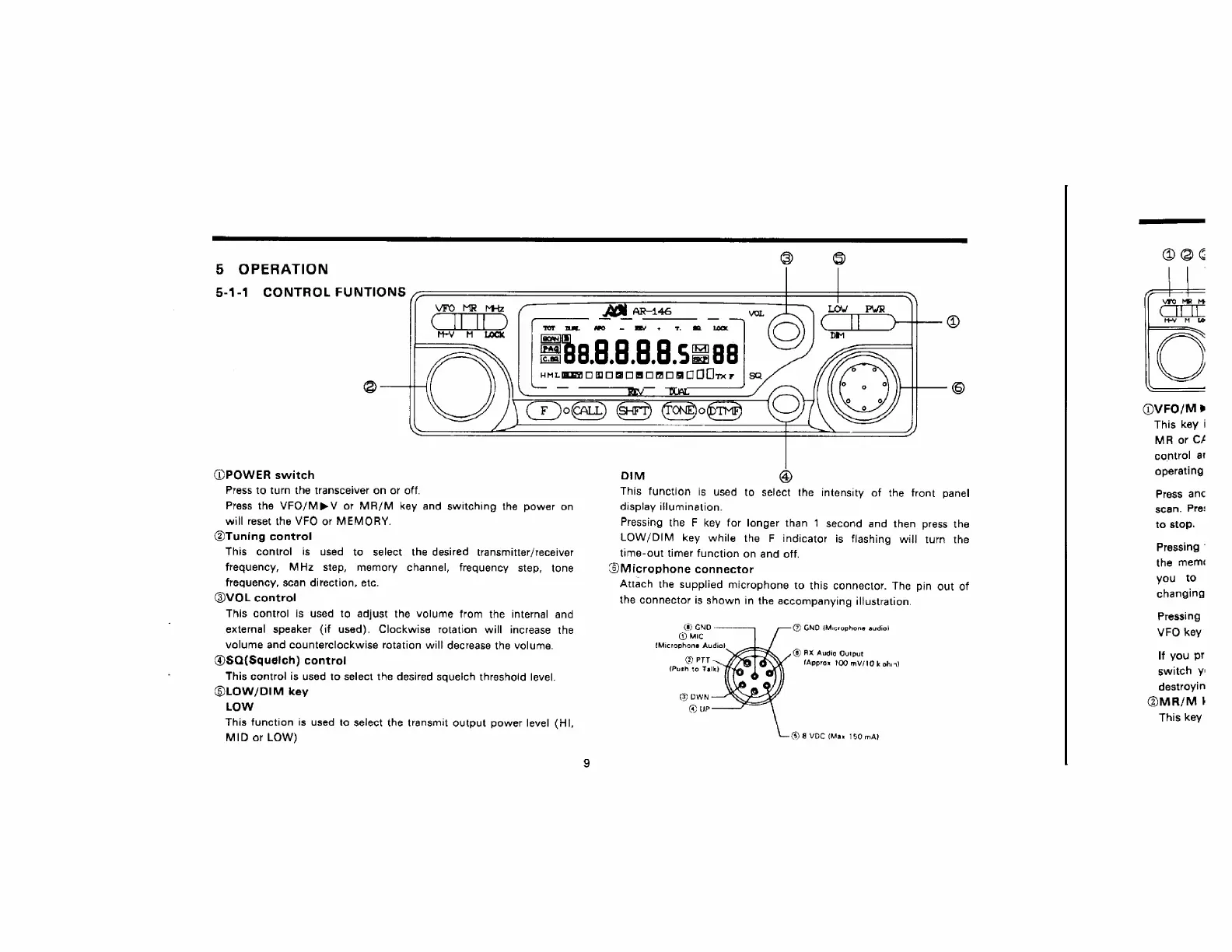
@POWER
switch
Press
to
turn
the
transceiver
on
or
off.
Press
the
VFO/Mb®V
or
MR/M
key
and
switching
the
power
on
will
reset
the
VFO
or
MEMORY.
@Tuning
control
This
control
is
used
to
select
the
desired
transmitter/receiver
frequency,
MHz
step,
memoary
channel,
frequency
step,
tone
frequency,
scan
direction,
etc.
@VOL
control
This
control
is
used
to
adjust
the
volume
from
the
internal
and
external
speaker
{if
used).
Clockwise
rotation
will
increase
the
volume
and
counterclockwise
rotation
will
decrease
the
volume.
@$Q(Squelch)
control
This
control
is
used
to
select
the
desired
squelch
threshold
level.
@®LOW/DIM
key
LOW
This
function
is
used
to
select
the
transmit
output
power
level
(HI,
MID
or
LOW)
DIM
@
This
function
is
used
to
select
the
intensity
of
the
front
panel
display
illumination,
Pressing
the
F
key
for
longer
than
1
second
and
then
press
the
LOW/DIM
key
while
the
F
indicator
is
flashing
will
turn
the
time-out
timer
function
on
and
off.
®Microphone
connector
Attach
the
supplied
microphone
to
this
connector.
The
pin
out
of
the
connector
is
shown
in
the
accompanying
illustration.
@®)
GND
-——.
@
GND
{Microphone
sudiol
@
mic
{Microphone
Audia}
@
PTT
{Push
to
Talk}
@
RX
Audie
Output
(Approx
100
mV/10
k
obia)
@
DWN
(@
UP
(3)
8
VOC
(Max
150
mA}
cS)
@
3
a
3
:
@VFO/M»>
This
key
i
MR
or
Cf
control
ai
operating
Press
anc
scan.
Pre:
to
stop.
Pressing
©
the
mern
you
to
changing
Pressing
VFO
key
If
you
pr
switch
y

Related product manuals