
 Need help?
Do you have a question about the ADJ GOBO PROJECTOR IR and is the answer not in the manual?
Check shipping carton for damage, inspect unit, contact support if parts are missing or damaged.
Contact ADJ Service for support, visit forums.adj.com for questions, comments, or suggestions.
Warnings about electrical shock, eye damage from light source, and no user-serviceable parts.
Fixture designed for mobile DJs, clubs, bands, roller rinks. Compact, light weight, easy to use.
Before plugging in, ensure source voltage matches the required voltage for your device.
Stand-alone projector; no controller required. Select static or rotating display using rear button.
Factors affecting wireless signals and guidelines to maximize signal path for reliable operation.
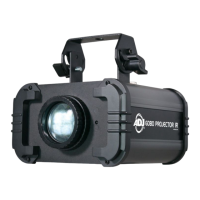
The ADJ Gobo Projector IR is a compact, lightweight, and easy-to-use rotating gobo projector designed for various applications, including mobile DJs, clubs, bands, roller rinks, and other arenas requiring a portable lighting solution. This fixture is engineered for straightforward operation, requiring no external controller, making it ready for use straight out of the box.
The primary function of the Gobo Projector IR is to project custom gobo patterns onto surfaces. It comes equipped with a 12W LED light source, capable of projecting clear and vibrant images. The unit features a built-in hanging yoke for flexible mounting options, allowing it to be securely affixed to various structures. The projector includes four replaceable gobo patterns (three metal and one glass), offering immediate customization possibilities. Users can also enhance the projected image with background colors using the four included color gels (red, green, blue, and yellow).
The Gobo Projector IR operates as a standalone unit, meaning it does not require complex programming or external DMX controllers. Once plugged into a power source, it will immediately project the included gobo. A button located on the rear panel allows the user to switch between a static display and a counter-clockwise rotating display, adding dynamic movement to the projected image. This simple control scheme makes it accessible for users of all experience levels.
For enhanced control, the Gobo Projector IR is compatible with the ADJ UC IR infrared remote control (sold separately). This remote provides access to various functions, allowing users to control the fixture from a distance of up to 30 feet. The remote's functions include "STAND BY" for blacking out the fixture, "FADE/GOBO" to run or stop the gobo effect, and "DIMMER +" and "DIMMER -" buttons to adjust the output intensity. While some buttons on the remote (like "FULL ON," "STROBE," "COLOR," "1-9," "SOUND ON & OFF," and "SHOW 0") may not have active functions for this specific device, the available controls offer sufficient flexibility for most projection needs.
The Gobo Projector IR is designed for ease of installation and operation. It comes with a built-in hanging yoke, which facilitates mounting using a standard mounting clamp (not provided). When installing, it is crucial to ensure that the mounting structure is secure and capable of supporting at least ten times the unit's weight. Additionally, a safety cable, capable of supporting at least twelve times the unit's weight, must always be used during installation to prevent accidents. The equipment should be installed by a professional in a location inaccessible to the general public.
The unit's standalone operation simplifies setup; users only need to plug it into a power source using the provided I.E.C. power cable. The rear panel button allows for quick selection between static and rotating gobo displays.
When using the optional ADJ UC IR remote, optimal performance is achieved by aiming the remote directly at the front of the fixture within the specified range. Environmental factors such as walls, glass, metal, objects, and people can interfere with the wireless signal. To maximize signal reliability, it is recommended to install the device a minimum of 9.8 feet (3m) above audiences or ground level (especially in suspended environments) and to position devices in direct line of sight of the transmitting controller. Careful planning and testing of the installation location are essential for ensuring optimized and reliable wireless operation.
Regular maintenance is crucial for optimizing the light output and ensuring the longevity of the Gobo Projector IR. Due to environmental factors like fog residue, smoke, and dust, both internal and external optical lenses require periodic cleaning. The frequency of cleaning depends on the operating environment; for heavy club use, monthly cleaning is recommended.
Cleaning the external casing can be done using normal glass cleaner and a soft cloth. For the internal and external optics, glass cleaner and a soft cloth should be used periodically. It is imperative to ensure that all parts are completely dry before plugging the unit back in after cleaning.
The device also features a replaceable gobo, allowing users to customize their projections. The gobo replacement process involves unscrewing two screws on the bottom of the unit to remove the gobo housing, using needle-nose pliers to remove the retaining ring, replacing the gobo, and then reassembling the components. Similarly, color gels can be added by unscrewing the lens housing, carefully removing the retainer ring with a flat-head screwdriver, inserting the desired color gel onto the small ledge inside the housing, and then reinserting the lens and retainer ring securely.
In the event of a power issue, the unit's fuse is replaceable. The fuse holder is located inside the power socket. To replace a blown fuse, the power cord must be removed, and a flat-head screwdriver used to gently pry out the fuse holder. The bad fuse can then be replaced with a new one of the same rating. The fuse holder also has a built-in socket for a spare fuse, which should not be confused with the active fuse. If the device does not illuminate after checking the fuse, users are advised to contact customer support for further instructions. There are no user-serviceable parts inside the unit beyond the fuse and gobo/gel replacement, and attempting other repairs will void the manufacturer's warranty.
 Lighting Specifications
| LED power | 12 W |
|---|---|
| beam angle | 13 degrees |
| gobo size | 26.8 mm |
 Power
Power| voltage | 120 V 60 Hz / 230 V 50 Hz |
|---|---|
| power consumption | 14.4 W |
| fuse | 1 Amp |
 Weight and Dimensions
| weight | 6.3 lbs / 2.9 kg |
|---|---|
| length | 8.5 in / 217 mm |
| width | 8 in / 206 mm |
| height | 4.75 in / 121 mm |

 To Next Page

