A.D.J. Supply Europe B.V. – www.americandj.eu – H
2
O LED™ Instruction Manual Page 4
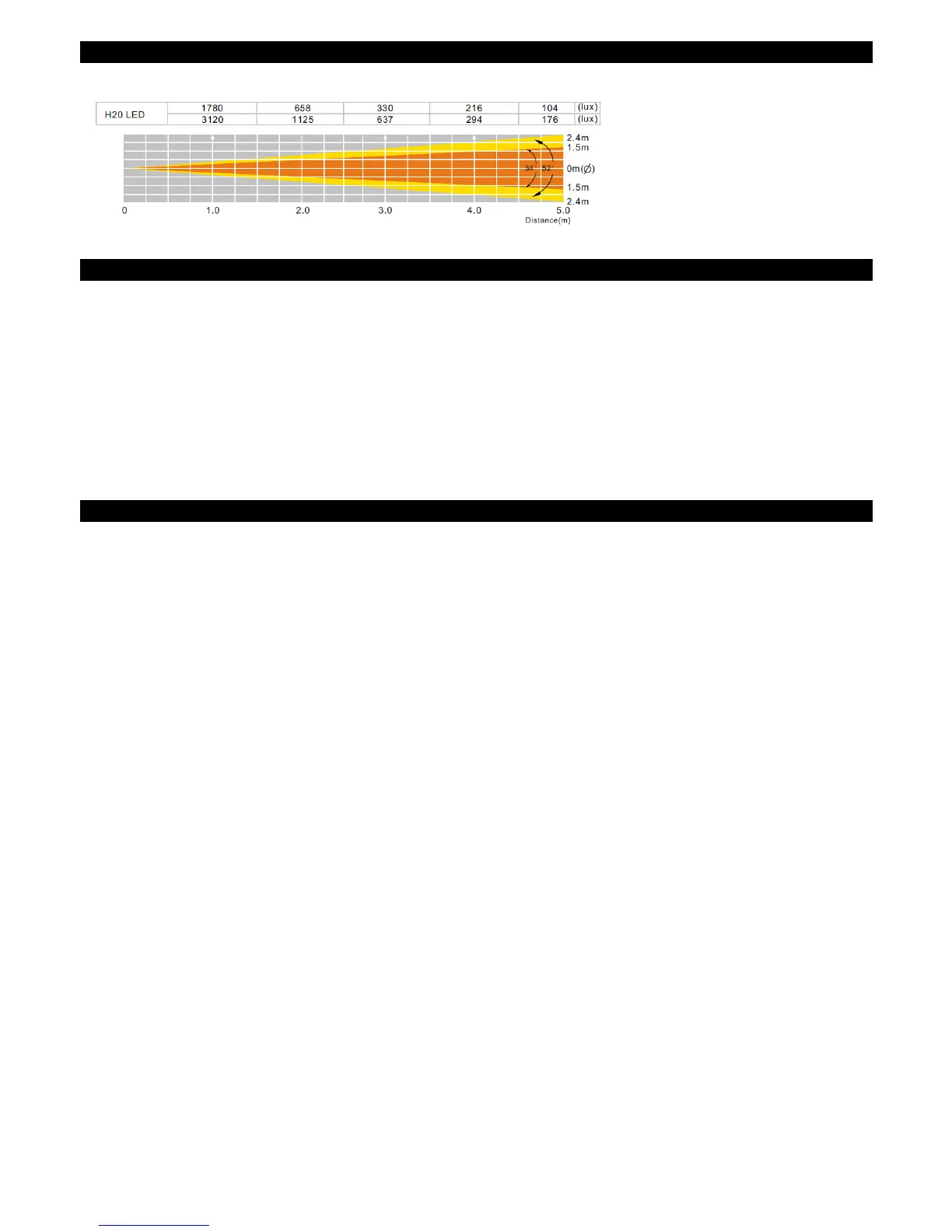
H2O LED Photometric Chart
H2O LED Fuse Replacement
H2O LED Fuse Replacement
Warning: If after replacing the fuse you continue to blow fuses, STOP using the unit. Contact customer
support for further instructions, you may have to return the unit for servicing. Continuing to use the unit may
cause serious damage.
Fuse Replacement: Locate and remove the unit’s power cord. Once the cord has been removed located the
fuse holder located inside the power socket. Insert a flat-head screw driver into the power socket and gently
pry out the fuse holder. Remove the bad fuse and replace with a new one. The fuse holder has a built-in
socket for a spare fuse be sure not to confuse the spare fuse with active fuse.
H2O LED Trouble Shooting
Trouble Shooting: Listed below are a few common problems that you may encounter, with solutions.
No light output from the unit;
1. Be sure you have connected your unit into a wall outlet with a matching power supply.
2. Be sure the fuse has not blown. The fuse is located on the rear panel near the power cord.
Unit does not color change;
1. Be sure the unit's toggle switch is in the lock position.



 To Next Page