For customer service call: 1-877-707-7533 6
Using the Remote Control:
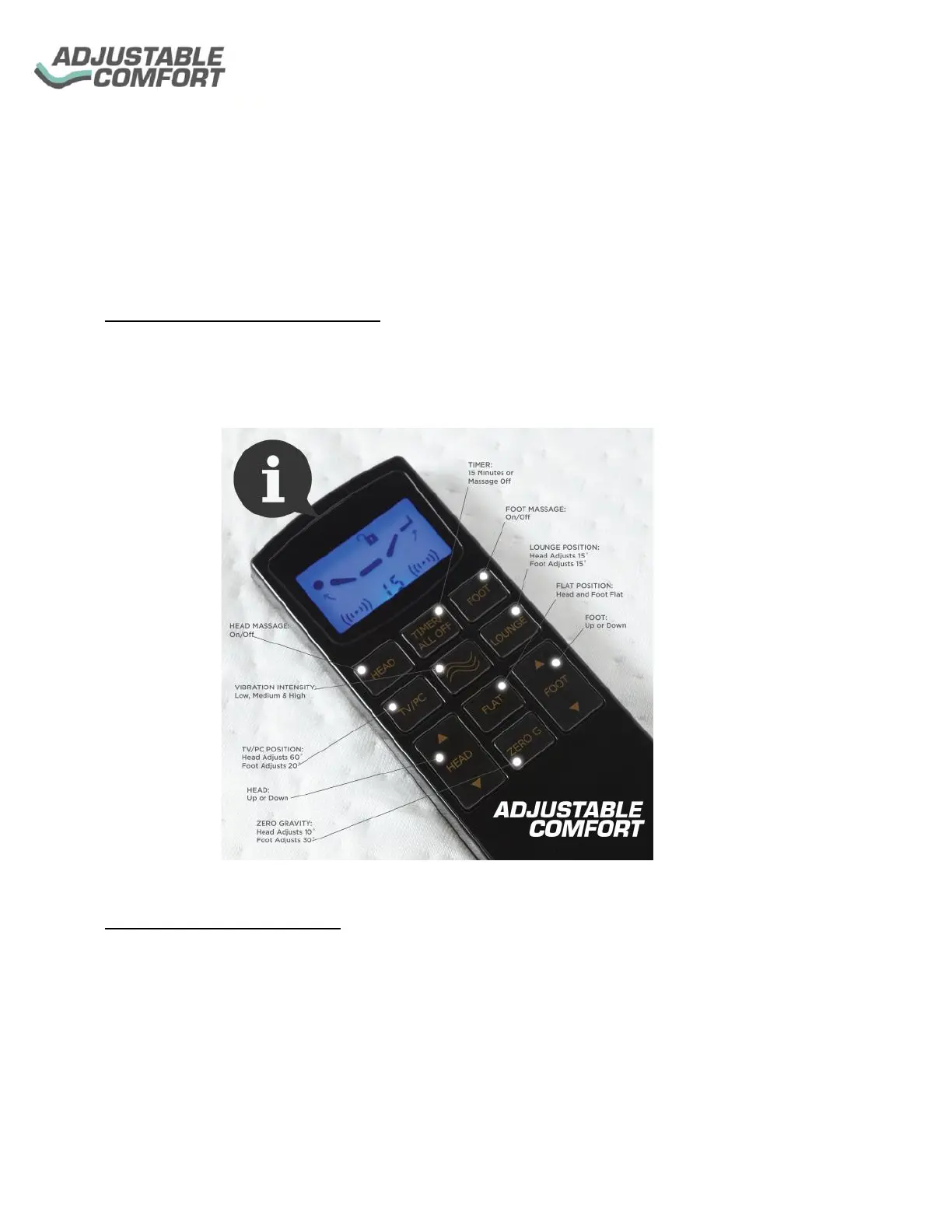
Using the Remote Control is easy; each button is clearly labeled to operate up and down
elevations, massage, and timer.
Programming the Remote Control:
Sync Remote Control with the Base:
• To sync the remote with the base, simultaneously hold the Red button on the Control Box
and any button on the remote Control (except for TV/PC, LOUNGE, FLAT, ZERO G) for 5
seconds to turn it on. This will allow the remote to pair with the base.
Programming Preset Positions:
• TV/PC, LOUNGE, FLAT, ZERO G buttons can be programmed. To program your preset
positions, use the Head/Foot Up and Down buttons to move the base to your desired
position. Once the desired position is set, press and hold the button (TV/PC, LOUNGE,
FLAT, ZERO G) that you want to program.
• Repeat the same steps to program the additional buttons, (TV/PC, LOUNGE, FLAT,
ZERO G)


 To Next Page