251
ADOBE FRAMEMAKER 7.0
Classroom in a Book
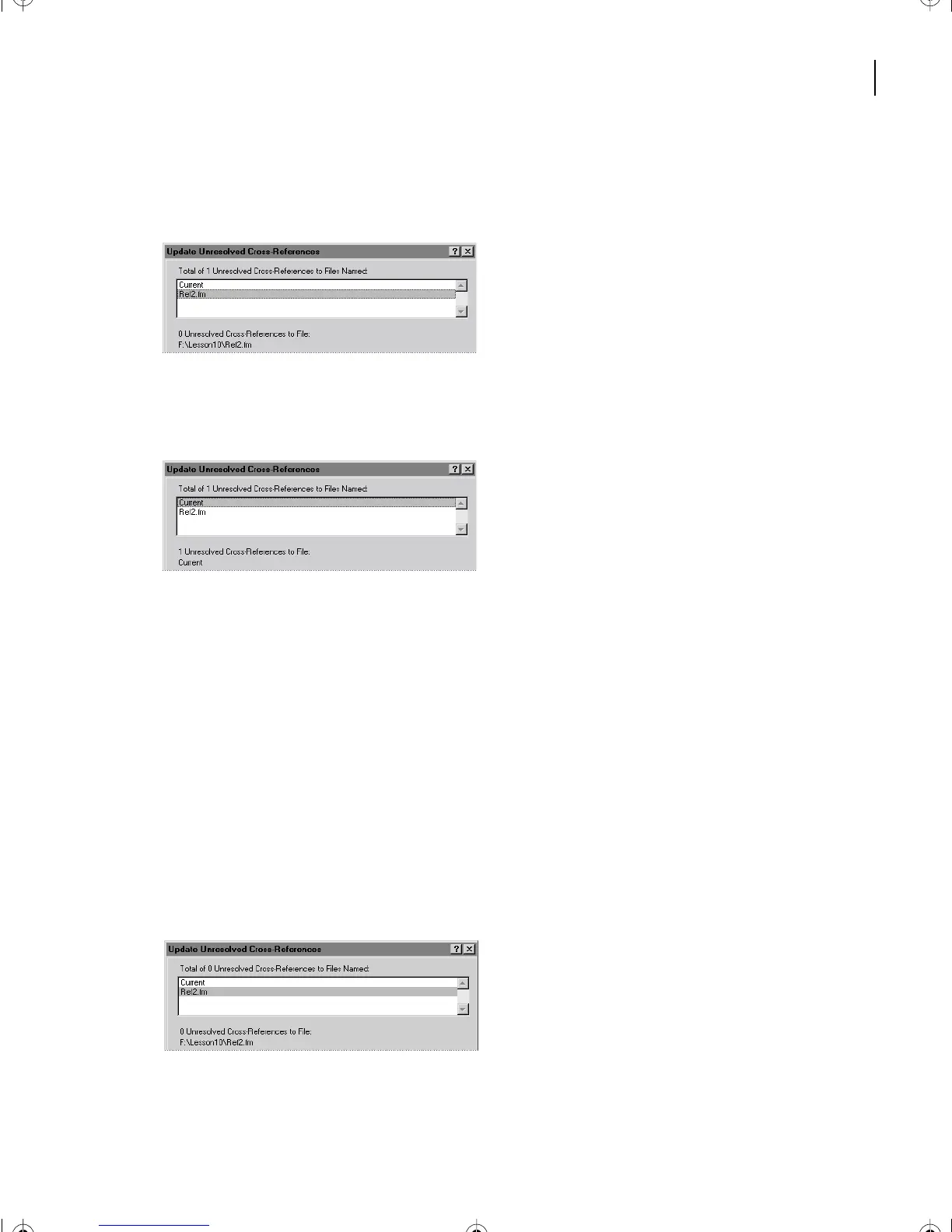
3 In the Total of Unresolved Cross-References scroll list, click Ref2.fm. The text below the
scroll list tells you that there are no unresolved cross-references to Ref2.fm.
4 In the Total of Unresolved Cross-References scroll list, click Current. The text below the
scroll list tells you that one of the internal cross-references is unresolved.
If the cross-reference were unresolved because the source was deleted, you’d have to fix the
problem by closing this dialog box and re-creating the source or by deleting the cross-
reference. Before doing that, it’s a good idea to see if the cross-reference is unresolved
because its source has been moved (in this case, moved from Ref1.fm to Ref2.fm). When
this is the cause of the problem, you can fix the problem right in this dialog box.
5 Do one of the following:
• (Windows and UNIX) In the Look In list, select Ref2.fm as the document to search for
the missing cross-reference source, then click Open.
• (Mac OS) Click Change to File, select Ref2.fm, and click Select.
The Update Unresolved Cross-References dialog box reappears, but this time it shows that
no unresolved cross-references remain.
L10.fm Page 251 Saturday, July 6, 2002 12:17 PM



 To Next Page