catch catch
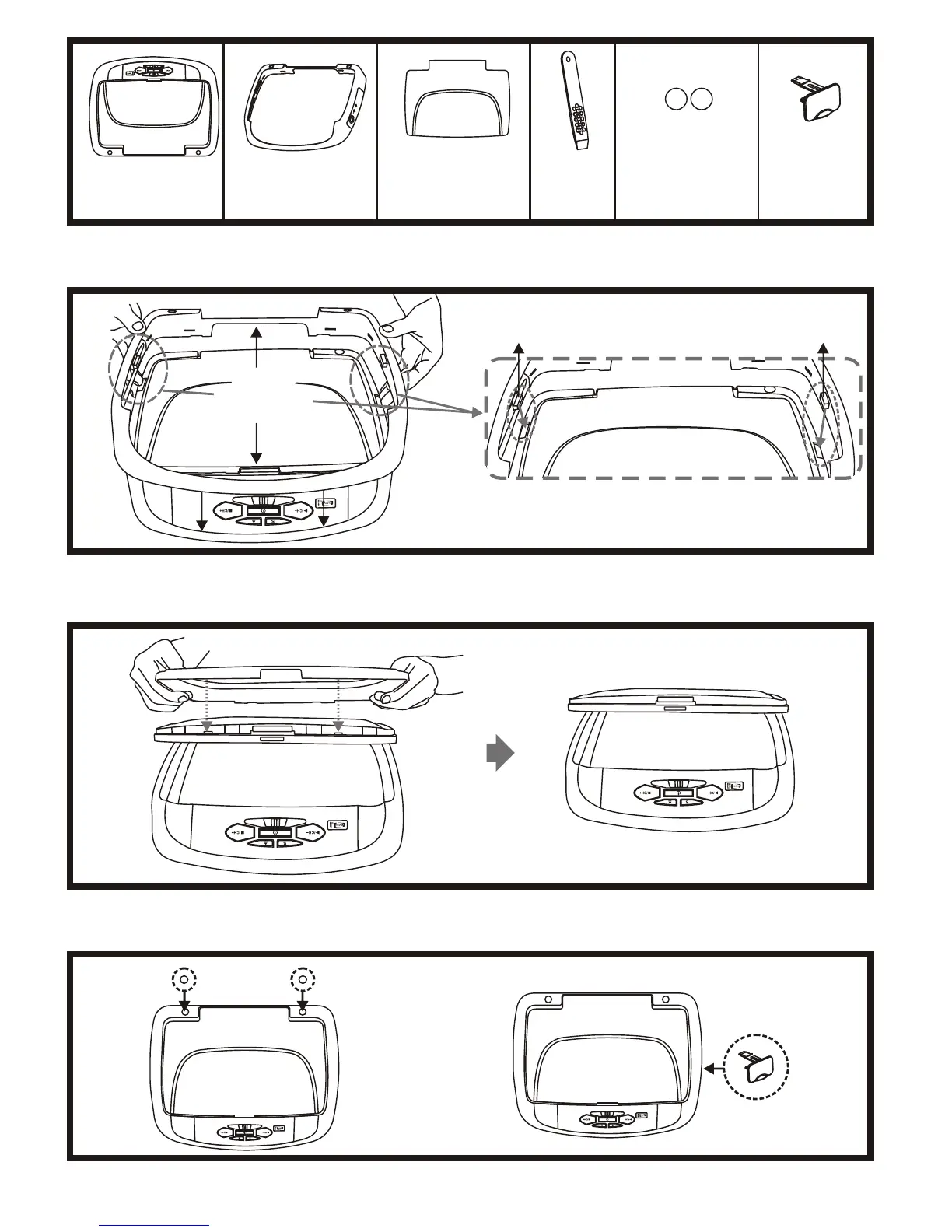
Begin by hooking area “A” (above) over the dome light and slide the cover over the pod. The cover will snap in place.
Place the pod on a soft surface to avoid damaging the plastic.
Open the screen and hook the two tabs “B” on the bottom edge of the screen. Snap the opposite side over the hinge.
Installing The Shroud
(B)
(B)
(A)
Installing The Screen Cover
Installing The Snap On Covers
Housing
3.2. 4.
Snap On Cover
(Shroud)
1 Pewter, 1 Shale
Snap On Cover
(Screen Back Cab)
1 Pewter, 1 Shale
Pry Tool
1. 5.
Screw Cap
(L & R)
2 Pewter, 2 Shale
6.
USB Cover
Installing The Screw Cap & USB Cover
Plug-in
Plug-in
4
Remove
tape backing
before installing.
Screw cap & USB cover get installed after the unit is mounted.
ON OFF AUTO
ON OFF AUTO
ON OFF AUTO
ON OFF AUTO
ON OFF AUTO
ON OFF AUTO


 To Next Page
 Loading...