
EasyManua.ls Logo

Advent LCDM40A - User Manual

Advent LCDM40A
5 pages
Print Icon
To Next Page IconTo Next Page
Loading...
Model: LCDM40A
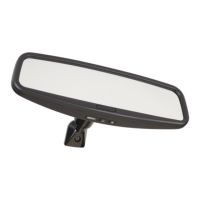
4.0LCD Rear Vision Mirror Monitor
User Manual
Features
Mirror with built in 4.0” LCD Superbright Monitor
Low Profile, Slim Design
High Resolution LED Backlit LCD TFT
Built in Speaker
Two video inputs
Fully Adjustable
Auto screen brightness adjustment

Other manuals for Advent LCDM40A

Questions and Answers

  • S
    Shelly SmithJul 29, 2025
    What to do if there is no power to my Advent monitor?
    • K
      Kenneth CastroJul 30, 2025
      If your Advent monitor isn't receiving power, verify the following: * The orange wire is connected to reverse power. * The red wire is connected to accessory power. * The black wire is properly grounded to the vehicle body. * The fuse is intact and, if replacement is needed, use a fuse with the same amperage.
  • M
    Margaret OwensAug 2, 2025
    Why is there no image from my Advent backup camera when the vehicle is in reverse?
    • J
      James DavisAug 2, 2025
      If you're not seeing an image from your Advent backup camera when you shift into reverse, please check: * That the camera itself is working correctly. * That the orange wire is properly connected to reverse power. * That the backup camera is connected to the correct input, CAM1.
  • B
    Brian YoungAug 7, 2025
    Why can't I hear sound from my Advent camera?
    • P
      Peter ParsonsAug 7, 2025
      If you're experiencing sound issues with your Advent camera, try the following: * Increase the volume using the MENU button. * Ensure the camera is connected with the supplied SVHS cable. * Confirm that your camera model is equipped with a microphone.
  • C
    Christian OwensAug 11, 2025
    What to do if there is no image from Advent Automobile Accessories backup camera when vehicle placed in reverse?
    • L
      Lisa SilvaAug 11, 2025
      If there's no image from the Advent Automobile Accessories backup camera when the vehicle is in reverse, first, verify that the camera itself is working. Next, ensure the orange wire is connected to reverse power. Finally, check that the backup camera is connected to the CAM1 input.
  • W
    williamcuevasAug 15, 2025
    How to troubleshoot no power to the Advent Automobile Accessories monitor?
    • A
      Aaron CollinsAug 15, 2025
      If there is no power to the Advent Automobile Accessories monitor, check the following: 1. Make sure the reverse power is attached to the orange wire. 2. Confirm that the accessory power is connected to the red wire. 3. Verify the black wire is attached to the vehicle body (ground). 4. Inspect the fuse and, if it's blown, replace it ONLY with a fuse of the same rating.
  • E
    Edward HamiltonAug 20, 2025
    What to do if sound can not be heard from Advent Automobile Accessories camera?
    • K
      Kristin MarshallAug 20, 2025
      If you can't hear sound from the Advent Automobile Accessories camera, try the following: 1. Increase the volume using the MENU button. 2. Make sure the camera is connected with the supplied extension cable.
  • H
    Hannah MillerAug 25, 2025
    How to adjust mirrored image on Advent Automobile Accessories?
    • A
      anita07Aug 25, 2025
      To adjust the image on your Advent Automobile Accessories, including fixing a mirrored image, press the MENU button to access and modify all available settings.

Summary

Product Features

Important Warnings

Product Description

Operating the System

Automatic Activation and Manual Control

Monitor activates automatically in reverse or manually via front button. Camera needs power to display.

Camera Input Switching

Toggle between camera inputs (CAM1/CAM2) or OFF using the control button.

Adjusting Display Settings

Access and adjust settings like Volume, Brightness, Contrast, Mirror, and Guidelines via MENU button.

Guideline Adjustment

Select guideline size and adjust position using +/- buttons for reference.

Image Mirroring and System Shutdown

Option to mirror image and turn off the system by holding the front button.

Troubleshooting Guide

Warranty Information

Advent LCDM40A Specifications

General IconGeneral
Screen Size40 inches
Aspect Ratio16:9
Response Time8 ms
SpeakersYes
Power Consumption65W
Resolution1920 x 1080
Panel TypeLCD
ConnectivityHDMI, VGA
Viewing Angle178°/178°
Input PortsHDMI, VGA