Parameter Settings:
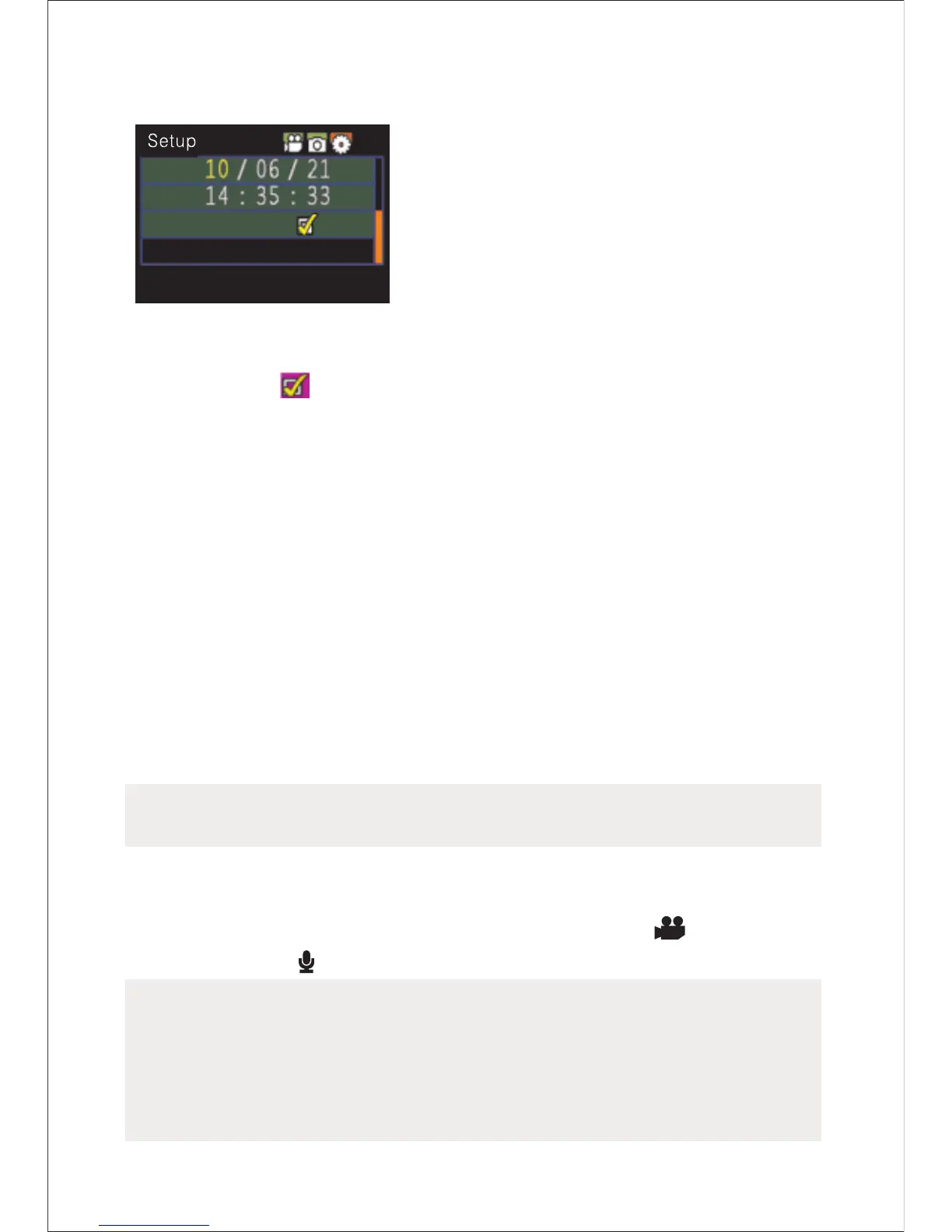
The yellow number indicates the
current cursor position. To press
“ <” or “ >” key can move the
cursor and select date or time.
Press “ OK” key to confirm, and
this number will turn red and value
of date or time can be changed.
Then press “ OK” key again to finish; Finally, move the
cursor to “ ” via “<” or “>”key and press “OK”
key to confirm date or time changed.
In preview mode, press “M” key to enter the menu interface,
press “<” or “>” key to move the cursor left and right, and
press “+” or “-” key to move the cursor up and down. After
selecting the menu, press “ OK” key to set the selected
menu and to press “M” key again can exit.
(1)Setting of camera parameter:
a.Video image resolution: Select 1080P,720P, WVGA or
QVGA;
(720P models do not contain the setup options of 1080P
models)
b.Laser synchronous shooting: Turn on or turn off the laser
transmitter;
c.Shooting mode: Select video recording “ ” or voice
recording “ ” ;
Notes:
a.Under the voice recording mode, Press “ Record” key
once, the system starts recording, voice recording
duration is displayed on the bottom of TFT display
screen and the green indicator twinkles slowly; if press
-13-


 To Next Page