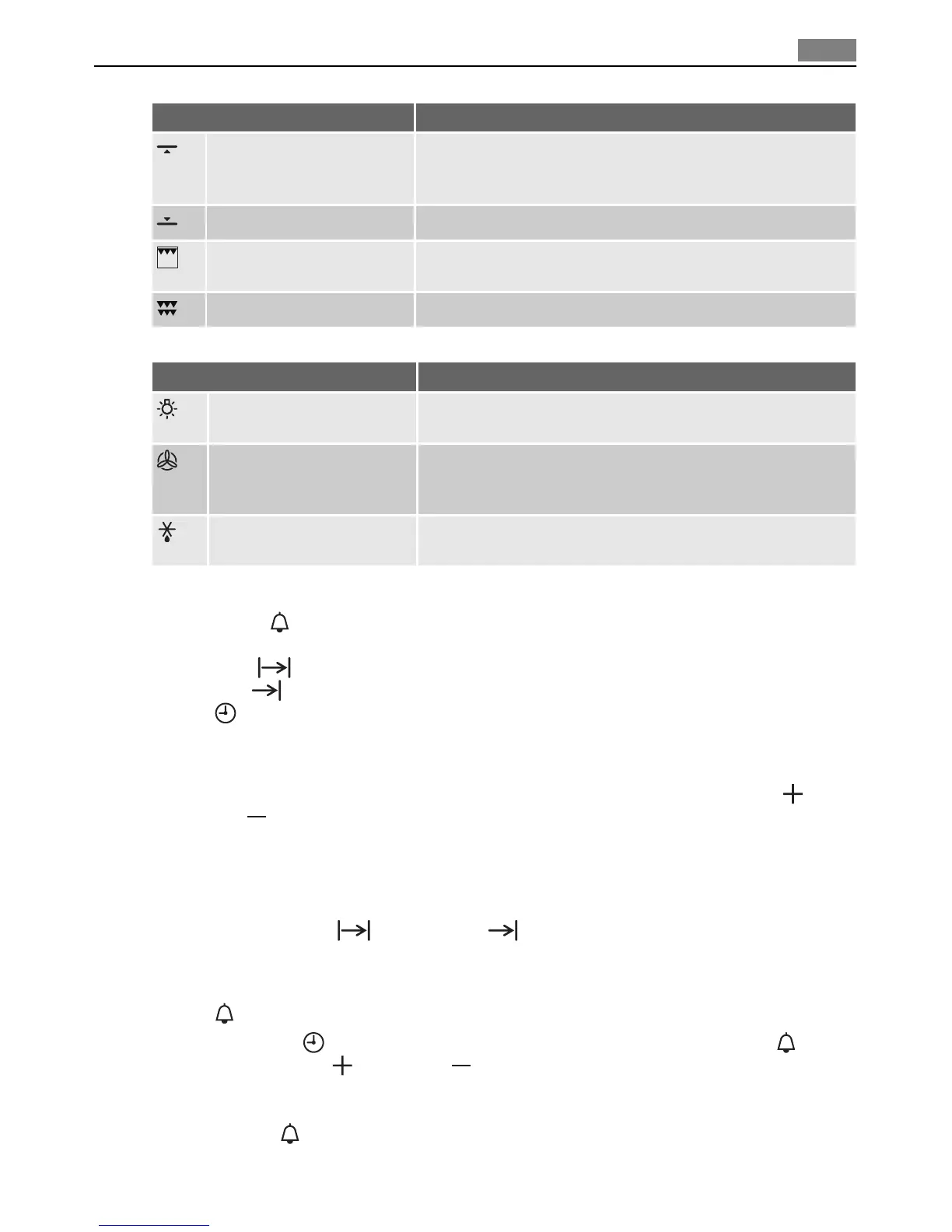
Oven function Application
Top Heat Browning This function uses the top element to give single level cook-
ing. This is particularly suitable for dishes which require extra
top browning.
Base Heat Finishing For baking cakes with crispy or crusty bases.
Economy Grill For grilling flat foodstuffs placed in the middle of the grill
and for toasting.
Full Grill For grilling flat foodstuffs in large quantities and for toasting.
Bottom Oven
Oven function Application
Light Using this function you can light up the oven interior, e.g.
for cleaning.
True Fan The fan function is particularly suitable for cooking larger
quantities of food. Set the oven temperatures 20-40 °C lower
than when using Conventional.
Fan Conrolled Defrosting For defrosting e. g. flans and gateaux, butter, bread, fruit or
other frozen foods.
Clock Functions
•Countdown - See appropriate chapter on setup. A signal sounds after the time has
elapsed. This function does not affect the functioning of the oven.
• Cook time
- is used to set the desired period of cooking time.
•End time
- when set the appliance is turned off at desired time.
•Time
- shows the current time.
How to use the clock functions
• After a function has been selected, the corresponding function indicator flashes for about
5 seconds. During this period, the desired times can be set using the increase
or
decrease
button.
• When the desired time has been set, the function indicator continues to flash for approx.
5 seconds. After that the function indicator is then lit. The set time begins to run.
• Press any of the buttons to stop the audible signal.
• The desired oven function and temperature can be selected before or after the clock
functions Cook time
and End time are set.
• When the cooking process is completed, turn the oven function dial and the temperature
selector back to the OFF position.
Countdown
1. Press the Mode button repeatedly until the function indicator Countdown flashes.
2. Using the increase
or decrease button set the desired Countdown (max. 2 hours
30 minutes).
3. After approx. 5 seconds the display shows the time remaining. The function indicator
Countdown
lights up.
4. When the time has elapsed, the function indicator flashes and an audible signal sounds
for 2 minutes. The signal can be stopped by pressing any button.
Operation
9



 To Next Page