13
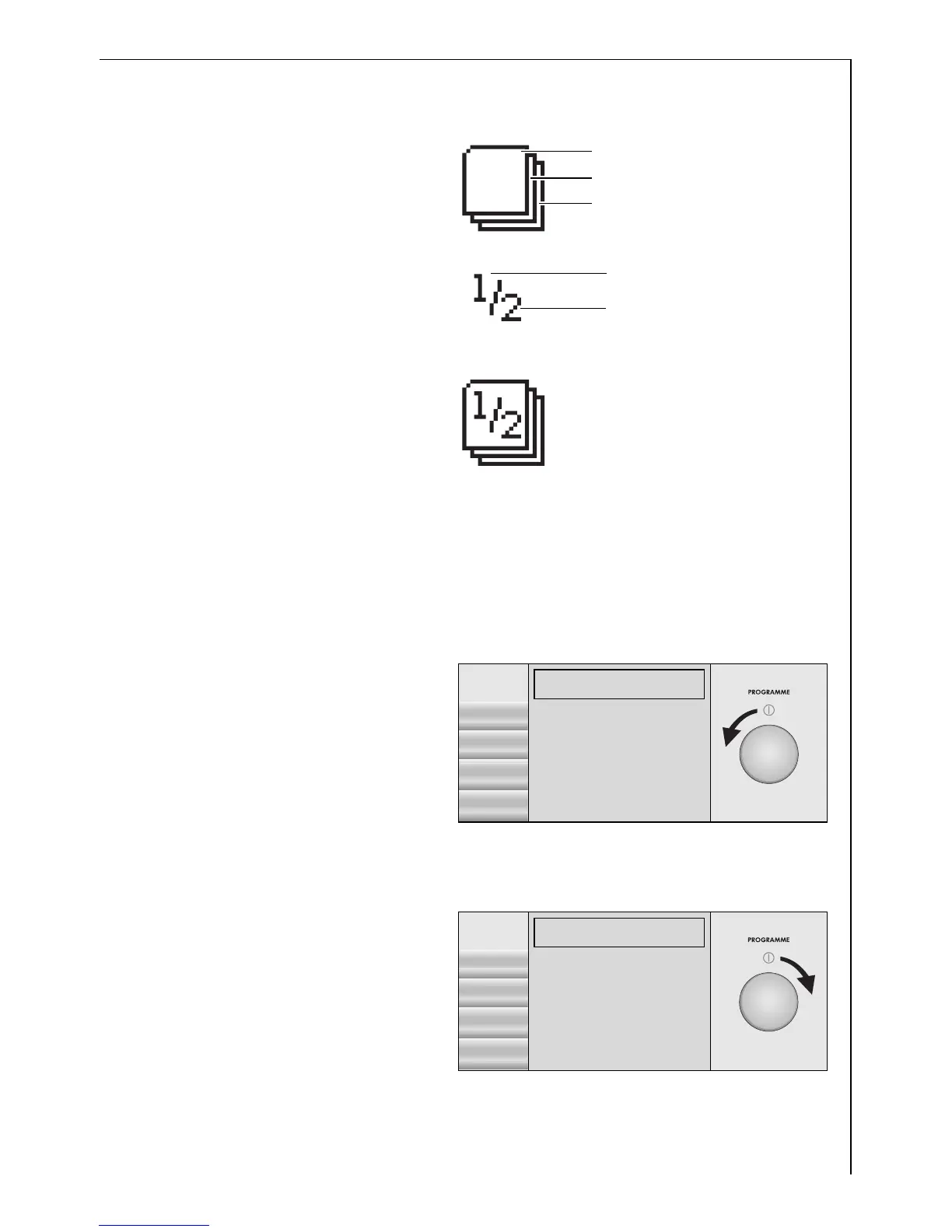
Navigation display
The functions are detailed
over levels and pages within
the washing machine dis-
play.
One level can include a
number of pages.
You can see from the navi-
gation display which level
and page you are currently
on (here: level 3, page 1 of
2).
Control knob and pages
You can highlight the entries on the right of the display by turning the
control knob.
Turning the knob anti-clock-
wise moves the area high-
lighted down. If the area
highlighted is on the last en-
try of a page (here: WOOL-
LENS) and you then turn the
knob again in an anti-clock-
wise direction, the display
will turn to the next page (ö).
Turning the knob clockwise
moves the area highlighted
up. If the area highlighted is
on the first entry of a page
(here: SILK) and you contin-
ue to turn the knob in a
clockwise direction, the dis-
play will turn to the previous
page (î).
Current page
Total number pages
Level 3 (Current level)
Level 2
Level 1
WOOLLENS 30°C
1200 RPM 10:17-10:54
î
START
LINEN/EASY-C.
30°
ENERGY SAVING
1200
COTTONS
DELICATES
OPTIONS WOOLLENS H)
SILK 30°C
1200 RPM 10:17-10:53
ö
START
SILK H)
LINGERIE
1200
40°-60° MIX
EASY IRON
OPTIONS REFRESH




 To Next Page