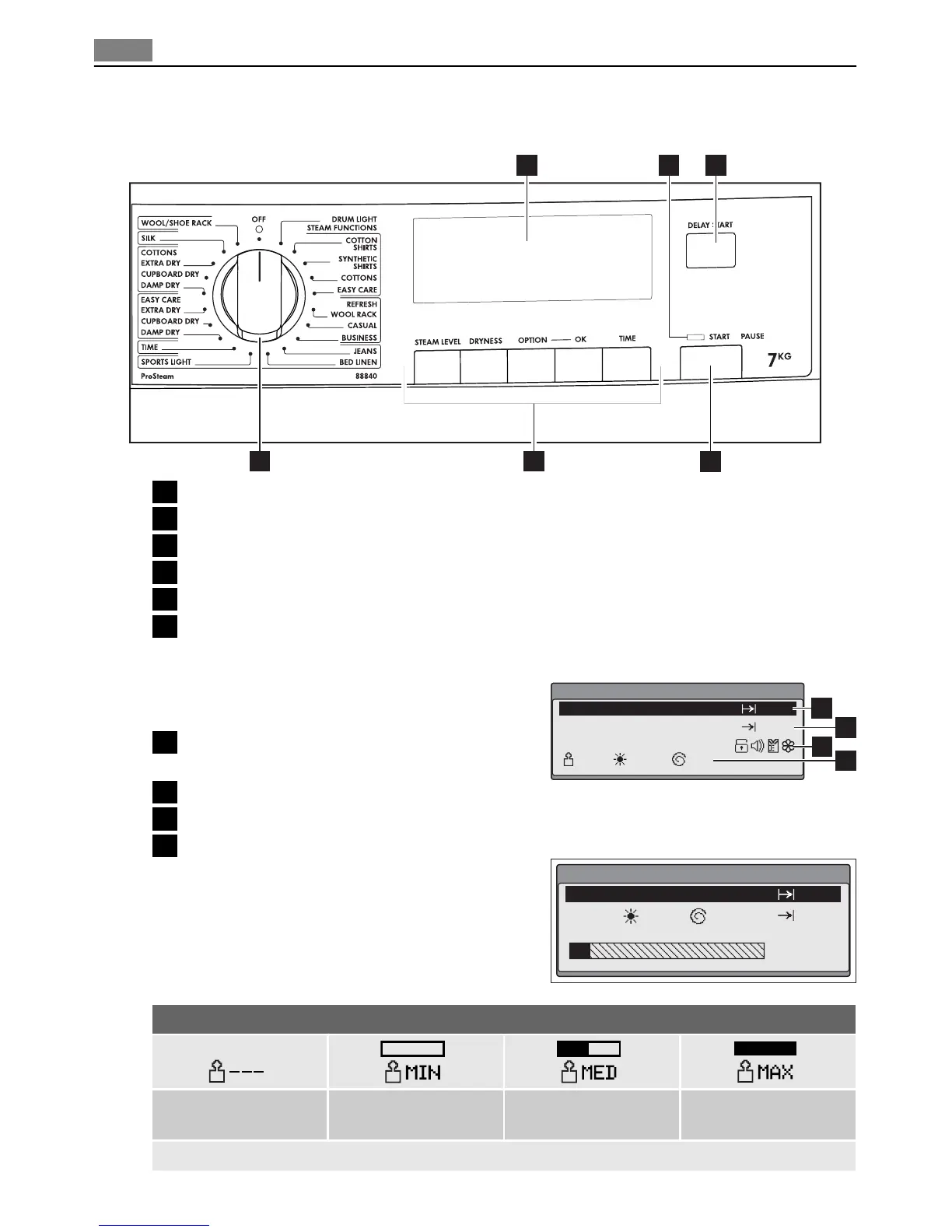
Control panel
1
2
3
4
56
1 Programme knob and OFF switch
2 Function buttons
3 START PAUSE button
4 DELAY START button
5 Status LED
6 Display
Display
The display can show the following basic messag-
es:
1 Currently set ProSteam or drying programme
name and cycle duration.
2 Expected time of cycle end.
3 Option icon after option selection.
4 Visualisation of additional functions.
Every time a cycle is performed an animated pro-
gress bar is shown on the display indicating the
status. In some cases you might also be guided and
warned by displayed messages.
Display description
STEAM LOAD not se-
lectable
minimal STEAM LOAD medium STEAM LOAD maximal STEAM LOAD
COTTONS EXTRA DRY
4:02
16:05
MIN
---
800
1
3
4
2
COTTONS EXTRA DRY
2:00
14:17
Drying
MIN
1200
8
Control panel



 To Next Page