7
Gasket
8
Air filter
5. OPERATION
WARNING!
Do not spill any liquids on
the control panel. This may
damage the equipment and
increase the risk of electric
shock.
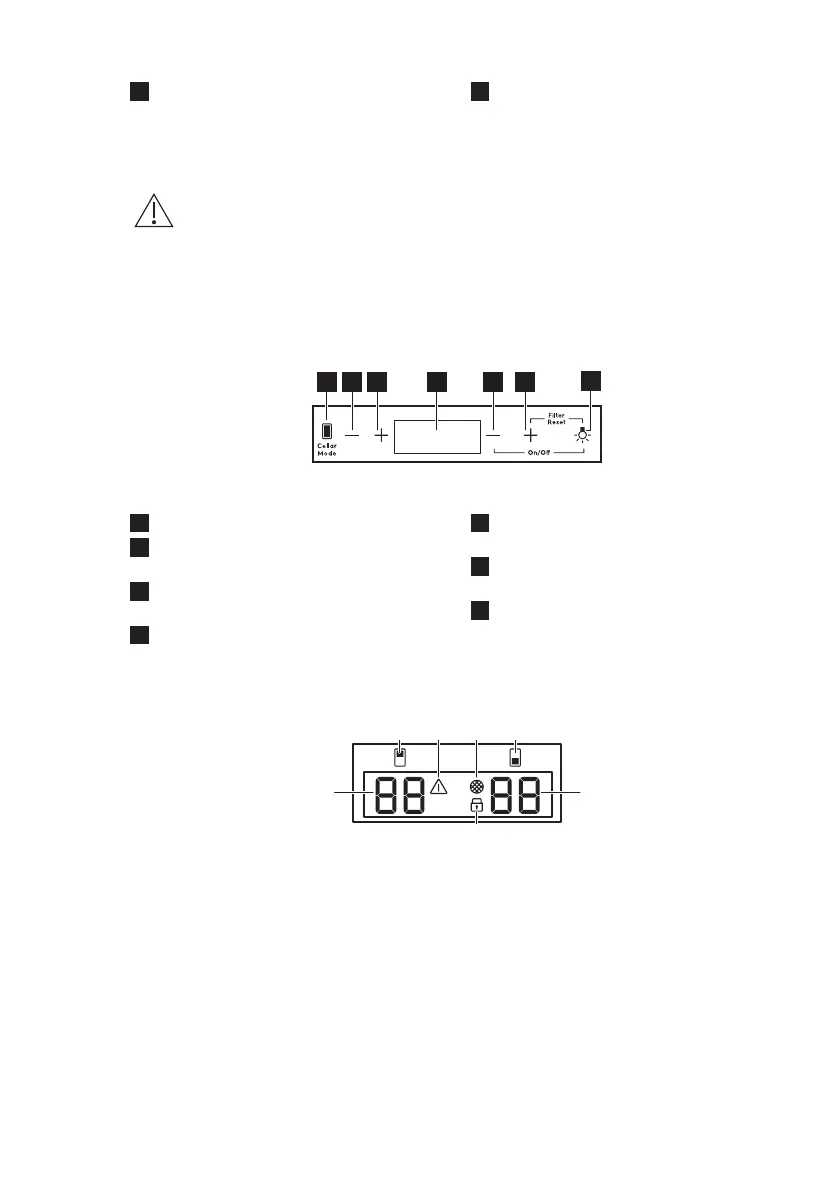
5.1 Control panel
1
Cellar Mode key
2
Temperature decrease key for top
compartment
3
Temperature increase key for top
compartment
4
Display
5
Temperature decrease key for
bottom compartment
6
Temperature increase key for bottom
compartment
7
Light key
5.2 Display
A. Temperature indicator for top
compartment
B. Top compartment indicator
C. Alarm indicator
D. Filter reset indicator
E. Bottom compartment indicator
F. Temperature indicator for bottom
compartment
G. Child lock indicator
5.3 Switching on and off
To switch on the appliance:
1. Insert the plug into the wall socket.
2. Go to the right side of the control
panel.
3. Tap and hold the Temperature
decrease key and Light key for 3
seconds if the display is off.
4. The display shows the default set
temperature (12°C).
ENGLISH 9


 To Next Page