10
5. Allow the oven to run empty for
approximately 45 minutes.
6. Open a window for ventilation.
This procedure should be repeated with the
"Fan Cooking" function and the "Double
Grill" function for approximately 5-10
minutes.
Once this operation is carried out, let
the oven cool down, then clean the
oven cavity with a soft cloth soaked in
warm water to which a little mild
washing-up liquid has been added.
Before cooking for the first time,
carefully wash the oven accessories.
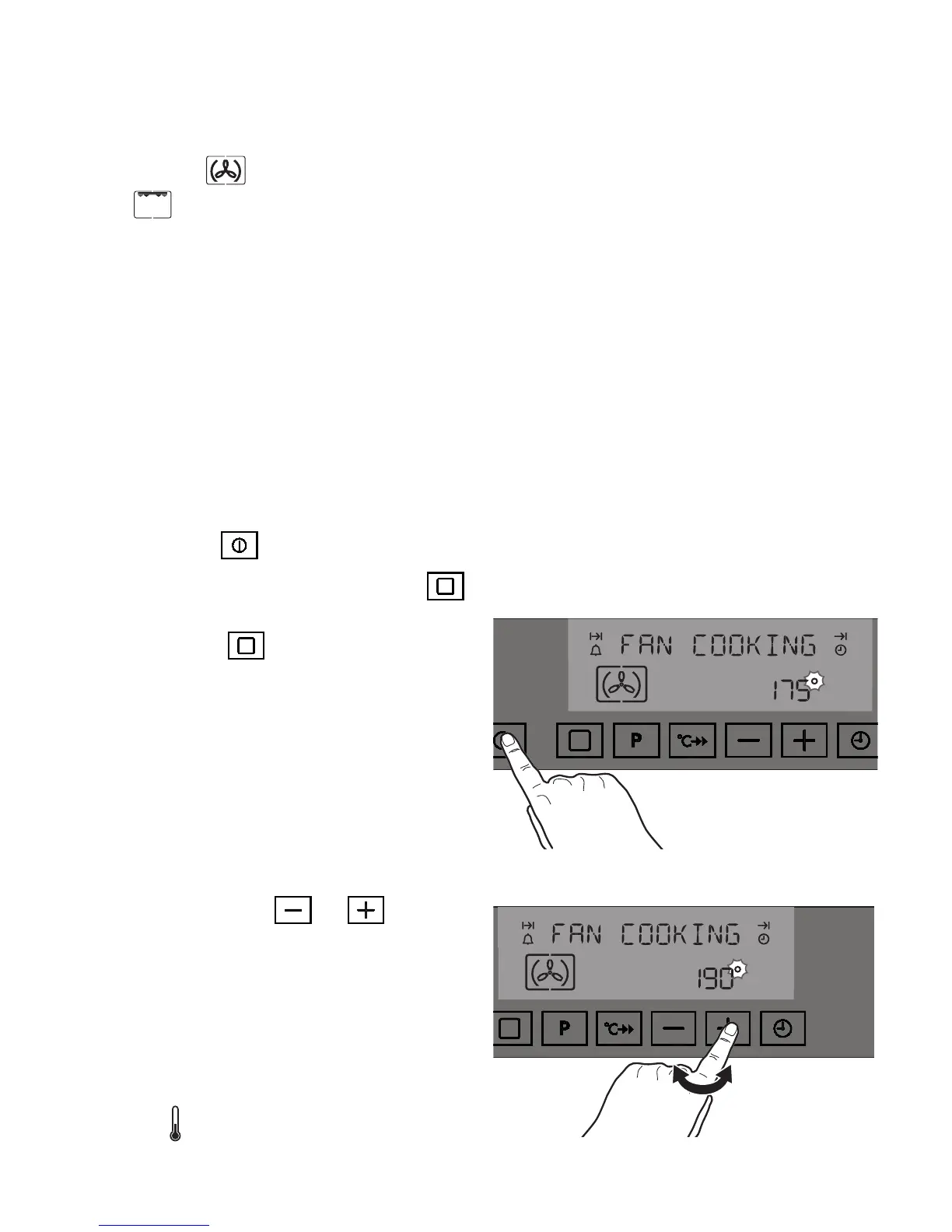
To select a Cooking Function
1. Switch on the oven by touching the
"ON/
OFF" control
.
2. Touch the "Cooking Functions"
control
to select the required oven function. Each
time
control
is touched, a different
cooking symbol appears in the lower section
of the display and the description of the
cooking function appears as a message in
the upper section. The pre-set temperature
for each function is shown in the lower
section, and symbol "" flashes on the right
hand (Fig. 8).
3. Symbol " " flashing means that it is
possible to adjust the pre-set temperature by
touching
control
or
(Fig. 9).
Temperature level is adjusted in 5 degree
steps. Please note that symbol "" will flash
for 5 seconds.
4. When 5 seconds elapse, symbol "" will go
out showing that the temperature level has
been stored in the Electronic Control
memory. The thermometer symbol rises
slowly , indicating the degree to which
the oven is currently heated.
Fig. 8
Fig. 9






 To Next Page