5.1 Initial Cleaning
Remove all accessories and removable
shelf supports from the oven.
Refer to "Care and
cleaning" chapter.
Clean the oven and the accessories
before first use.
Put the accessories and the removable
shelf supports back to their initial
position.
6. DAILY USE
WARNING!
Refer to Safety chapters.
6.1 Retractable knobs
To use the appliance press the knob. The
knob comes out.
6.2 Setting a heating function
1. Turn the knob for the heating
functions to select a heating function.
2. Turn the control knob to select the
temperature.
The lamp turns on when the oven
operates.
3. To turn off the oven, turn the knob
for the heating functions to the off
position.
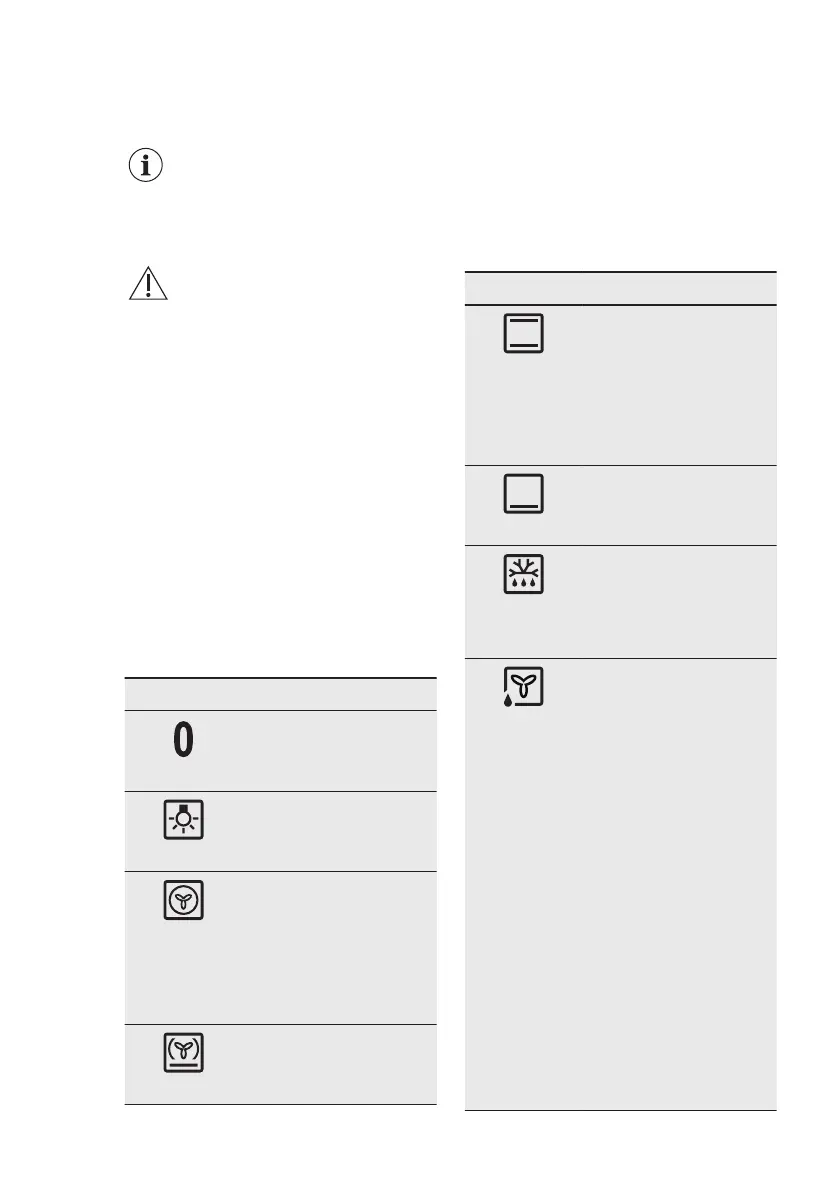
6.3 Heating functions
Oven function Application
Off position
The oven is off.
Light
To turn on the lamp with-
out a cooking function.
True Fan
Cooking
To bake on up to three
shelf positions at the
same time and to dry
food.
Set the temperature 20 -
40 °C lower than for Con-
ventional Cooking.
Pizza Setting
To bake pizza. To make
intensive browning and a
crispy bottom.
Oven function Application
Conventional
Cooking
(Top / Bottom
Heat) / Aqua
Cleaning
To bake and roast food
on one shelf position.
For more information
about Aqua Cleaning, re-
fer to "Care and clean-
ing" chapter.
Bottom Heat
To bake cakes with crispy
bottom and to preserve
food.
Defrost
To defrost food (vegeta-
bles and fruit). The de-
frosting time depends on
the amount and size of
the frozen food.
Moist Baking
This function is designed
to save energy during
cooking. For the cooking
instructions refer to
"Hints and tips" chapter,
Moist Baking. The oven
door should be closed
during cooking so that
the function is not inter-
rupted and to ensure that
the oven operates with
the highest energy effi-
ciency possible. When
you use this function, the
temperature in the cavity
may differ from the set
temperature. The heating
power may be reduced.
For general energy sav-
ing recommendations re-
fer to "Energy Efficiency"
chapter, Energy Saving.
www.aeg.com
8


 To Next Page