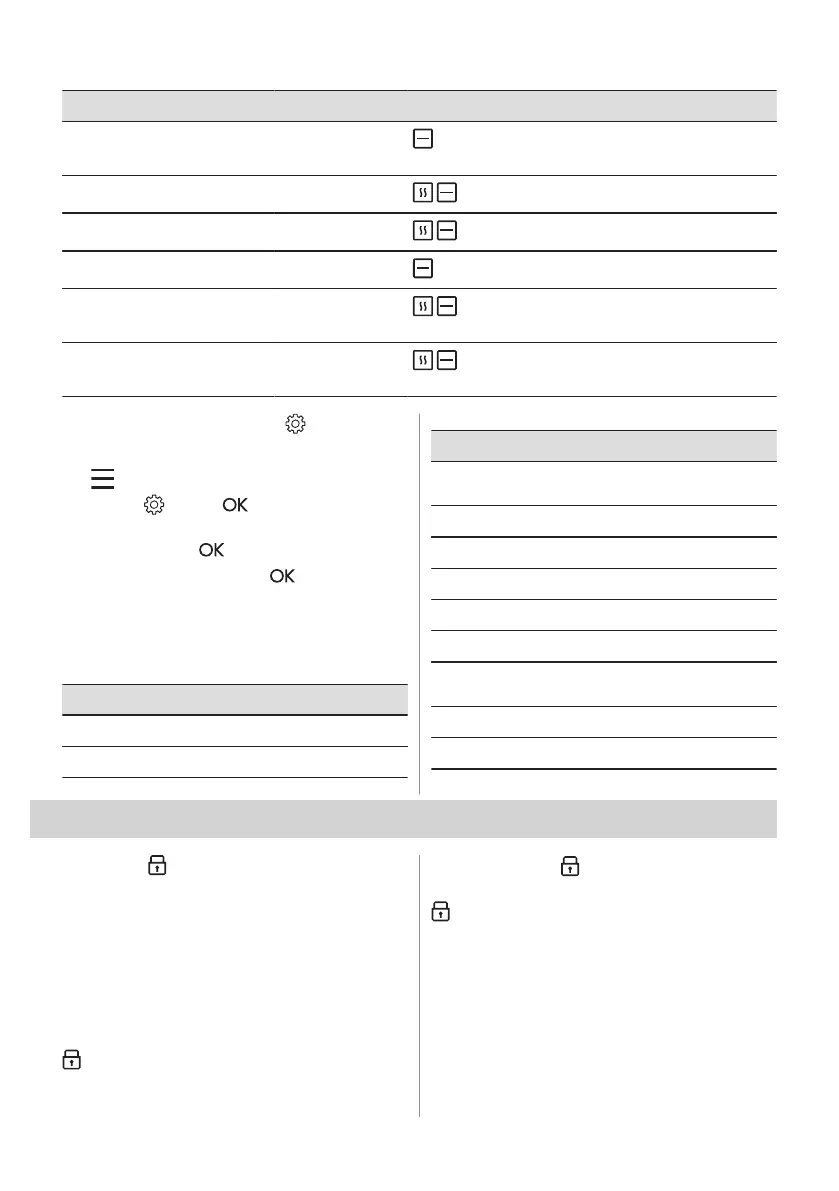
Dish Weight Shelf level / Accessory
P40
Potato gratin (raw po‐
tatoes)
1 - 1.5 kg
1; casserole dish on wire shelf
Rotate the dish after half of the cooking time.
P41
Pizza fresh, thin
-
2; baking tray lined with baking paper
P42
Pizza fresh, thick
-
2; baking tray lined with baking paper
P43
Quiche -
2; baking tin on wire shelf
P44
Baguette / Ciabatta /
White bread
0.8 kg
2; baking tray lined with baking paper
More time needed for white bread.
P45
Whole grain / Rye /
Dark bread
1 kg
2; baking tray lined with baking paper / loaf pan
on wire shelf
7.5 Changing: Settings
1. Turn the knob for the heating functions to
to enter Menu.
2. Select . Press .
3. Turn the control knob to select the
setting. Press .
4. Adjust the value. Press .
Turn the knob for the heating functions to the
off position to exit Menu.
Menu: Settings
Setting Value
01
Time of day Change
02
Display brightness 1 - 5
Setting Value
03
Key tones 1 - Beep, 2 - Click,
3 - Sound off
04
Buzzer volume 1 - 4
05
Uptimer On / Off
06
Light On / Off
07
Fast Heat Up On / Off
08
Cleaning Reminder On / Off
09
Demo mode Activation code:
2468
10
Software version Check
11
Reset all settings Yes / No
8. ADDITIONAL FUNCTIONS
8.1 Lock
This function prevents an accidental change
of the appliance function.
Turn it on when the appliance works - the set
cooking continues, the control panel is
locked.
Turn it on when the appliance is off - it cannot
be turned on, the control panel is locked.
- press and hold to turn on the function.
A signal sounds. - flashes 3 times when
the lock is turned on.
- press and hold to turn off the function.
8.2 Automatic switch-off
For safety reasons, if the heating function is
active and no settings are changed, the
appliance will turn off automatically after a
certain period of time.
14 ENGLISH



 To Next Page