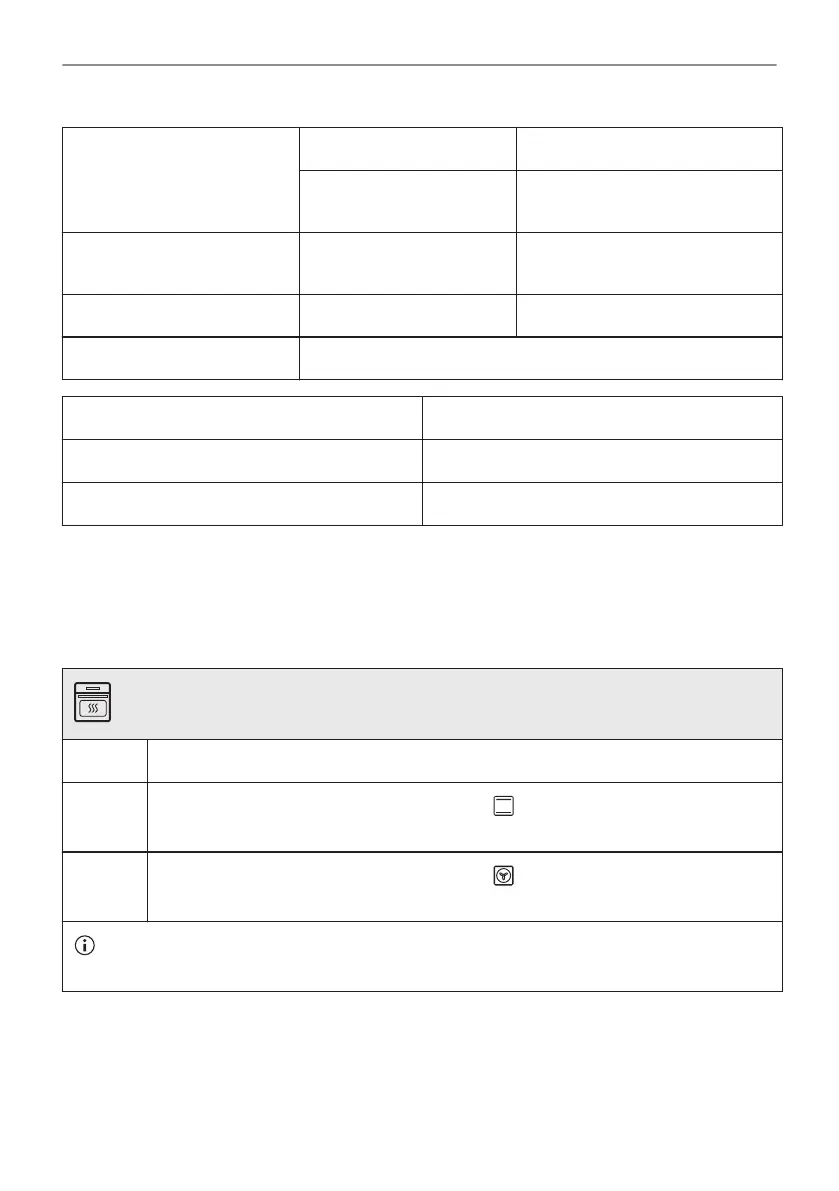
Frequency 2.4 GHz WLAN 5 GHz WLAN
2400 - 2483.5 MHz 5150 - 5350 MHz
5470 - 5725 MHz
Protocol IEEE 802.11b DSSS,
802.11g/n OFDM
IEEE 802.11 a/n OFDM
Max Power EIRP < 20 dBm (100 mW) EIRP < 22 dBm (200mW)
Wi-Fi module NIU5-50
Frequency Bluetooth 2400 - 2483.5 MHz
Protocol LE: DSSS
Max Power EIRP < 4 dBm (5 mW)
EU member states covered by the provision of Directive 2014/53/EU: Belgium, Bulgaria, Czech
Republic, Denmark, Germany, Estonia, Ireland, Greece, Spain, France, Croatia, Italy, Cyprus,
Latvia, Lithuania, Luxemburg, Hungary, Malta, Netherlands, Austria, Poland, Portugal,
Romania, Slovenia, Slovakia, Finland, Sweden, Norway, Switzerland, United Kingdom, Turkey.
5.4 Initial preheating
Preheat the empty oven before the first use.
Step 1 Remove all accessories and removable shelf supports from the oven.
Step 2
Set the maximum temperature for the function: .
Let the oven operate for 1 h.
Step 3
Set the maximum temperature for the function: .
Let the oven operate for 15 min.
The oven can emit an odour and smoke during preheating. Make sure that the room is ventila‐
ted.
5.5 How to set: Water hardness
When you connect the oven to the mains you have to set the water hardness level.
Use the test paper or contact your water supplier to check the water hardness level.
18/60
BEFORE FIRST USE


 To Next Page