2. Turn the knob for the temperature to
select a temperature.
3. To deactivate the oven turn the knob for
the top / main oven functions to the off
position.
9.4 Activating the function:
SteamBake
This function increases humidity while
cooking.
WARNING!
Risk of burns and damage to the
appliance.
Released humidity can cause burns:
• Do not open the appliance door when
using the function: SteamBake.
• Open the appliance door carefully after
using the function: SteamBake.
Refer to “Hints and tips” chapter.
1. Open the oven door.
2. Fill the cavity embossment with tap water.
The maximum capacity of the cavity
embossment is 250 ml.
Fill the cavity embossment with water
only when the oven is cold.
3. Turn the function knob: SteamBake .
4. Turn the temperature knob to set a
temperature.
5. Put food in the appliance and close the
oven door.
CAUTION!
Do not refill the cavity embossment
with water during cooking or when
the oven is hot.
6. To turn off the appliance, turn the knobs
for the oven functions and temperature to
the off position.
7. Remove water from the cavity
embossment.
WARNING!
Make sure that the appliance is cold
before you remove the remaining
water from the cavity embossment.
9.5 Cooling fan
When the oven operates, the cooling fan
turns on automatically to keep the surfaces of
the oven cool. If you turn off the oven, the
cooling fan continues to operate until the
oven cools down.
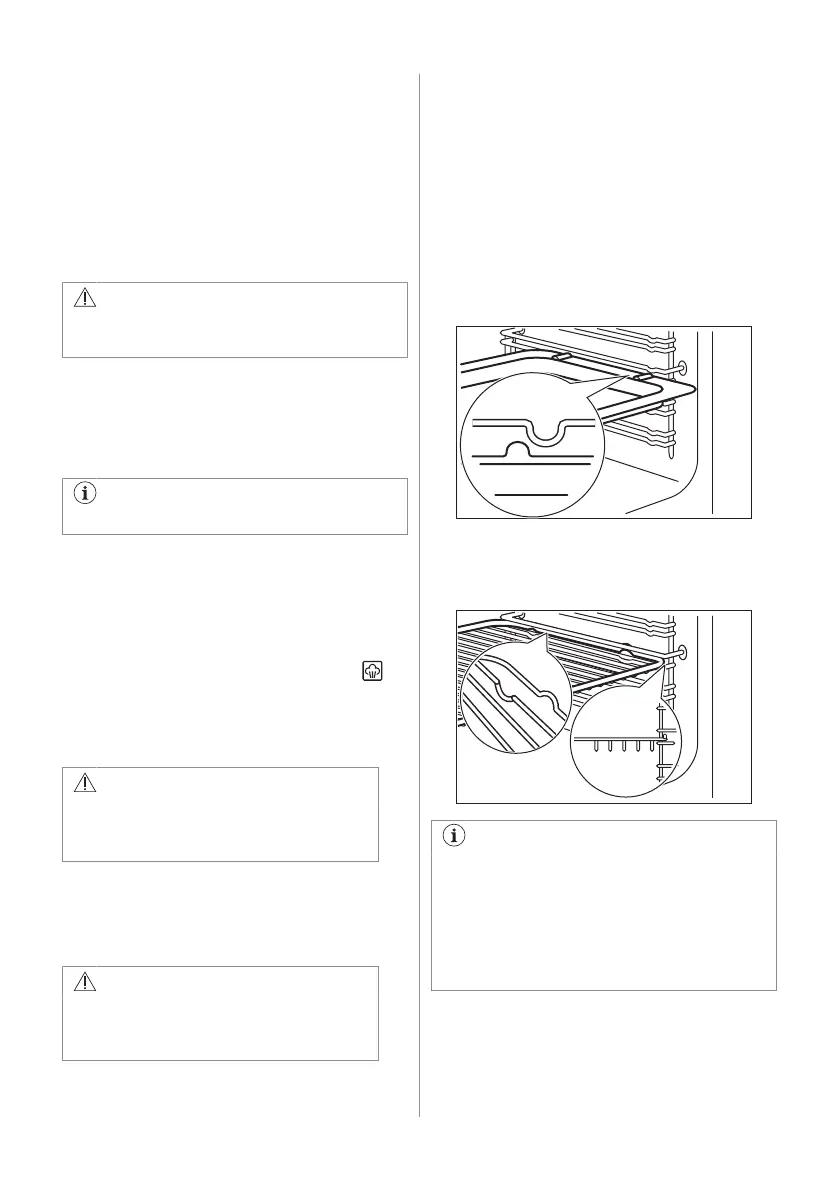
9.6 Inserting the oven accessories
Deep pan:
Push the deep pan between the guide bars of
the shelf support.
Wire shelf:
Push the shelf between the guide bars of the
shelf support.
• All accessories have small
indentations at the top of the right and
left side to increase safety. The
indentations are also anti-tip devices.
• The high rim around the shelf is a
device which prevents cookware from
slipping.
9.7 Trivet and Grill- / Roasting pan
You can use the trivet to roast larger pieces
of meat or poultry on one shelf position.
14 ENGLISH


 To Next Page