27
External Call
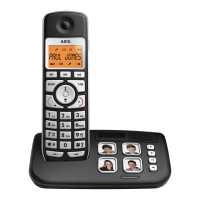
External Calls to the public network.
1. The handset is in standby (no tone).
2. Press the line key _ (2).
3. The line/charge indicator ` /F ((15 or 20) flashes, the contact symbol ^ and
EXT are displayed.
4. You hear the dial tone.
5. Dial the number you want to call.
6. The number is displayed and called automatically.
7. To end the communication, press the line key _ (2) or replace the hand-set
in its cradle.
Block Dialing
1. The handset is in standby (no tone).
2. Dial the number you want to call.
NOTE: If you have made a mistake, you can delete the wrong digits with the
mute/delete key (10).
3. The number is displayed.
4. Press the line key _ (2).
5. The line/charge indicator `/F ((15 or 20) flashes, the contact symbol ^ and
EXT are displayed.
6. The number will be called automatically and you can communicate.
7. To end the communication, press the line key _ (2) or replace the hand-set
in its cradle.
Redialing
Last Number Redial
1. The handset is in standby (no tone).
2. Press the line key _ (2).
3. The line/charge indicator ` /F ((15 or 20) flashes, the contact symbol ^ and
EXT are displayed.
4. You hear the dial tone.
5. Press the pause/redial key P tt (6).
6. The last number dialed will be called automatically.
Redial of the 5 Last Numbers
1. The handset is in standby (no tone).
2. Press the pause/redial key P tt (6).
3. The last number dialed is displayed.
4. Press the pause/redial key P tt (6) repeatedly to select one of the 4 numbers
previously dialed. Or use the arrow key to scroll through the list.
5. You can delete wrong digits with the mute/delete key ? (10).
6. Press the line key _ (2).
7. The displayed number will be called automatically.


 To Next Page