English
21
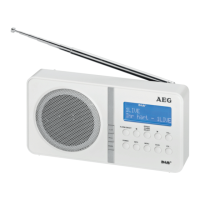
Overview of the components
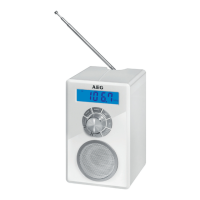
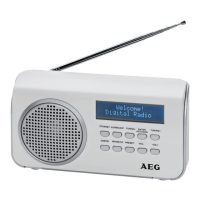
Front (Fig. 1)
1 Telescopic antenna
2 LCD Display
3 TUNING+/TUNING- buttons (Scan forwards / backwards)
4 ENTER/AUTO-SCAN button (Enter/Scan)
5 VOL+/VOL- buttons (volume)
6 PRESET button
7 INFO/SETUP button (show information/manual DAB
search)
8 DAB/FM button
9 STANDBY button (Standby/Operation)
10 ALARM/SLEEP button (Alarm time/Sleep)
11 SNOOZE button (Snooze)
12 Speakers
Rear view (Fig. 2)
13 DC 6 V connector
14 Battery compartment
15 POWER OFF/ON switch (On / Off)
16 PHONES Headphones jack
17 AUX jack
Installation
• Chooseasuitablelocationforthedevice.Suitableloca-
tions are dry, even and antislip surfaces on which you may
operate the device easily.
• Makesurethereisproperventilationforthedevice!
• Remove,ifnecessary,theprotectionsheetfromthe
display.
Power supply (Adaptor)
• Insertthegridplugintoaproperlyinstalledthreeprong
socket. Connect the device with the plug connector by
inserting its plug into the DC 6 V jack of the device.
• Makesurethegridvoltagecorrespondstothegureson
the rating plate.
CAUTION:
• Onlyusethesuppliedpoweradaptorforthisdevice.
Do not use for other devices.
• Onlyusepoweradaptorwith6V(
), other
adaptors may cause damage to the device.
NOTE:
Disconnect from mains power supply during longer periods
of non-use.
Battery Operation (Batteries not included)
You also have the option of operating the unit with 4 Type R6
“AA” batteries.
1. Open the battery compartment (14) on the back.
2. Insert 4 R6 “AA” batteries 1.5 V. Mind the correct polarity
(indicated on the bottom of the battery case)!
3. Close the battery case.
4. Ifthedeviceisnotusedforanextendedperiodoftime,
remove the batteries from the device to avoid any leaking
of battery acid.
WARNING:
Thebatteriesshallnotbeexposedtoexcessiveheatsuch
as sunshine, fire or the like. Danger of explosion!
CAUTION:
• Neverusedifferentbatterytypesornewandusedbat-
teries together.
• Batteriesmustnotbedisposedofinthegarbage.
Please bring used batteries to competent collection
centers or back to the dealer.
NOTE:
If you have connected the power supply, the batteries are
automatically deactivated.
Installation
1. Fullyextendthetelescopicantenna(1).Standitupright
for initial installation.
2. Switch the device on at the back of the device using the
POWER OFF ON switch (15). The device automatically
searches for DAB stations. SEARCHING… and a progress
bar appears on the display. The figure on the right of the
display shows the number of radio stations found. The
first alphanumeric DAB station is played.
When playing a radio station, the time and date is taken
from the broadcasting service.
General operation
Switch the device on/off
• SwitchthedeviceonbysettingthePOWEROFFON
switch on the back of the device to ON.
• Standby / On: Now you can switch the device between
Standby and On. Press the STANDBY button (9) to do so.
• Toswitchoffthedevice,settheOFF/ONswitchtoOFF.
NOTE:
The preset time/date is lost as soon as the device is turned
off with the POWER ON/OFF, or as soon as the power sup-
ply is interrupted.
DAB/FM button (8)
For switching between DAB and FM mode.
VOL+/VOL- Volume (5)
Adjust to your preferred volume level. The higher the volume,
the more blocks are filled in.


 To Next Page