USE
10
USE
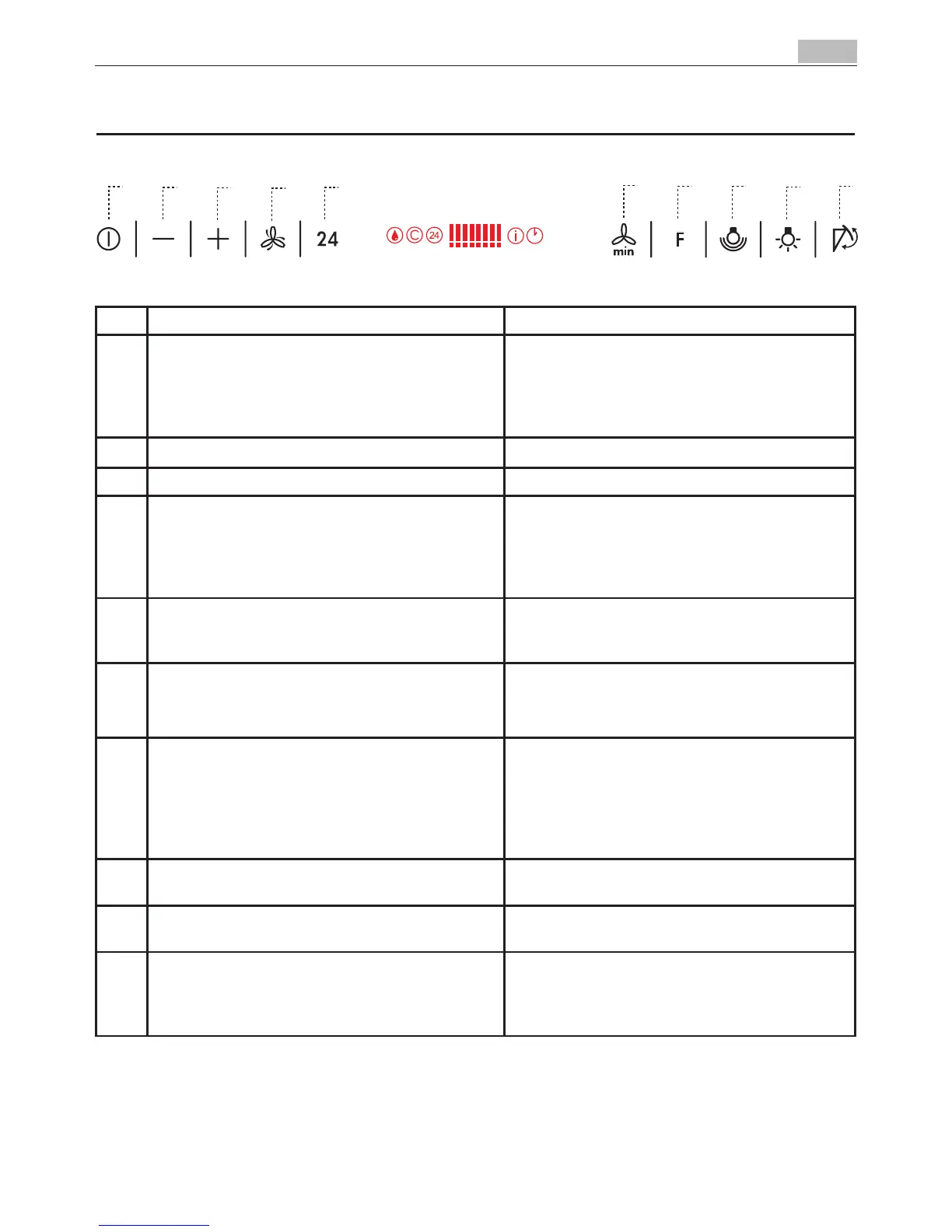
Key Function Display
A Upper panel closed: when pressed for about two sec-ond
it opens the upper panel. It switches the motor on at the
latest selected speed.Upper panel open: when shortly
pressed it switches the motor and the lights on/off. It stops
all function and closes the panel
Indicates the selected speed.
B Decreases the suction speed. Number of lit LEDS decreases.
C Increases the suction speed. Number of lit LEDS increases.
D Functioning only when the upper panel is open. This speed
has been timed at 10 minutes. After that time the system
activates automatically the latest selected speed. The func-
tion is suitable for cooking conditions when vapours and
smells are of the at most emission.
I flashes and all the LEDS on the display are lit.By pressing
the key the function is deacti-vated.
E Functioning only when the upper panel is open. By press-
ing this key it is possible to set up the motor to a suction
speed at 100 m3/h .
24–symbol appears and the LEDS on the display go off
cyclically, one by one. By pressing the key the function
is deacti-vated.
F Functioning only when the motor is on. By pressing this
key it is possible to set the delayed shutdown of the motor
and the lighting to 30 minutes.
A flashing clock symbol appears. By pressing the key the
function is deacti-vated.
G By pressing this key for about 2 seconds it is possible to
reset the filter saturation alarm.
A drop symbol indicates that the metal grease filters satura-
tion alarm has been activated, and the filters need to be
washed. The alarm is triggered after 100 working hours.
C indicates that the charcoal filter satura-tion alarm has
been activated, and the filter has to be replaced. The alarm
s triggered after 200 working hours.
H By pressing this key the intensity of the lighting sys-tem
can be modified up to five levels.
I It switches the lights on and off (at maximum speed) inspite
of the panel’s position.
L Upper panel closed: when pressed for about two sec-ond it
opens the upper panel .Upper panel open: when pressed for
about two second it switches off motor and lights resetting
every acti-vated function, and closes the panel.
Keyboard lock:itispossibletojamthekeyboardwhen,forexample,cleaningtheglass.Themotorandlightsare
switched off.
By pressing the D-key for about 5 seconds the keyboard block can be activated or deactivated. This function is confirmed
by a Beep and by an animation on the display.


 To Next Page