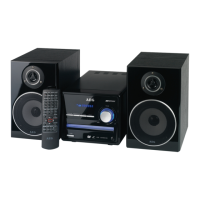
Need help?
Do you have a question about the AEG DVD 4606 HC and is the answer not in the manual?
Details on operating voltage and power source requirements.
Instructions on servicing and qualified specialist involvement.
Compatibility with NTSC and PAL colour systems.
Ensuring proper airflow and preventing overheating.
Warnings about liquid, fire sources, and magnetic objects.
Advice on handling moisture buildup inside the device.
Guidance on device placement, audio outputs, and laser protection.
Information on playable discs and picture quality.
Guidelines for handling, cleaning, and storing discs.
Identifies and explains controls on the front panel of the device.
Identifies and explains connection sockets on the rear panel.
Step-by-step guide for installing batteries in the remote.
Instructions on operating the remote control effectively.
Guidance on ideal placement of speakers for optimal sound effect.
Instructions on how to properly connect speaker cables.
Instructions for connecting and positioning the AM loop aerial.
Instructions for connecting and positioning the FM room aerial.
Overview of fundamental operations like volume and mute.
Guide to finding and selecting radio stations.
Automatic station scanning and recalling stored stations.
Explanation of Radio Data System features and display.
Steps for playing DVD video discs.
Steps for playing audio discs (CD, MP3).
How to view disc playback information on the screen.
Feature to stop and resume playback from a specific point.
How to play back discs in slow motion, forwards or backwards.
Setting video system and selecting audio language for playback.
Selecting subtitle languages and changing camera angles.
How to choose specific titles or chapters for playback.
Displaying playback time and accessing disc menus.
Options for repeating sections, tracks, or entire discs.
Adjusting volume levels and enlarging/reducing picture size.
Setting custom track order and accessing DVD setup menus.
General settings for TV screen format and display options.
Selecting different camera angles during playback.
Setting display language and closed caption options.
Function to activate screen saving after a period of inactivity.
Configuring speaker settings like downmix and individual speaker sizes.
Setting the size for center and rear speakers.
Function to test speaker output and levels.
Configuring digital audio output settings (SPDIF, LPCM).
Settings for Dolby Digital audio, including dual mono and dynamic range.
Adjusting sound settings using EQ types, bass, and treble boosts.
Settings for surround sound processing like Pro Logic II and reverb.
Configuring video output settings like component and TV modes.
General preference settings for language, subtitles, and parental control.
Setting preferred subtitle, audio, and disc menu languages.
Setting parental control levels for movie content.
Option to restore the machine to its original factory settings.
Setting or changing a personal password for device access.
Guide on playing MP3s and navigating files via lists or folders.
Features for JPEG playback, including slideshow, repeat and zoom.
Solutions for when the device has no power or no sound.
Troubleshooting distorted picture, no picture, or disc playback issues.
Solutions for remote control malfunctions and picture interference.
Solutions for problems encountered when playing MP3 discs.
Technical specifications for DVD, FM, and AM tuner functions.
Technical data for the amplifier section and remote control.
General specifications including power supply and consumption.
Information on repair services and costs after the guarantee period.
 General
| Brand | AEG |
|---|---|
| Model | DVD 4606 HC |
| Category | Home Theater System |
| Language | English |

 To Next Page