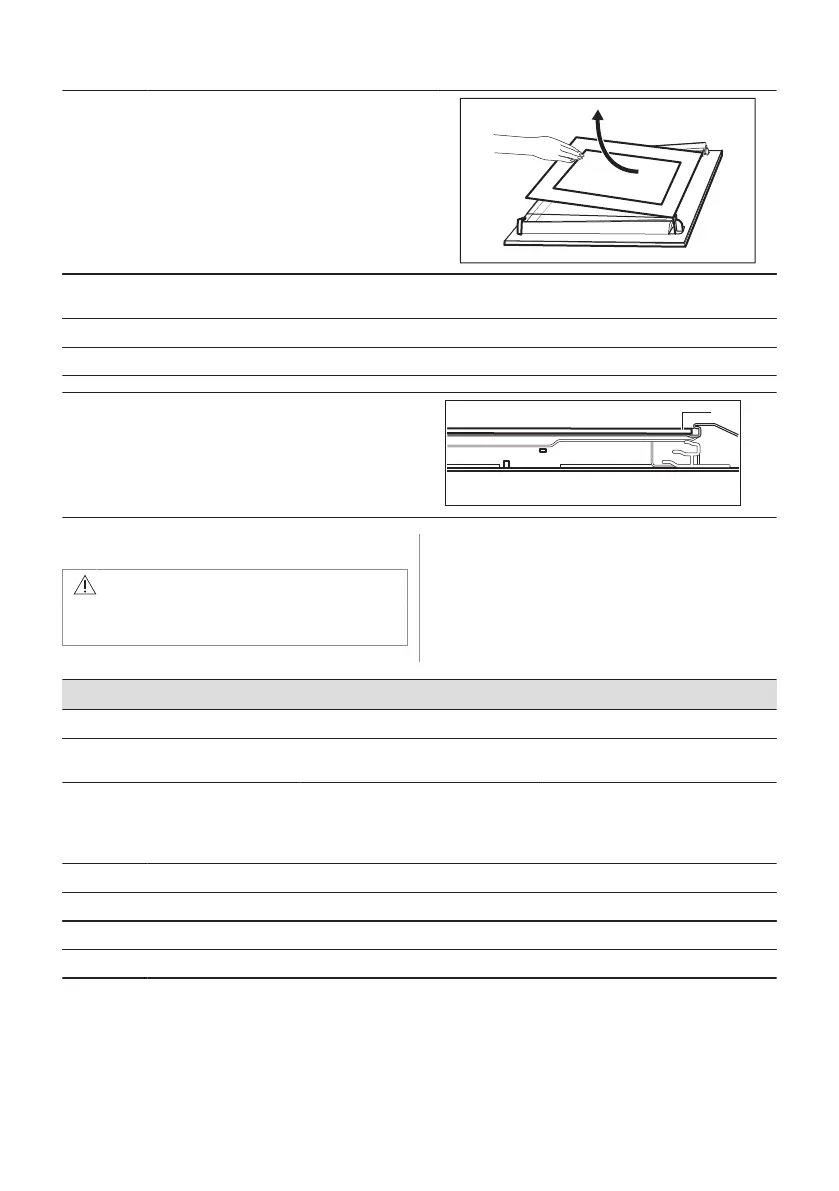
Step 7 Hold the door glass panel by its top edge
and carefully pull it out. Make sure the glass
slides out of the supports completely.
Step 8 Clean the glass panels with water and soap. Dry the glass panels carefully. Do not clean the glass
panels in the dishwasher.
Step 9 After cleaning, install the glass panel and the oven door.
If the door is installed correctly, you will hear a click when closing the latches.
The screen-printing zone must face the inner side of
the door. Make sure that after the installation the sur‐
face of the glass panel frame on the screen-printing
zones is not rough when you touch it.
When installed correctly the door trim clicks.
Make sure that you install the internal glass panel in
the seats correctly.
12.4 How to replace: Lamp
WARNING!
Risk of electric shock.
The lamp can be hot.
Always hold the halogen lamp with a cloth to
prevent grease residue from burning on the
lamp.
Before you replace the lamp:
Step 1 Step 2 Step 3
Turn off the oven. Wait until the
oven is cold.
Disconnect the oven from the
mains.
Put a cloth on the bottom of the cav‐
ity.
Back lamp
Step 1 Turn the glass cover to remove it.
Step 2 Clean the glass cover.
Step 3 Replace the lamp with a suitable 300 °C heat-resistant lamp.
Step 4 Install the glass cover.
ENGLISH 19


 To Next Page