Quick Light cleaning 1 h
Normal Normal cleaning 1 h 30 min
Intense Thorough cleaning 3 h
When the cleaning starts, the oven door is locked and the lamp is off.
To stop the cleaning before it is completed, turn off the oven.
The oven stays locked until it is cold.
When the cleaning ends:
Turn off the oven and wait until it
is cold.
Clean the cavity with a soft cloth. Remove the residue from the bottom of
the cavity.
12.4 How to remove and install:
Door
You can remove the door and the internal
glass panels to clean it. The number of glass
panels is different for different models.
WARNING!
The door is heavy.
CAUTION!
Carefully handle the glass, especially
around the edges of the front panel. The
glass can break.
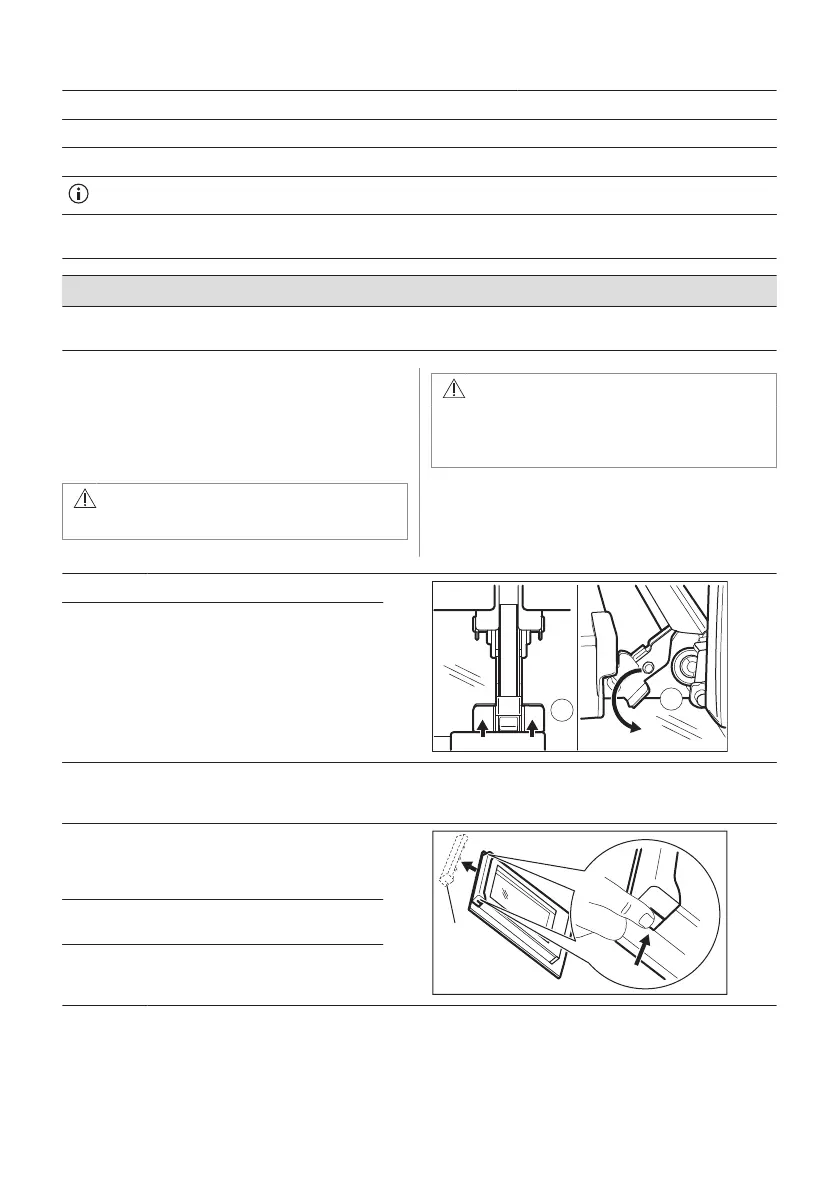
Step 1 Fully open the door.
Step 2 Lift and press the clamping levers
(A) on the two door hinges.
Step 3 Close the oven door to the first opening position (approximately 70° angle). Hold the door at both
sides and pull it away from the oven at an upwards angle. Put the door with the outer side down on
a soft cloth on a stable surface.
Step 4 Hold the door trim (B) on the top
edge of the door at the two sides
and push inwards to release the clip
seal.
Step 5 Pull the door trim to the front to re‐
move it.
Step 6 Hold the door glass panels on their
top edge one by one and pull them
up out of the guide.
38 ENGLISH



 To Next Page