Sensor
field
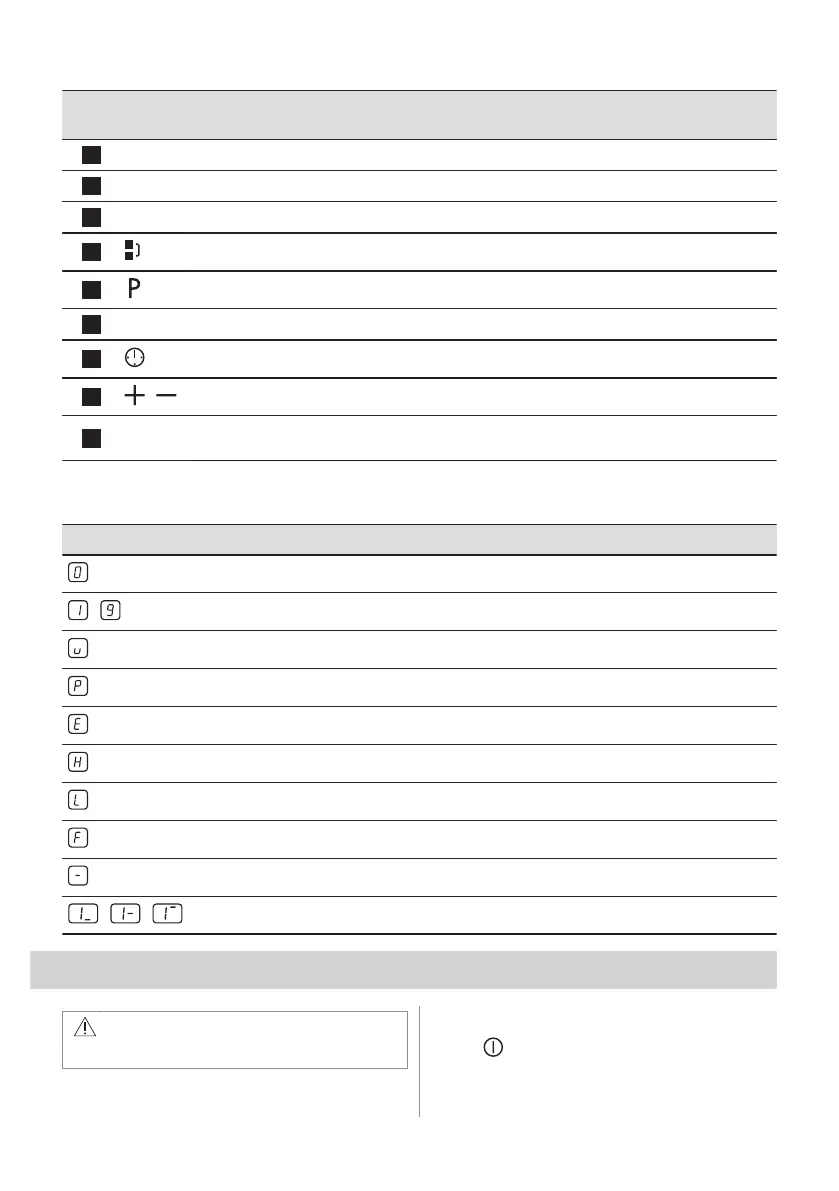
Function Comment
5
- Heat setting display To show the heat setting.
6
- Timer indicators of cooking zones To show for which zone you set the time.
7
- Timer display To show the time in minutes.
8
Bridge To activate and deactivate the function.
9
PowerBoost To activate and deactivate the function.
10
- Control bar To set a heat setting.
11
- To select the cooking zone.
12
/
- To increase or decrease the time.
13
- Control bar To set the heat setting for flexible induction cooking
area.
4.3 Heat setting displays
Display Description
The cooking zone is deactivated.
-
The cooking zone operates.
Pause operates.
PowerBoost operates.
+ digit
There is a malfunction.
A cooking zone is still hot (residual heat).
Child Safety Device operates.
Incorrect or too small cookware or no cookware on the cooking zone.
Automatic Switch Off operates.
/ /
PowerSlide operates.
5. DAILY USE
WARNING!
Refer to Safety chapters.
5.1 Activating and deactivating
Touch for 1 second to activate or
deactivate the hob.
ENGLISH 29



 To Next Page