EasyManua.ls Logo

AEG K 19 E - How to Operate the Air-Conditioner

AEG K 19 E
14 pages
Print Icon
To Next Page IconTo Next Page
To Previous Page IconTo Previous Page
Loading...
HOW
TO
OPERATE
THE
AIR-CONDITIONER
(refer
to
the
control
panel
on
the
opposite
page)
d
DEHUMIDIFICATION
Two
pilot
lamps
light:
V_sexternal
conden-
sation
discharge
condensation
dis-
charge
in
canister
Turnthe
thermostatto
MAX
‘|
COLD
and
press
the
button
relative
to
the
desired
function.
If
discharge
into
the
canister
is
selected,
the
:
B@
FULL
pilotiamp
lights
when
the
canister
is
full.
In
this
case,
empty
the
canister
and
restart
the
|
machine
(see
page
21).
The
pilot
lamp
for
the
selected
function
remains
lit.
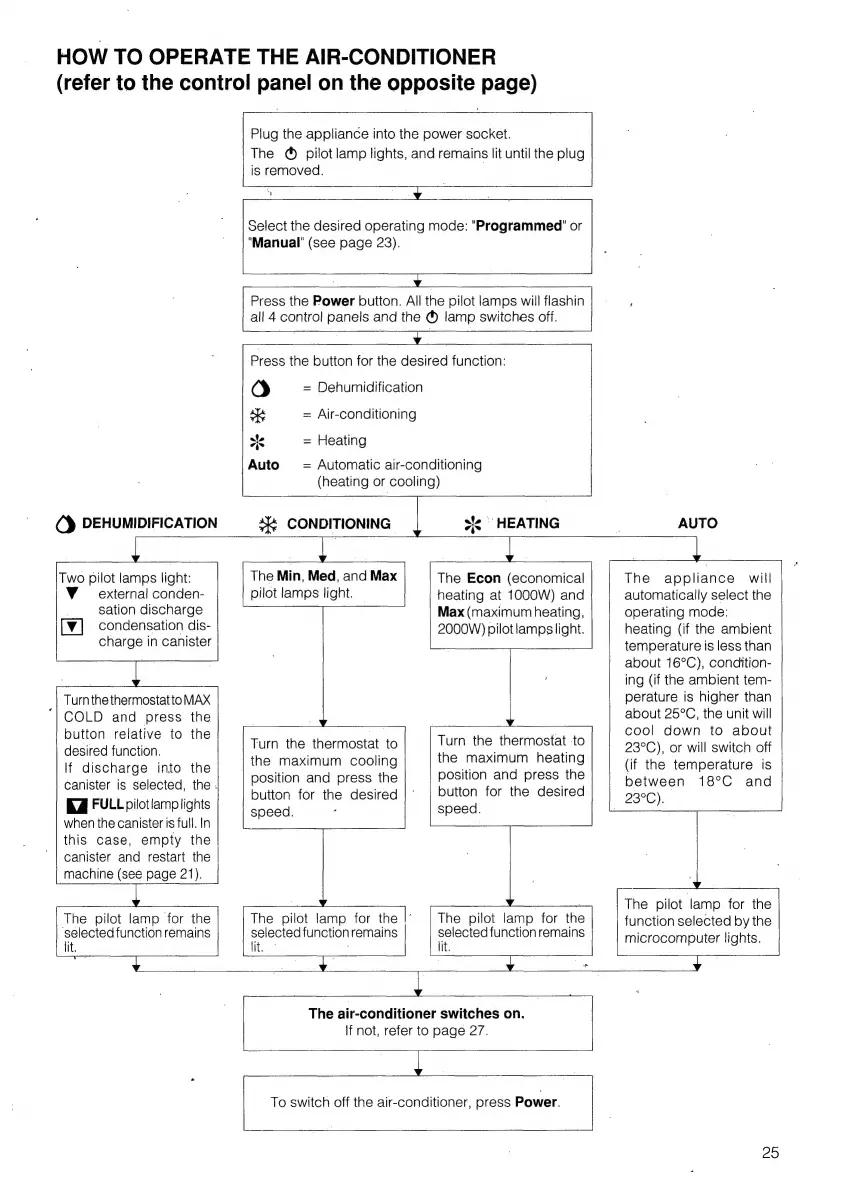
Plug
the
appliance
into
the
power
socket.
The
®
pilot
lamp
lights,
and
remains
lit
until
the
plug
is
removed.
3
Select
the
desired
operating
mode:
"Programmed
or
"Manual"
(see
page
23).
Press
the
Power
button.
All
the
pilot
lamps
will
flashin
all
4
control
panels
and
the
®
lamp
switches
off.
rn
Press
the
button
for
the
desired
function:
Od
=
Dehumidification
sh
=
Air-conditioning
=
Heating
Auto
=
Automatic
air-conditioning
(heating
or
cooling)
|
a
CONDITIONING
oe
~
HEATING
The
Econ
(economical
heating
at
1000W)
and
Max
(maximum
heating,
2000W)
pilot
lamps
light.
The
Min,
Med,
and
Max
pilot
lamps
light.
Turn
the
thermostat
to
the
maximum
cooling
position
and
press
the
button
for
the
desired
speed.
Turn
the
thermostat
to
the
maximum
heating
position
and
press
the
button
for
the
desired
speed.
The
pilot
lamp
for
the
|:
The
pilot
lamp.
for
the
selected
function
remains
selected
function
remains
lit. lit.
Ty
AUTO
The
appliance
will
automatically
select
the
operating
mode:
heating
(if
the
ambient
temperature
is
less
than
about
16°C),
condition-
ing
(if
the
ambient
tem-
perature
is
higher
than
about
25°C,
the
unit
will
cool
down
to
about
23°C),
or
will
switch
off
(if
the
temperature
is
between
18°C
and
23°C):
The
pilot
lamp
for
the
function
selected
by
the
microcomputer
lights.
y
4
The
air-conditioner
switches
on.
If
not,
refer
to
page
27.
To
switch
off
the
air-conditioner,
press
Power.
25

Related product manuals