Child Lock
With this option you can prevent that the children play with the
control panel.
To activate/deactivate this option, touch the Intensive/Prewash
and the Option buttons simultaneously until the indicator
comes on/goes off on the display.
You can activate this option:
• After you touch the Start/Pause button: all the buttons and
the programme dial are deactivated (except On/Off button).
• Before you touch the Start/Pause button: the appliance
cannot start.
The appliance keeps the selection of this option after you switch it
off.
Acoustic signals
This appliance is provided with different acoustic signals, that op-
erate when:
• You activate the appliance (special short tune).
• You deactivate the appliance (special short tune).
• You touch the buttons (click sound).
• You make a wrong selection (3 short sounds).
• The programme is completed (sequence of sounds for about 2
minutes).
• The appliance has a malfunction (sequence of short sounds for
about 5 minutes).
To deactivate/activate the acoustic signals when the programme
is completed, touch the Intensive/Prewash and the Delay Start
buttons simultaneously for about 6 seconds.
If you deactivate the acoustic signals, they contin-
ue operate when the appliance has a malfunction.
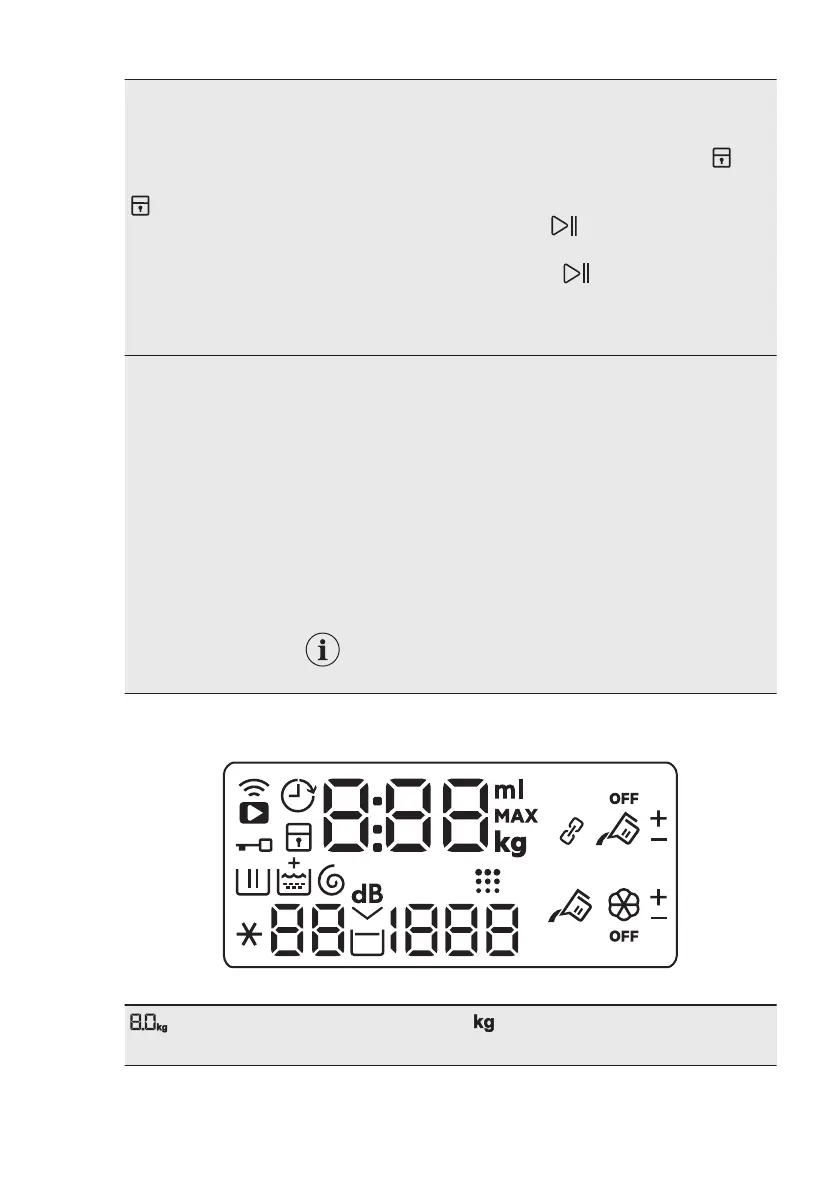
5.2 Display
Maximum load indicator. The indicator flashes during the laundry
load estimation (refer to ProSense load detection paragraph) .
www.aeg.com18


 To Next Page